ngx-bootstrap: data-picker problem:The first default time format error
The first time is
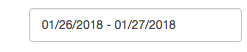
But after I chose the time, it is:

My configuration is
this.bsConfig = Object.assign({}, { locale: 'zh-cn', rangeInputFormat: 'YYYY/MM/DD' });
About this issue
- Original URL
- State: closed
- Created 6 years ago
- Comments: 21 (3 by maintainers)
I agree. When bsValue is set into ngOnInit, there is a problem. A use the version 3.3.0. But there is more. I can make it work on the ngOnInit when i set bsValue into a subcribe of asynchronous treatment of RXjs. My workaround, and it’s very dirty, is to encapsulate my code (which is into the ngOnInit) in a setTimeout …
Two years past, and there is still no fix? I still have the same problem with version 5.6.1 and 5.6.2!
Component:
config:
also works. Its also not an ideal workaround. It’s a normal date pipe from
@angular/coreSeeing the same with 2.0.5 both when providing value in template as @ianfdk suggested and when initializing a bound property during
ngInit.Same issue for me. Any updates on this, @valorkin ?