flow: Cannot import CSS or Javascript files (Vaadin 14 NPM)
I get an error message when trying to import Javascript or CSS. When i don’t import anything everything works fine (no errors).
-> Original Vaadin Forum Entry
- Vaadin 14 NPM mode
- Java 11 (Windows 10)
- Spring Boot 2.1.7
Not usingVaadin Maven Plugin (using Gradlewithoutvaadin-gradle-plugin)
Error message when starting:
CSS Import
@CssImport("./styles/dashboard.css")
@Theme(value = Material.class, variant = Material.DARK)
public class MainLayout extends Div implements ....
Failed to find the following css files in the
node_modulesor/frontendtree: - ./styles/dashboard.css Check that they exist or are installed.
Javascript Import
@JavaScript("./src/scripts/navigation.js")
...
Failed to resolve the following files either: · in the
/frontendsources folder · or as aMETA-INF/resources/frontendresource in some JAR. - ./src/scripts/navigation.js Please, double check that those files exist.
Project folder structure:
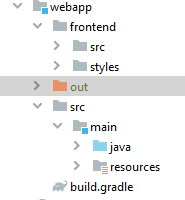
About this issue
- Original URL
- State: open
- Created 5 years ago
- Comments: 18 (7 by maintainers)
That's actually as expected.Let’s say : this is by design. But apparently this is not expected by the user/developer.
The main issue is : even if it works by design it’s too hard to understand what’s going on there and how to fix it…
The error message reported initially in the ticket doesn’t help anyhow.
Now it’s better. And may be it should be even more better: proposing some steps how to fix this (with may be some heuristic checks/assumptions).
The explanation of this behavior is: you don’t use plugin which should execute
prepare-frontendgoal which producesflow-build-info.jsonfile wherefrontendFoldervalue is written. As a result the realfrontendfolder is ignored and some other (with a location which may don’t even exist) is used.This is a consequence of magic and logic which is not isolated in one place with spread out over the code in various places. It’s not possible to understand what’s going on unless you have written the code and know how it works from the beginning to the end.
As a result we have a lot of confusion with various scenarios and every time I spend a lot of time to understand what’t going on.
Apparently so magic and complicated code doesn’t have proper error catching so that in case something goes wrong it prints a good message with a detailed description and exact steps to fix.
E.g. in this case I believe
flow-build-info.jsonis just absent. This can be detected and reported. Thefrontendfolder which is used in this situation should be logged (DevModeInitializer::initDevModeHandler). If this folder doesn’t exist then it means that something is already wrong. And this should throw an exception.Also @Legioth recently made a bunch of tickets related to better the error reporting . May be some of those tickets cover this situation as well.