uno: [iOS] Weird incorrect content placement and nesting
Current behavior
Something within the last several dev releases is causing an odd behavior to happen with the placement of frame content and popup content on iOS occasionally (possibly other platforms as well but I haven’t run into it yet).
For example, here is a screenshot of a test content dialog that contains text boxes and a button inserting its content inside what should be a filter textbox after it is closed:

Here the dialog content has replaced the tabs and most of the content that is supposed to be on that page:

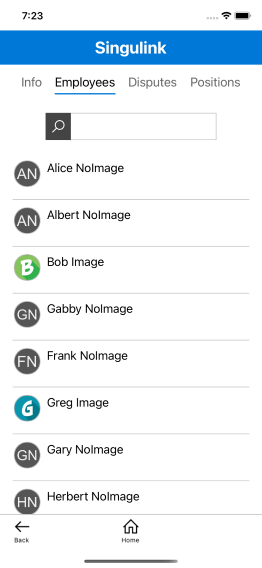
This is what that page should look like:
Expected behavior
No response
How to reproduce it (as minimally and precisely as possible)
If you run the following project in an iOS simulator and click around then eventually some content will pop into a place it shouldn’t be: https://github.com/mikernet/UnoTest2
Suggested Method A:
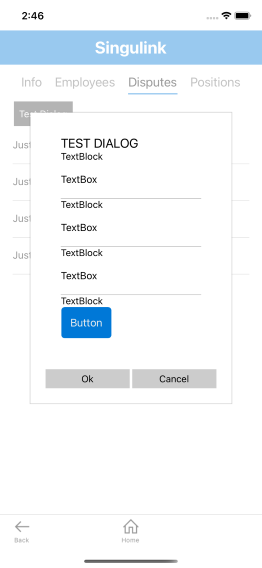
Go to the business employees tab and click on an employee to open the test dialog, then close the dialog and repeat. You can position the list such that the mouse is over both the OK button in the dialog and over an employee in the list so you can just keep clicking to open/close the dialog without repositioning the mouse. After 5-20 times you will notice that the dialog content nests inside itself. This is what the dialog should look like:
This is what it looks like when it dumps itself inside itself:

Sometimes when you open the dialog it ALMOST looks ok but you can tell that the dialog content has been placed in the wrong spot in the visual tree when the TextBox text is missing (just like all the other times when it ends up in the wrong spot), like this:

Suggested Method B:
Click Login, click “Business Dialog 1”, click “Business Dialog 2”, then click “Business Page” and follow the steps above to rapidly open and close the dialog by clicking on an employee in the employee list. Notice that within 5-20 clicks the business dialog content will show instead of the test dialog content.
In my actual app that has a more complex visual tree, the problem manifests almost immediately within 1 or 2 dialogs being shown.
Workaround
No response
Works on UWP/WinUI
Yes
Environment
Uno.UI / Uno.UI.WebAssembly / Uno.UI.Skia
NuGet package version(s)
3.11.0-dev.468, 3.11.6, 3.12.0-dev.2, 4.0.0-dev.5526, 4.0.0-dev.5612 The problem does not occur on 3.11.0-dev.210
Affected platforms
iOS
IDE
No response
IDE version
No response
Relevant plugins
No response
Anything else we need to know?
No response
About this issue
- Original URL
- State: closed
- Created 5 years ago
- Comments: 17 (17 by maintainers)
We’ve been investigating this issue, and this seems to be related to the recycling of
ScrollViewercontrol templates. A fix should be coming soon.