typescript-eslint: ESLint: Cannot read property 'loc' of undefined. Please see the 'ESLint' output channel for details.
What code were you trying to parse?
import * as React from 'react';
import styled from 'styled-components';

const TestStyledComponent = styled.div`
  // css
`;

class Example extends React.Component<ExampleProps, ExampleState> {
  public render () {
    return (
      <TestStyledComponent />
    );
  };
}

export default Example;
What did you expect to happen? No Error What actually happened? ESLint: Cannot read property ‘loc’ of undefined. Please see the ‘ESLint’ output channel for details.
[Error - 1:08:08 PM] ESLint stack trace:
[Error - 1:08:08 PM] TypeError: Cannot read property 'loc' of undefined
    at Object.VariableDeclaration [as listener] (/Users/wdever/Documents/Projects/hanlight-frontend-web/node_modules/eslint/lib/rules/indent.js:1361:69)
    at Program:exit.listenerCallQueue.filter.forEach.nodeInfo (/Users/wdever/Documents/Projects/hanlight-frontend-web/node_modules/eslint/lib/rules/indent.js:1537:55)
    at Array.forEach (<anonymous>)
    at Program:exit (/Users/wdever/Documents/Projects/hanlight-frontend-web/node_modules/eslint/lib/rules/indent.js:1537:26)
    at listeners.(anonymous function).forEach.listener (/Users/wdever/Documents/Projects/hanlight-frontend-web/node_modules/eslint/lib/util/safe-emitter.js:45:58)
    at Array.forEach (<anonymous>)
    at Object.emit (/Users/wdever/Documents/Projects/hanlight-frontend-web/node_modules/eslint/lib/util/safe-emitter.js:45:38)
    at NodeEventGenerator.applySelector (/Users/wdever/Documents/Projects/hanlight-frontend-web/node_modules/eslint/lib/util/node-event-generator.js:251:26)
    at NodeEventGenerator.applySelectors (/Users/wdever/Documents/Projects/hanlight-frontend-web/node_modules/eslint/lib/util/node-event-generator.js:280:22)
    at NodeEventGenerator.leaveNode (/Users/wdever/Documents/Projects/hanlight-frontend-web/node_modules/eslint/lib/util/node-event-generator.js:303:14)
when I write const in tsx, ESlint send an errror.
my eslint.js:
module.exports = {
  parser: '@typescript-eslint/parser',
  extends: [
    'plugin:@typescript-eslint/recommended',
    'react-app',
    'plugin:prettier/recommended',
    'prettier',
  ],
  plugins: ['@typescript-eslint', 'react'],
  rules: {
    '@typescript-eslint/indent': ['error', 2],
    // "@typescript-eslint/explicit-function-return-type": ["false"],
    '@typescript-eslint/explicit-function-return-type': 0,
    // "prettier/prettier": ["error", {
    //   "singleQuote": true,
    //   "parser": "flow"
    // }],
    // "no-unused-vars": ["error", { "vars": "all", "args": "none", "ignoreRestSiblings": true }],
    'no-unused-vars': 0,
    '@typescript-eslint/no-empty-interface': 0,
    'prettier/prettier': 0,
    '@typescript-eslint/no-parameter-properties': 0,
    // "@typescript-eslint/no-unused-vars": 0,
    // "@typescript-eslint/no-unused-vars": ["error", { "vars": "all", "args": "after-used", "ignoreRestSiblings": false }],
  },
};
Versions
| package | version |
|---|---|
@typescript-eslint/parser |
1.6.0 |
TypeScript |
3.3.3333 |
ESLint |
create-react-app default |
node |
11.10.0 |
npm |
6.8.0 |
About this issue
- Original URL
- State: closed
- Created 8 years ago
- Reactions: 9
- Comments: 19 (9 by maintainers)
Commits related to this issue
- fix(eslint-plugin): handle `const;` Fixes #441 — committed to typescript-eslint/typescript-eslint by bradzacher 7 years ago
- fix(eslint-plugin): handle `const;` (#633) Fixes #441 — committed to typescript-eslint/typescript-eslint by bradzacher 7 years ago
Like I said, I’m in the middle of a rewrite to handle all of these cases properly.
It’s going to be a while as indent is a huge rule.
awesome, thanks. looks like a bug to do with the conversion logic for indent.
I’m in the middle of the rewrite, of the indent rule which should fix issues like this.
I have the same issue. My eslint version is
5.16.0My eslintrc.js is:After you type the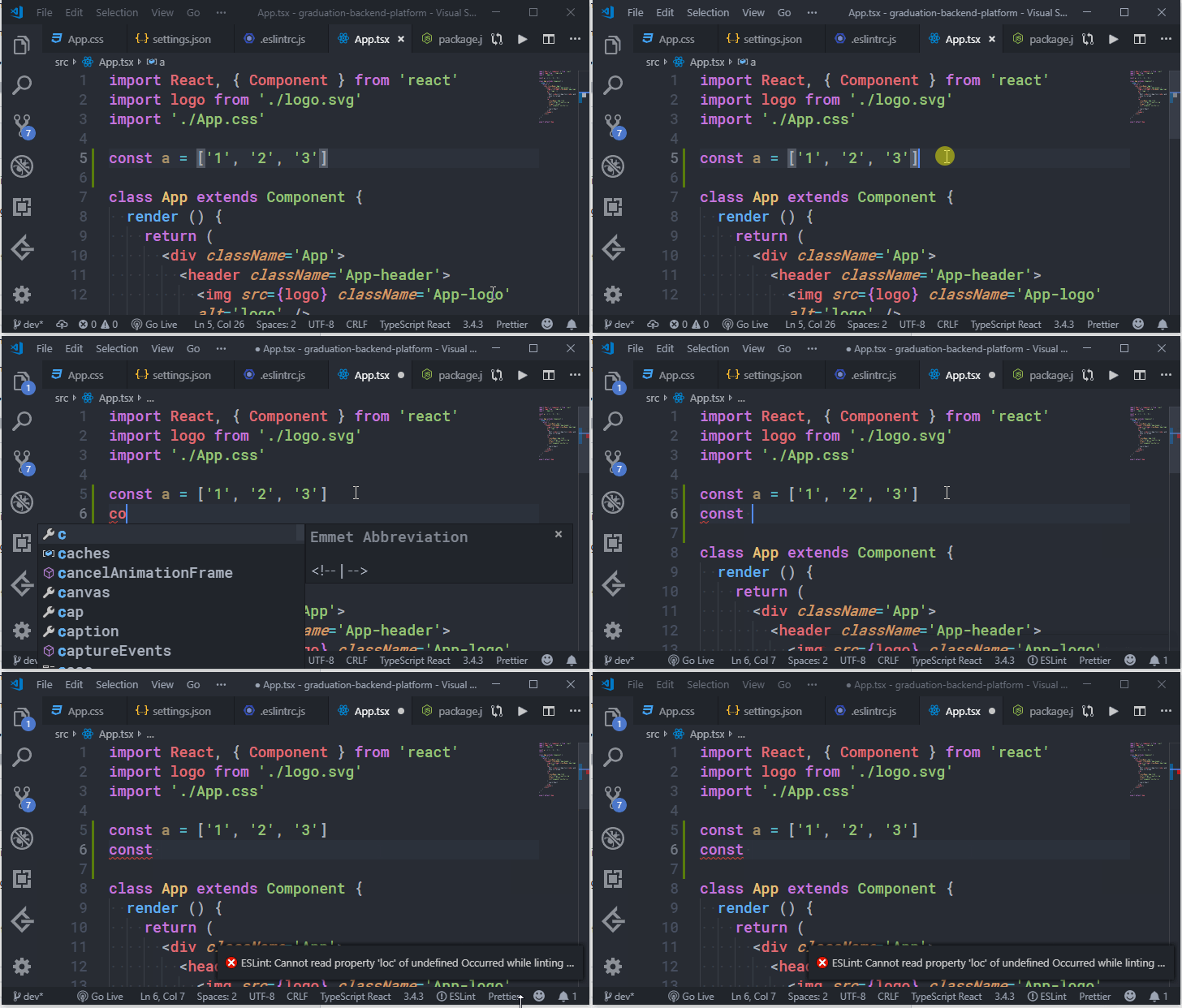
const, this error will display in VSCode:@2alin - what is your repro case for “the same problem”? Is it exactly the same problem as one of the ones? If not then please elaborate with a repro. It’s hard to recommend a workaround for you if we don’t know what’s causing your problem.
If it’s an error that’s only showing up within your IDE, then just ignore the error and the eslint extension will recover as soon as you save the file again. In this instance - the error probably occurred because you attempted to lint a semantically invalid file.
If the issue persists through file saves, then it’s probably not a semantically invalid file, and might be a bug in a rule. Try doing a CLI run to see if that errors in the same way.
If it’s an error that occurs during a CLI run, then please, please, please comment with the output of running your eslint command with the
--debugflag so that we can read through the output to determine the error.this debug log https://github.com/typescript-eslint/typescript-eslint/issues/441#issuecomment-485097423 and this repro https://github.com/typescript-eslint/typescript-eslint/issues/441#issuecomment-502342268 is an issue with the indent rule caused by linting an incomplete variable declaration (i.e they attempted to lint
const;). The workaround is to finish writing valid code, and the error will disappear.Your use case might be different. I don’t know - I don’t have your codebase. Help me to help you.
Same problem here, is there any workaround? This is the only reason that makes me not use ESLint in a typescript team project.
@bradzacher Thanks for being on top of it.
The issue for me is not that IDE will not recover or it shows up during CLI run. It’s just when I type
constan error tooltip pops up from the bottom right corner of VS Code and it’s so distracting.I bet your PR is going to fix it as it’s on
VariableDeclarationofindent.jsfor me when the passednodeargument’sdeclarationsproperty is empty/null. Thanks again. 😃We’ve been discussing if we want to add the ability to handle recoverable errors in ESLint core. This type of error was actually one of the concerns that was brought up during that discussion. See https://github.com/eslint/rfcs/pull/19 for more details.
it’s hard to say - this is a very, very generic error; it could be from any number of rules. Indent is just one rule that causes an error in a specific case.
Usually this error occurs the vscode extension attempts to lint incomplete code. The incomplete code can cause the parser to create a weird AST which isn’t technically valid TS/JS 99% of the time when you see this error popup in vscode, just ignore/close it and keep working.
A lot times rule authors make assumptions about the shape of AST because they assume 100% valid code. Which is fine in the majority of cases, but edge cases sometimes happen (esp with the extension running on incomplete code).
For example, in the gif above - a common assumption is that there’s at least 1 declaration in a variable declaration, as the code is not valid JS without it However in that gif, there is a dangling
constreserved word, which the parser accepts and creates a weird case where the AST has a variable declaration with no declaration - invalid code that won’t run, but parsable code none-the-less.If you see the toast popup very regularly, create a repro case so we can investigate and fix the exact failing case.
Sure. The log is :