bootstrap: Big dropdowns are unusable when used inside an `overflow:scroll` container, due to being constrained inside it
Problem
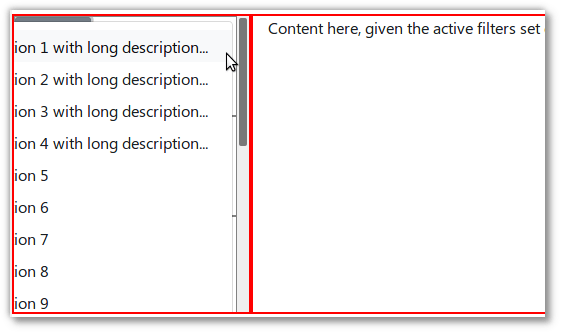
When using a Bootstrap (4.0.0beta) Dropdown in an element that is a child of an overflow:scroll element, the dropdown is “stuck” inside the container, making it unusable if the dropdown contents are too big horizontally/vertically:
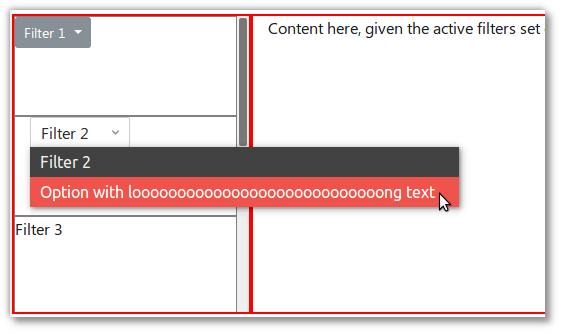
Contrarily, a vanilla HTML <select> will merrily bleed out of the overflow:scroll element as necessary:
See demo at JSFiddle/ronj/t6z6Lnfb.
Use case
A few words on the use case justifying this combination, as shown in the JSFiddle which mimics a webapp I’m working on:
- In the left sidebar live a set of filters. It may contain several filters that will consume undetermined vertical space, thus lives in an
overflow-y:scrolldiv. Each filter has a dropdown which lets users modify filter options. - In the right pane lives the content, filtered by the filters in the left sidebar.
→ As a user,
- I do need that
overflow-y:scrollsidebar scrolling behavior (because the list of filters is of undetermined and potentially large height, depending on the number of filters) - But filter dropdowns (which can be large, both in width due to length of options and height due to count of options) should be able “escape out of” / not be constrained by the sidebar.
And as shown in the demo/screenshots, vanilla HTML <select> don’t suffer from this problem, but it’s not always practical/possible to revert back to using them, e.g. due to using features specific to Bootstrap Dropdown, or for consistent styling.
Details
Bootstrap version: 4.0.0-beta
OS/Browser: Ubuntu 16.04.3 / {Chrome 63, Firefox 58}
This issue is a follow-up to SO / Letting a bootstrap b-dropdown escape out of an overflow:scroll container, but noticing regular <select> are not affected, it starts to look like a bug, thus this issue. Sorry for the noise if I’m missing something obvious / if there’s a workaround / if this is a known problem tracked in an existing issue.
Thanks 🙂.
About this issue
- Original URL
- State: closed
- Created 7 years ago
- Reactions: 3
- Comments: 16 (11 by maintainers)
Commits related to this issue
- Fix user switcher overflow Overflow scroll elements doesn't play well with overflowing children with position anything but static: https://github.com/twbs/bootstrap/issues/24251 Fix by padding with ... — committed to ub-digit/fjarrkontrollen by gnucifer 5 years ago
- Fix user switcher overflow Overflow scroll elements doesn't play well with overflowing children with position anything but static: https://github.com/twbs/bootstrap/issues/24251 Fix by padding with ... — committed to ub-digit/fjarrkontrollen by gnucifer 5 years ago
- [FIX] web: dropdown boundary overflow Open a search view modal ("search more" on a m2o) Select a filter that will make records fall to zero The modal will shrink Trigger the opening of a dropdown (Fi... — committed to odoo-dev/odoo by kebeclibre 5 years ago
- [FIX] web: dropdown boundary overflow Open a search view modal ("search more" on a m2o) Select a filter that will make records fall to zero The modal will shrink Trigger the opening of a dropdown (Fi... — committed to odoo/odoo by kebeclibre 5 years ago
- [FIX] web: dropdown boundary overflow Open a search view modal ("search more" on a m2o) Select a filter that will make records fall to zero The modal will shrink Trigger the opening of a dropdown (Fi... — committed to odoo-dev/odoo by kebeclibre 5 years ago
- [FIX] web: dropdown boundary overflow Open a search view modal ("search more" on a m2o) Select a filter that will make records fall to zero The modal will shrink Trigger the opening of a dropdown (Fi... — committed to odoo-dev/odoo by kebeclibre 5 years ago
- [FIX] web: dropdown boundary overflow Open a search view modal ("search more" on a m2o) Select a filter that will make records fall to zero The modal will shrink Trigger the opening of a dropdown (Fi... — committed to odoo-dev/odoo by kebeclibre 5 years ago
- [FIX] web: dropdown boundary overflow Open a search view modal ("search more" on a m2o) Select a filter that will make records fall to zero The modal will shrink Trigger the opening of a dropdown (Fi... — committed to odoo/odoo by kebeclibre 5 years ago
- [FIX] web: dropdown boundary overflow Open a search view modal ("search more" on a m2o) Select a filter that will make records fall to zero The modal will shrink Trigger the opening of a dropdown (Fi... — committed to odoo/odoo by kebeclibre 5 years ago
- [FIX] web: dropdown boundary overflow Open a search view modal ("search more" on a m2o) Select a filter that will make records fall to zero The modal will shrink Trigger the opening of a dropdown (Fi... — committed to odoo/odoo by kebeclibre 5 years ago
- [FIX] web: dropdown boundary overflow Open a search view modal ("search more" on a m2o) Select a filter that will make records fall to zero The modal will shrink Trigger the opening of a dropdown (Fi... — committed to odoo/odoo by kebeclibre 5 years ago
@FezVrasta, @Johann-S @mdo @ronjouch For Bootstrap-Vue we have just added an option (via PR https://github.com/bootstrap-vue/bootstrap-vue/pull/1440) to change the
modifiers.preventOverflow.boundariesElement(i.e. from the default ofscrollParenttoviewportorwindow), and if anything other thanscrollParentis set, we add the CSSposition: staticto the outer wrapper around the dropdown button(s) (i.e. thediv.dropdown).Popper.js reference: https://popper.js.org/popper-documentation.html#modifiers..preventOverflow
This appears to work well from our tests so far, while still preserving the default behavior when scrollParent is set as the
boundariesElementand does not require re-parenting the.dropdown-menu.Before (with
boundariesElementat default, and noposition: static, which is the current behavior):Now (with the
boundaryset toviewportorwindow, andposition: static):Which renders the following if
boundaryis set to something other than'scrollParent':Try this:
I use this for table responsive.
An usually unknown behavior of DOM and CSS is that an
overflow: scrollelement doesn’t implicitly means that nothing can actually overflow from its boundaries.The only situation when an
overflow: scrollelement becomes completely “un-overflowable” is when it, or one of its children, also have apositiondifferent fromstaticThis behavior can be leveraged to make a popper overflow its scrolling parent.
In our specific case, the
.dropdownwrapper hasposition: relative, and it forces the dropdown to always get hidden by anyoverflow: scrollparent