ring-mqtt: Camera Snapshot Image corrupted
Describe the bug
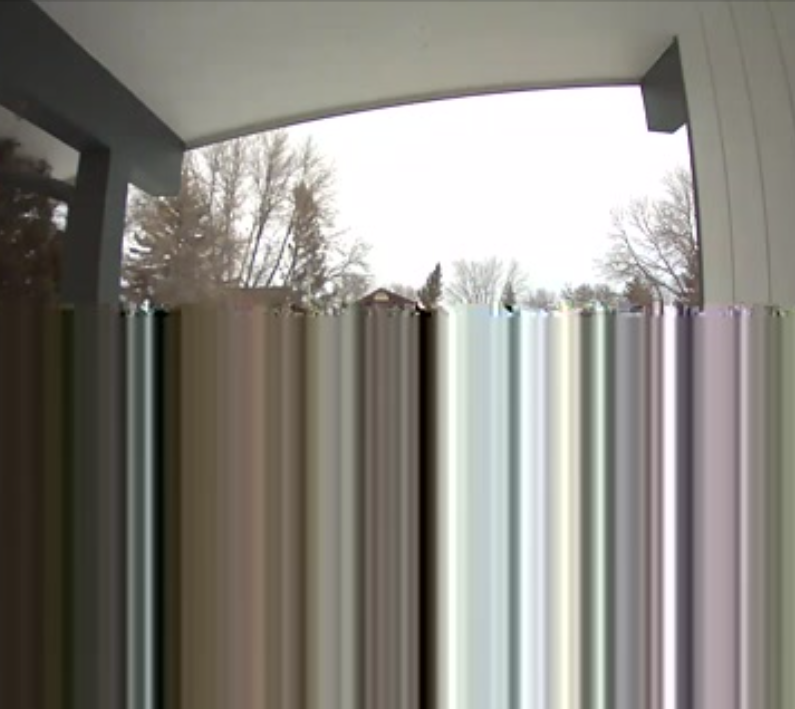
Apparently random, some of the still images show corrupted. It seems totally random, although it happens very often, some works with no problem. Below an example:
Describe your environment
Home assistant OS on a Raspberry Pi 4. Plenty of RAM available. Up-to date HA. Ring-mqtt runs as home assistant add-on, so does the Mosquitto itself. The Raspberry machine is hooked to an ethernet cable, not wifi.
Describe your settings and what you’ve tried
enable_cameras: true
snapshot_mode: motion
livestream_user: ''
livestream_pass: ''
enable_modes: false
enable_panic: false
beam_duration: 0
disarm_code: 'REDACTED'
mqtt_host: <auto_detect>
mqtt_port: <auto_detect>
mqtt_user: <auto_detect>
mqtt_password: <auto_detect>
branch: addon
debug: ring-*
ring_token: ''
location_ids:
  - ''
Debug Logs
2022-03-25T13:32:49.216Z ring-mqtt [Front Door] Failed to retrieve motion event recording URL for event
2022-03-25T13:32:50.572Z ring-attr [Front Door] ring/c822d046-e2a3-4946-a364-e682805d2625/camera/54e019c6883c/motion/attributes {"lastMotion":1648214612,"lastMotionTime":"2022-03-25T13:23:32Z","personDetected":false,"motionDetectionEnabled":true}
2022-03-25T13:32:50.573Z ring-mqtt [Front Door] ring/c822d046-e2a3-4946-a364-e682805d2625/camera/54e019c6883c/stream/state ON
2022-03-25T13:32:50.573Z ring-attr [Front Door] ring/c822d046-e2a3-4946-a364-e682805d2625/camera/54e019c6883c/stream/attributes {"status":"active"}
2022-03-25T13:32:50.574Z ring-mqtt [Front Door] ring/c822d046-e2a3-4946-a364-e682805d2625/camera/54e019c6883c/event_stream/state OFF
2022-03-25T13:32:50.575Z ring-attr [Front Door] ring/c822d046-e2a3-4946-a364-e682805d2625/camera/54e019c6883c/event_stream/attributes {"status":"inactive"}
2022-03-25T13:32:50.575Z ring-mqtt [Front Door] ring/c822d046-e2a3-4946-a364-e682805d2625/camera/54e019c6883c/event_select/state Motion 1
2022-03-25T13:32:50.576Z ring-attr [Front Door] ring/c822d046-e2a3-4946-a364-e682805d2625/camera/54e019c6883c/event_select/attributes {"recordingUrl":null,"eventId":null}
2022-03-25T13:32:50.577Z ring-mqtt [Front Door] ring/c822d046-e2a3-4946-a364-e682805d2625/camera/54e019c6883c/motion/state OFF
2022-03-25T13:32:50.578Z ring-attr [Front Door] ring/c822d046-e2a3-4946-a364-e682805d2625/camera/54e019c6883c/motion/attributes {"lastMotion":1648214612,"lastMotionTime":"2022-03-25T13:23:32Z","personDetected":false,"motionDetectionEnabled":true}
2022-03-25T13:32:50.578Z ring-mqtt [Front Door] ring/c822d046-e2a3-4946-a364-e682805d2625/camera/54e019c6883c/ding/state OFF
2022-03-25T13:32:50.579Z ring-attr [Front Door] ring/c822d046-e2a3-4946-a364-e682805d2625/camera/54e019c6883c/ding/attributes {"lastDing":1648169194,"lastDingTime":"2022-03-25T00:46:34Z"}
2022-03-25T13:32:50.580Z ring-mqtt [Front Door] ring/c822d046-e2a3-4946-a364-e682805d2625/camera/54e019c6883c/snapshot/image <binary_image_data>
2022-03-25T13:32:50.581Z ring-attr [Front Door] ring/c822d046-e2a3-4946-a364-e682805d2625/camera/54e019c6883c/snapshot/attributes {"timestamp":1648214625}
2022-03-25T13:32:50.856Z ring-attr [Front Door] ring/c822d046-e2a3-4946-a364-e682805d2625/camera/54e019c6883c/info/state {"batteryLevel":null,"firmwareStatus":"Up to Date","lastUpdate":"2022-03-25T13:32:32Z","wirelessNetwork":"Binarius","wirelessSignal":-83,"stream_Source":"rtsp://03cabcc9-ring-mqtt:8554/54e019c6883c_live","still_Image_URL":"https://homeassistant:8123{{ states.camera.front_door_snapshot.attributes.entity_picture }}"}
2022-03-25T13:32:50.857Z ring-attr [Front Door] ring/c822d046-e2a3-4946-a364-e682805d2625/camera/54e019c6883c/wireless/attributes {"wirelessNetwork":"Binarius","wirelessSignal":-83}
2022-03-25T13:32:50.858Z ring-attr [Front Door] ring/c822d046-e2a3-4946-a364-e682805d2625/camera/54e019c6883c/battery/attributes {"batteryLevel":null}
2022-03-25T13:33:29.766Z ring-mqtt [Front Door] Failed to retrieve motion event recording URL for event
2022-03-25T13:34:30.599Z ring-mqtt [Front Door] Failed to retrieve motion event recording URL for event
2022-03-25T13:35:31.619Z ring-mqtt [Front Door] Failed to retrieve motion event recording URL for event
2022-03-25T13:35:38.913Z ring-attr [Front Door] ring/c822d046-e2a3-4946-a364-e682805d2625/camera/54e019c6883c/info/state {"batteryLevel":null,"firmwareStatus":"Up to Date","lastUpdate":"2022-03-25T13:35:16Z","wirelessNetwork":"Binarius","wirelessSignal":-83,"stream_Source":"rtsp://03cabcc9-ring-mqtt:8554/54e019c6883c_live","still_Image_URL":"https://homeassistant:8123{{ states.camera.front_door_snapshot.attributes.entity_picture }}"}
2022-03-25T13:35:38.922Z ring-attr [Front Door] ring/c822d046-e2a3-4946-a364-e682805d2625/camera/54e019c6883c/wireless/attributes {"wirelessNetwork":"Binarius","wirelessSignal":-83}
2022-03-25T13:35:38.923Z ring-attr [Front Door] ring/c822d046-e2a3-4946-a364-e682805d2625/camera/54e019c6883c/battery/attributes {"batteryLevel":null}
2022-03-25T13:36:32.394Z ring-mqtt [Front Door] Failed to retrieve motion event recording URL for event
2022-03-25T13:36:42.700Z ring-rtsp INF [RTSP] [conn 172.30.32.1:41544] closed (terminated)
2022-03-25T13:36:42.703Z ring-rtsp INF [RTSP] [session 931285196] closed (teared down by 172.30.32.1:41544)
2022-03-25T13:36:47.700Z ring-rtsp INF [path 54e019c6883c_live] runOnDemand command stopped
2022-03-25T13:36:47.701Z ring-rtsp INF [RTSP] [conn 127.0.0.1:39320] closed (terminated)
2022-03-25T13:36:47.701Z ring-rtsp INF [RTSP] [session 242602280] closed (terminated)
2022-03-25T13:36:47.702Z ring-rtsp [Front Door] Deactivating live stream due to signal from RTSP server (no more active clients or publisher ended stream)
2022-03-25T13:36:47.716Z ring-mqtt [Front Door] Received set live stream state OFF
2022-03-25T13:36:47.722Z ring-mqtt [Front Door] Live video stream ended
2022-03-25T13:36:47.723Z ring-mqtt [Front Door] ring/c822d046-e2a3-4946-a364-e682805d2625/camera/54e019c6883c/stream/state OFF
2022-03-25T13:36:47.723Z ring-attr [Front Door] ring/c822d046-e2a3-4946-a364-e682805d2625/camera/54e019c6883c/stream/attributes {"status":"inactive"}
2022-03-25T13:36:47.731Z ring-rtsp ./scripts/start-stream.sh: line 34: [: 1726: binary operator expected
Please let me know if I can change any setting to provide a better log.
About this issue
- Original URL
- State: closed
- Created 2 years ago
- Comments: 35 (19 by maintainers)
So it’s interesting, the code used the fast/reliable getSnapshot method as it would with a wired camera, however, the camera itself behaved like a battery camera:
You can see here that ring-mqtt detected a motion event and immediately, .002 seconds later, requested an updated snapshot via the API. However, the snapshot didn’t update until 35 seconds later, which is pretty much exactly the record time. This means that even though this is a line-powered camera, it has the limitations of a battery camera, i.e. it is unable to take a snapshot while recording.
To give you an example of how true line-powered camera should behave, here’s a similar snippet from my own Doorbell Pro camera:
Notice in this case it is the same, an almost immediate request for a snapshot update, but instead of taking 35 seconds, the new snapshot was received only 132ms later and immediate published via MQTT. This is still good information, because it means I need to modify the code to detect these cameras and behave as battery cameras when attempting to grab a snapshot.
However, that just means you are still stuck with the potential to get corrupt images sometimes. Later tonight I’ll type up the instructions on how to increase the UDP buffer size on Home Assistant OS and you can try that if you want to. I’m not sure what else I’d be able to do, maybe I can figure out some magic with ffmpeg to throw away the incomplete frames, but I’m not sure.
What model camera is it? Without full logs I can’t see what specific model. You say it’s wired, but is it a battery capable camera that is simply wired to power? If so, in the Ring ecosystem, that still counts as a battery powered camera from a functionality perspective. The code appears to be detecting it as a battery capable camera without a battery, which is why battery status is shown as “unknown”. If you truly have a wired power only camera (like the Doorbell Pro), then it would be worth investigating via full logs.
All data is pulled from Ring servers, however, the image you see in the Ring app is from a push API and my understanding is that Ring limits this API access to its own apps, at least, it’s not available to me via the ring-client-api library that this project uses for access to Ring API servers. You can read about the snapshot limitations of that API here: https://github.com/dgreif/ring/wiki/Snapshot-Limitations
Because I can’t access this image, the only options left are to either wait for the recording to be done and then send a stale image (as ring-homebridge does), or start a live stream and try to grab a still image from the stream. The current code attempts the latter approach, but it’s of course more error prone as it relies on the 100% of RTP packets for the requested keyframe arriving and being processed in a timely manner. Note that this might not even be noticeable when watching the video stream since additional corrective packets may come in almost immediately, so it might just be a glitch of a few milliseconds, but, because an image grab is an instantaneous view of that stream, it still shows up there.
I’ve tested this code extensively across the 7 cameras I own, although none of them are battery cameras so they don’t have snapshot limitations, but I force the code to use the battery camera logic even for my wired cameras. Of those 7 cameras, 2 are wired ethernet, the remaining 5 are wireless. If I walk around my home to trigger the cameras I will get about 1 corrupted image per 15 snapshot images, but almost all will come from the wireless cameras with the weakest signal, and nearly none from the wired cameras.
Unfortunately, there’s just not much I can do about it. I knew from the start that this method would not be 100% reliable, and would be worse for people with weaker Wifi or poor upstream bandwidth, but again, the only other available option is no snapshot at all and it seemed reliable enough for me and the other testers to be usable, so I released it as is and it’s been in the code this way for nearly a year and you’re the first person to ever open an issue on it so I’m thinking that it must work good enough for most people. Perhaps one day we will get access to the snapshot push API and this problem will go away completely, there is some work ongoing for a new snapshot API for v10 of ring-client-api.
One thing that would be interesting, if you login to both the Ring app on your phone/tablet as well as the Ring web app (or perhaps just on another phone), and you start a live stream to that camera, does the snapshot in the app continue to refresh on the other device while the live stream to that camera is active? If so, it might mean that the new snapshot API is not as limited in this regard, but, as I have no battery cameras, I have no way to test it.