Ghost-CLI: Ghost-CLI: npm install sqlite3 --save error
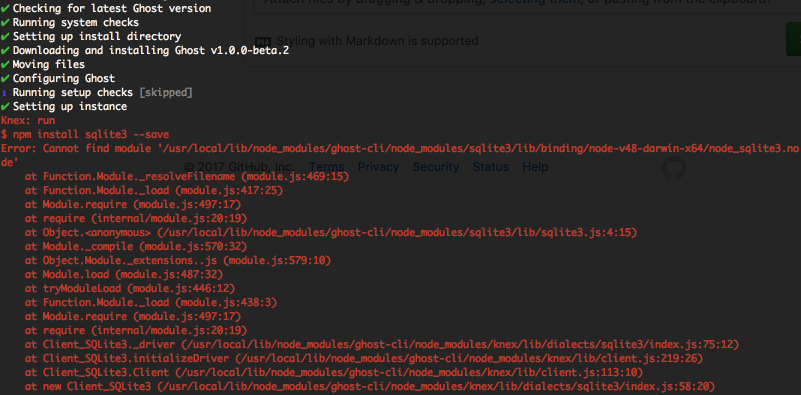
Currently when using ghost-cli 1.0.0.4 and using ghost install local during the installation I get this error and the installation fails.
About this issue
- Original URL
- State: closed
- Created 7 years ago
- Reactions: 2
- Comments: 27 (9 by maintainers)
Commits related to this issue
- fix(migrate): improve error handling with sqlite install failure refs #281 - add better error message when sqlite install hasn't worked — committed to acburdine/Ghost-CLI by acburdine 7 years ago
- fix(migrate): improve error handling with sqlite install failure refs #281 - add better error message when sqlite install hasn't worked — committed to acburdine/Ghost-CLI by acburdine 7 years ago
- fix(migrate): improve error handling with sqlite install failure refs #281 - add better error message when sqlite install hasn't worked — committed to acburdine/Ghost-CLI by acburdine 7 years ago
- fix(doctor): add install checks for various nvm edge cases closes #281 - skip directory check if `--no-setup-linux-user` option is passed - throw error if npm bin directory is not the same as the one... — committed to acburdine/Ghost-CLI by acburdine 7 years ago
- fix(migrate): improve error handling with sqlite install failure refs #281 - add better error message when sqlite install hasn't worked — committed to acburdine/Ghost-CLI by acburdine 7 years ago
- fix(migrate): improve error handling with sqlite install failure refs #281 - add better error message when sqlite install hasn't worked — committed to TryGhost/Ghost-CLI by acburdine 7 years ago
- fix(doctor): add install checks for various nvm edge cases closes #281 - throw error if npm bin directory is not the same as the one used to install ghost-cli — committed to acburdine/Ghost-CLI by acburdine 7 years ago
- fix(doctor): add install checks for various nvm edge cases closes #281 - throw error if npm bin directory is not the same as the one used to install ghost-cli — committed to acburdine/Ghost-CLI by acburdine 7 years ago
- fix(doctor): add install checks for various nvm edge cases closes #281 - throw error if npm bin directory is not the same as the one used to install ghost-cli — committed to acburdine/Ghost-CLI by acburdine 7 years ago
- fix(doctor): add install checks for various nvm edge cases closes #281 - throw error if npm bin directory is not the same as the one used to install ghost-cli — committed to TryGhost/Ghost-CLI by acburdine 7 years ago
For anyone else who comes across this issue, it is caused by changing node versions after installing ghost-cli.
Sqlite3 is a binary dependency that comes with precompiled binaries and downloads the right one for your system on install. If you change the environment, it will look for a different binary, which wasn’t downloaded.
Ideally, the CLI would catch this error and explain clearly what the problem was 😬
Got the same error when using Node 14 LTS (Fedora 33, Yarn). Downgrading to Node 12 LTS and removing and reinstalling ghost-cli fixed it. (
yarn global remove ghost-cli && yarn global add ghost-cli)Hi,
I’ve been stuck on this issue for a while now.
ghost --version Ghost-CLI version: 1.4.1 Ghost Version (at ~/Desktop/ghost/theme): 1.19.0which ghost /usr/local/bin/ghostnpm root -g /usr/local/lib/node_modulesnode --version v6.12.2npm --version 5.6.0I’ve tried using nvm, but then it gave me the same error or Error occurred running command: ‘yarn install --no-emoji --no-progress’ aka out of memory exception.
so then I brew install node@6 and do npm un -g ghost-cli && npm i -g ghost-cli
but then I get the same error: npm install sqlite3 --save error
I understand that the result of which ghost should be inside of npm root -g, but I have no idea how to make this possible. I’ve read this page multiple times and tried every command also.
Any suggestions ? Much thanks !!
how you installed node: –I use
nvmhow you installed ghost-cli: –I usednpm un -g ghost-cli && npm i -g ghost-cli& also tried apending@latestin the install portion what version of node you were on when you installed ghost-cli: –I’ve tried with6.9.5&6.11.1what version of node you were on when you ran ghost install local: –I’ve tried with6.9.5&6.11.1the contents of /usr/lib/node_modules/ghost-cli/node_modules/sqlite3/lib/binding/ (cd into that folder and do ls -al.:–There is no
/usr/lib/node_moduleson my computer (Mac osx 10.12.6) –However at/usr/local/lib/node_modules/ghost-cli/node_modules/sqlite3/lib/binding/FOUND THE ISSUE. was with nvm.
An old version of ghost was trumping over the nvm managed one. I noticed nvm was installing to here
/Users/username/.nvm/versions/node/v6.11.1/lib/node_modules/ghost-cli, but the above showed it was still present from a prior nonnvminstalled version. Therefore, uninstalling wasn’t removing the underlying incorrect version. Steps to fix:rm -rf /usr/local/lib/node_modules/ghost-cli//careful, am using -f herenode --version//verify it’s a proper onenvm use v6.11.1//if needed (or a similar version: https://docs.ghost.org/docs/supported-node-versions)npm un -g ghost-cli && npm i -g ghost-cli// Clean installghost install localand voilaThis was fixed by uninstalling and reinstall of ghost-CLI.
npm un -g ghost-cli && npm i -g ghost-cli