react-native-background-geolocation: Native Module cannot be null
Your Environment
- Plugin version: 2.9.4
- Platform: iOS
- OS version: IOS 11.0
- Device manufacturer / model: iOS Simulator iPhone 6
- React Native version (
react-native -v): 0.49.3 - Plugin config: None
Expected Behavior
The app should run correctly
Actual Behavior
Unfortunately, an error occured:

Steps to Reproduce
- Installed using iOS Installation with rnpm
- After not getting the result, I tried the Manual Installation. See screenshots on every steps:
-
Adding 3 Libraries into Project Navigator
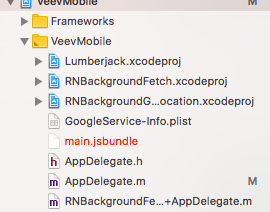
-
Link Binary With Libraries and other frameworks

-
Adding Framework Search Paths

-
Configure Background Capabilities

-
Edit
Info.plist
-
BackgroundFetch AppDelegate extension

- react-native run-ios
Context
Import React native background geolocations
Debug logs
I dont know where to find the logs. Sorry. I’m using xCode 9.0 and this is my first time building an ios app.
About this issue
- Original URL
- State: closed
- Created 7 years ago
- Comments: 16 (7 by maintainers)
Commits related to this issue
- Merge pull request #334 from theodorton/patch-1 Fix typo in Cocoapods installation docs — committed to livecirrus/react-native-background-geolocation by christocracy 7 years ago
it is the repetition issue, I removed potential conflicting npm, and it can build and run now. thanks man.
@christocracy I just gone to bare again using
react-native init. I guess I had just messed up the installation. @IikkaWinter, just tryreact-native initthen after that try this https://github.com/transistorsoft/react-native-background-geolocation/blob/master/docs/INSTALL-IOS-RNPM.md. After this, i didn’t get any error regarding about that again. I hope it works for you. Gonna close this issue