toolkit-for-ynab: [BUG] ...Blank white column between account list and register
Describe the bug When opening YNAB with Toolkit, a large white column appears between the account list (blue bar area) and the account register itself. This pushes the account register off of the screen and I am not able to right scroll to view content.
Could be coincidental but this happened the same day I received a notice on my mobile that the “Goals” feature has been updated. Turning off the toolkit in the Chrome browser extension makes the issue disappear.
To Reproduce
- Logon to YNAB
- Do Nothing
- White Column appears between blue account column and register.
Expected behavior I did not expect the column to appear. All of my accounts and the budget are click-able in the blue column, but I can only view half of the results in the register area and the inspector has been completely pushed off the screen.
Screenshots
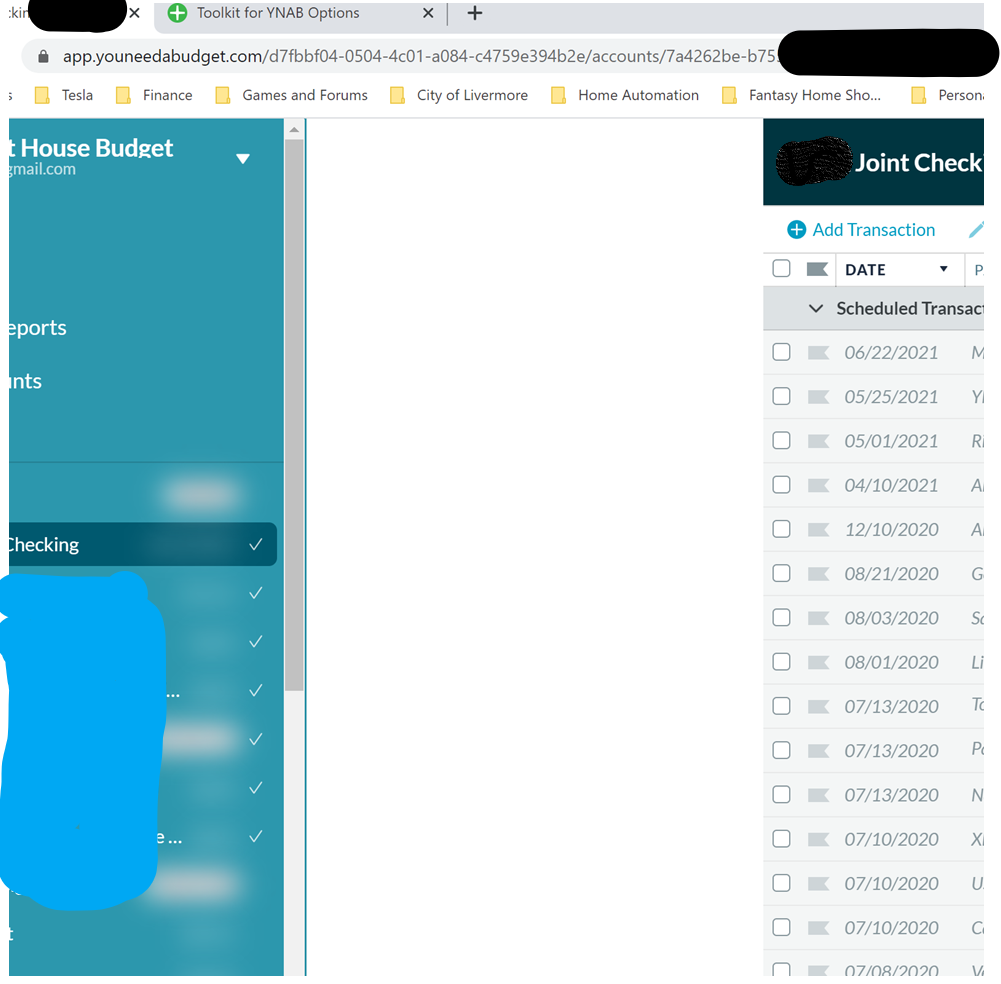
- OS: Windows 10
- Chrome Browser v83.0.4103.106
- Toolkit Version 2.24.0
Setting Export [{“key”:“AccountsDisplayDensity”,“value”:“0”},{“key”:“AccountsEmphasizedOutflows”,“value”:false},{“key”:“AccountsStripedRows”,“value”:false},{“key”:“AutoDistributeSplits”,“value”:false},{“key”:“AutoEnableRunningBalance”,“value”:false},{“key”:“AutomaticallyMarkAsCleared”,“value”:false},{“key”:“BetterScrollbars”,“value”:“0”},{“key”:“BottomNotificationBar”,“value”:false},{“key”:“BudgetCategoryFeatures”,“value”:true},{“key”:“BudgetProgressBars”,“value”:“0”},{“key”:“BudgetQuickSwitch”,“value”:false},{“key”:“BudgetSpendingGoal”,“value”:false},{“key”:“BulkManagePayees”,“value”:false},{“key”:“CalendarFirstDay”,“value”:“0”},{“key”:“CategoryActivityCopy”,“value”:false},{“key”:“CategoryActivityPopupWidth”,“value”:“0”},{“key”:“CategorySoloMode”,“value”:“0”},{“key”:“ChangeEnterBehavior”,“value”:false},{“key”:“ChangeMemoEnterBehavior”,“value”:false},{“key”:“CheckCreditBalances”,“value”:false},{“key”:“CheckNumbers”,“value”:false},{“key”:“ClearSelection”,“value”:false},{“key”:“CollapseSideMenu”,“value”:true},{“key”:“ColourBlindMode”,“value”:false},{“key”:“CompactIncomeVsExpense”,“value”:false},{“key”:“ConfirmKeyboardCancelationOfTransactionChanges”,“value”:false},{“key”:“CreditCardEmoji”,“value”:false},{“key”:“CtrlEnterCleared”,“value”:false},{“key”:“CurrentMonthIndicator”,“value”:true},{“key”:“CustomFlagNames”,“value”:false},{“key”:“DateOfMoney”,“value”:false},{“key”:“DaysOfBuffering”,“value”:false},{“key”:“DaysOfBufferingDate”,“value”:false},{“key”:“DaysOfBufferingHistoryLookup”,“value”:“0”},{“key”:“DeselectTransactionsOnSave”,“value”:false},{“key”:“DisableToolkit”,“value”:false},{“key”:“DisplayTargetGoalAmount”,“value”:“0”},{“key”:“DisplayTotalMonthlyGoals”,“value”:false},{“key”:“DisplayUpcomingAmount”,“value”:false},{“key”:“EasyTransactionApproval”,“value”:false},{“key”:“EditAccountButton”,“value”:“0”},{“key”:“EnlargeCategoriesDropdown”,“value”:true},{“key”:“EnterToMove”,“value”:false},{“key”:“FilterCategories”,“value”:true},{“key”:“GoalIndicator”,“value”:false},{“key”:“GoalWarningColor”,“value”:false},{“key”:“GoogleFontsSelector”,“value”:“0”},{“key”:“HideAccountBalancesType”,“value”:“0”},{“key”:“HideAgeOfMoney”,“value”:false},{“key”:“HideClosedAccounts”,“value”:false},{“key”:“HideHelp”,“value”:true},{“key”:“HideReferralBanner”,“value”:true},{“key”:“HideTotalAvailable”,“value”:false},{“key”:“HighlightNegatives”,“value”:false},{“key”:“ImportNotification”,“value”:“0”},{“key”:“IncomeFromLastMonth”,“value”:“0”},{“key”:“IncomeVsExpenseHoverHighlight”,“value”:true},{“key”:“LargerClickableIcons”,“value”:false},{“key”:“LinkToInflows”,“value”:false},{“key”:“MonthlyNotesPopupWidth”,“value”:“0”},{“key”:“NavDisplayDensity”,“value”:“1”},{“key”:“NotesAsMarkdown”,“value”:false},{“key”:“POSStyleCurrencyEntryMode”,“value”:false},{“key”:“Pacing”,“value”:“0”},{“key”:“PrintingImprovements”,“value”:true},{“key”:“PrivacyMode”,“value”:“0”},{“key”:“QuickBudgetWarning”,“value”:false},{“key”:“ReconciledTextColor”,“value”:“0”},{“key”:“RemovePositiveHighlight”,“value”:false},{“key”:“RemoveZeroCategories”,“value”:true},{“key”:“ResizeInspector”,“value”:true},{“key”:“ResizeSidebar”,“value”:true},{“key”:“RightClickToEdit”,“value”:true},{“key”:“RowHeight”,“value”:“0”},{“key”:“RowsHeight”,“value”:“0”},{“key”:“RunningBalance”,“value”:“0”},{“key”:“SeamlessBudgetHeader”,“value”:false},{“key”:“SetMultipleFlags”,“value”:false},{“key”:“ShowCategoryBalance”,“value”:false},{“key”:“SpareChange”,“value”:false},{“key”:“SplitTransactionAutoAdjust”,“value”:false},{“key”:“SquareNegativeMode”,“value”:false},{“key”:“StealingFromFuture”,“value”:false},{“key”:“StripedBudgetRows”,“value”:false},{“key”:“SwapClearedFlagged”,“value”:false},{“key”:“TargetBalanceWarning”,“value”:false},{“key”:“ToBeBudgetedWarning”,“value”:false},{“key”:“ToggleMasterCategories”,“value”:false},{“key”:“ToggleSplits”,“value”:false},{“key”:“ToggleTransactionFilters”,“value”:“0”},{“key”:“ToolkitReports”,“value”:true},{“key”:“TransactionGridFeatures”,“value”:true},{“key”:“ViewZeroAsEmpty”,“value”:false},{“key”:“l10n”,“value”:“0”}]
REPLACE_ME_WITH_SETTINGS
About this issue
- Original URL
- State: closed
- Created 4 years ago
- Reactions: 8
- Comments: 16 (3 by maintainers)
It appears that having the
Collapsible Side Menuoption enabled also triggers this same bug. Both that andAllow Resizing of Side Menuhave to be disabled (on my machine at least) to make the odd spacing go away.This is a known (and reported many times already) bug so I’m closing this Issue.
The workaround is to disable the Collapse Side Menu and Allow Resizing of Side Menu features.
The workaround is still the same. Turn off the two features until this gets fixed.
@weirdcrap Are you sure about that? I just installed
2.24.1which, according to the chrome extension page was released today and I’m still seeing the issue (unless I disable Allow Resizing)Guys, stop posting in this issue, this is already fixed and just waiting to be approved by Chrome extension team, see here: https://github.com/toolkit-for-ynab/toolkit-for-ynab/issues/1939
edit: don’t get mad at me, i just posted what the dev said since apparently no one here knows how to search before they post.
I got this too. I noticed when I resized the side menu, the white space was resized along with it. I confirmed by turning off the
Allow Resizing of Side Menufeature, and the white space is no longer there. (But now my side menu is smaller, of course. ☹️ )same - This is with
Allow Resizing of Side Menudisabled