tinacms: Media folder relative to content directories not supported
Describe the issue that you’re seeing. Any Loom videos or screenshots usually help a lot!
[Edited]
I have a repo structure that follows the (original) https://github.com/gatsbyjs/gatsby-starter-blog setup:
 So the
assets where I store the media is in a sibling folder to the place of the Markdown files (blog).
As a consequence my image links are like ../assets/my_image.jpg
Both in the markdowns and in the frontmatter attributes.
This is my target, to make these links work.
Setup no.1
My approach to make it work with Tina was this Config:
  media: {
    tina: {
      publicFolder: "content/blog",
      mediaRoot: "../assets",
    },
  },
Unfortunately it does not work.
- newly created markdown text for an image is
when saved - see the first character
Though in Tina editor, even when reopened, the image loads and is working. - for previous / pre-Tine images the editor loading URLs are like
https://assets.tina.io/19f5616b-0bba-4f92-a99c-84f7fe3eeffb../assets/my_image.jpg- obviously broken - syncing media fails with timeout. This is the dialog:
 and the console:
Failed to load resource: the server responded with a status of 405 ()
index.es.js:8971 SyntaxError: Unexpected token 'M', "Method Not Allowed" is not valid JSON
(anonymous) @ index.es.js:8971
index.es.js:9046 'Error in syncing media, check below for more details
Re @ index.es.js:9046
index.es.js:9047 Error: Time out error
    at a (index.es.js:8881:14)
Re @ index.es.js:9047
Setup no.2
Then I changed my Tina Config to:
  media: {
    tina: {
      publicFolder: "content",
      mediaRoot: "assets",
    },
  },
Results:
- newly created markdown text for an image is
when saved - the double dot is missing
Though in Tina editor, even when reopened, the image loads and is working. - for previous / pre-Tine images the editor loading URLs are like
https://assets.tina.io/19f5616b-0bba-4f92-a99c-84f7fe3eeffb../my_image.jpg- still broken but differently - syncing media works
Again: my original and only goal is to have the ../assets/my_image.jpg image links work.
Maybe Tina has to be improved to be able to handle them, maybe it already can but with a different Config. Please help.
System Info
System:
    OS: Linux 5.15 Ubuntu 22.04.1 LTS 22.04.1 LTS (Jammy Jellyfish)
    CPU: (8) x64 AMD Ryzen 7 PRO 3700U w/ Radeon Vega Mobile Gfx
    Memory: 11.88 GB / 14.61 GB
    Container: Yes
    Shell: 5.1.16 - /bin/bash
  Binaries:
    Node: 18.13.0 - /usr/bin/node
    Yarn: 1.22.19 - ~/Work/eztettem/node_modules/.bin/yarn
    npm: 8.19.3 - /usr/bin/npm
  npmPackages:
    @tinacms/cli: ^1.0.7 => 1.0.7
    tinacms: ^1.1.4 => 1.1.4
Validations
- Follow our Code of Conduct
- Read the docs.
- Check that there isn’t already an issue that reports the same bug.
About this issue
- Original URL
- State: open
- Created 4 years ago
- Reactions: 1
- Comments: 18 (1 by maintainers)
Anyone ever find a solution to this?
I also want my images to be uploaded into my
/src/assetsfolder accessed via the root (srcis sibling totinadirectory)I use Astro and use the integrated image processing, so ideally I would be able to upload images into the
srcfolder rather thanpublicso the images can be processed on build. Is this possible?i ended up getting this working by setting tina up to upload to src/assets
and using a remark plugin to rewrite the tina paths to astro friendly paths
I spent some time the past few days looking at this (or, a similar problem). I’m using Astro and their content collections and image optimizations, with TinaCMS for editing. To use that, I need to have the markdown image name formatted a specific way (full file path from base of project), and having images in the public directory is fine.
Goals:
/public/images/media.jpg(this works in both local and production)/public/images/media.jpg, I’ve now got this working tooNote: my media.tina.publicFolder is “public” and media.tina.mediaRoot is “”
Things I’m trying I have found in the docs, the main thing being this page which has this section:
However, this doesn’t seem to work fully. “previewSrc” does not seem supported at all for instance. Here is my current solution:
This seems an ok workaround. Am I missing some feature I should be using? Or can support for this be added? I feel like this should be simple (but these things often never are), and would be a commonly requested feature. If this existed nicely, it would be great for many SSG’s.
I’m experiencing the same issue with broken image links due to
..in the path (for example,http://localhost:3000/../uploads/my_image.jpg).To provide some context, I recently migrated from Forestry.io to TinaCMS, where everything was working smoothly.
I’m using Gridsome SSG (https://gridsome.org/) and my folder structure looks like this: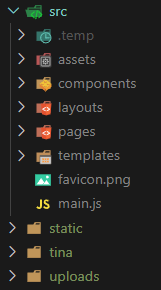
Essentially, my media files are located in the “
uploads” folder (at root level), which is a sibling to the “tina”, “src”, “static” and “data” (containing all my markdown files) folders.Unfortunately, I can’t move my media files to a folder inside the “
static” folder, as Gridsome needs to run optimizations on the images. Therefore, I need to keep my media files outside of the static folder.Ideally, the images would be inside the “
src” folder (https://gridsome.org/docs/images/), but doing so would mean losing the ability to manage media files through TinaCMS.But once again, this data structure used to work very well in Forestry.