tensorflow: TFLite_Detection_PostProcess produces invalid bounding box coordinates
System information
- Have I written custom code: yes
import tensorflow as tf
import numpy as np
import cv2

interpreter = tf.lite.Interpreter(model_path="ssd_mobilenet_v1_1_default_1.tflite")
interpreter.allocate_tensors()

input_details = interpreter.get_input_details()
output_details = interpreter.get_output_details()
print(input_details)
print(output_details)

input_shape = input_details[0]['shape']
im = cv2.imread("buggy_image_2.jpg")  # 1920x1080

# RGB conversion
im_rgb = cv2.cvtColor(im, cv2.COLOR_BGR2RGB)

# Crop center
crop_im = im_rgb[0:1080, 420:1500]  # 1080x1080

# Resize
im_rgb = cv2.resize(im_rgb, (input_shape[1], input_shape[2]))  # 300x300

# Set dimension
input_data = np.expand_dims(im_rgb, axis=0)
print(input_data.shape)
interpreter.set_tensor(input_details[0]['index'], input_data)

# Inference
interpreter.invoke()

detection_boxes = interpreter.get_tensor(output_details[0]['index'])
detection_classes = interpreter.get_tensor(output_details[1]['index'])
detection_scores = interpreter.get_tensor(output_details[2]['index'])
num_boxes = interpreter.get_tensor(output_details[3]['index'])

print("==detection_boxes==")
print(detection_boxes)
print()
print("==detection_classes==")
print(detection_classes)
print()
print("==detection_scores==")
print(detection_scores)
print()
print("==num_boxes==")
print(num_boxes)
print()
-
OS Platform and Distribution (e.g., Linux Ubuntu 16.04):
Mac Monterey 12.0.1 -
TensorFlow version (use command below):
python3 -c "import tensorflow as tf; print(tf.version.GIT_VERSION, tf.version.VERSION)"
unknown 2.7.0
- Python version:
3.9.9
Describe the current behavior Model: I got the tflite model from https://tfhub.dev/tensorflow/lite-model/ssd_mobilenet_v1/1/default/1 Image: https://github.com/heeh/tflite-test/blob/main/buggy_image_2.jpg Bounding box produces negative coordinates as well as coordinates bigger than one.

  [ 0.8324257   0.52732474  0.9950099   1.0011996 ]
  [ 0.83758724  0.5655538   1.0012565   0.8586073 ]
  [ 0.8129529   0.55081666  1.0012082   0.66460264]
  [-0.00595534  0.5822872   0.6086124   0.9962516 ]
  [ 0.06498116  0.5597983   0.8853406   1.0037088 ]
  [ 0.870738    0.7267949   1.0040077   0.99758047]
Describe the expected behavior
The bounding box should produce the output within 0.0 and 1.0
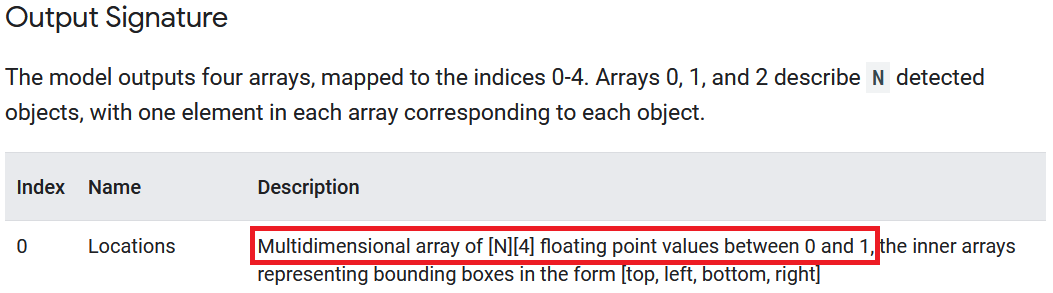
According to https://www.tensorflow.org/lite/examples/object_detection/overview
Multidimensional array of [N][4] floating point values between 0 and 1, the inner arrays representing bounding boxes in the form [top, left, bottom, right]
- Briefly describe your candidate solution(if contributing):
The
TFLite_Detection_PostProcessoperator should enforce the output between zero and one. I believe that this has something to do with the following code. https://github.com/tensorflow/tensorflow/blob/master/tensorflow/lite/kernels/detection_postprocess.cc
Standalone code to reproduce the issue https://colab.research.google.com/drive/1Ouyz_BUGSvvKG2Ib_fVMye6IjAmWuuRf?usp=sharing
Other info / logs
[{'name': 'normalized_input_image_tensor', 'index': 175, 'shape': array([  1, 300, 300,   3], dtype=int32), 'shape_signature': array([  1, 300, 300,   3], dtype=int32), 'dtype': <class 'numpy.uint8'>, 'quantization': (0.0078125, 128), 'quantization_parameters': {'scales': array([0.0078125], dtype=float32), 'zero_points': array([128], dtype=int32), 'quantized_dimension': 0}, 'sparsity_parameters': {}}]
[{'name': 'TFLite_Detection_PostProcess', 'index': 167, 'shape': array([ 1, 10,  4], dtype=int32), 'shape_signature': array([ 1, 10,  4], dtype=int32), 'dtype': <class 'numpy.float32'>, 'quantization': (0.0, 0), 'quantization_parameters': {'scales': array([], dtype=float32), 'zero_points': array([], dtype=int32), 'quantized_dimension': 0}, 'sparsity_parameters': {}}, {'name': 'TFLite_Detection_PostProcess:1', 'index': 168, 'shape': array([ 1, 10], dtype=int32), 'shape_signature': array([ 1, 10], dtype=int32), 'dtype': <class 'numpy.float32'>, 'quantization': (0.0, 0), 'quantization_parameters': {'scales': array([], dtype=float32), 'zero_points': array([], dtype=int32), 'quantized_dimension': 0}, 'sparsity_parameters': {}}, {'name': 'TFLite_Detection_PostProcess:2', 'index': 169, 'shape': array([ 1, 10], dtype=int32), 'shape_signature': array([ 1, 10], dtype=int32), 'dtype': <class 'numpy.float32'>, 'quantization': (0.0, 0), 'quantization_parameters': {'scales': array([], dtype=float32), 'zero_points': array([], dtype=int32), 'quantized_dimension': 0}, 'sparsity_parameters': {}}, {'name': 'TFLite_Detection_PostProcess:3', 'index': 170, 'shape': array([1], dtype=int32), 'shape_signature': array([1], dtype=int32), 'dtype': <class 'numpy.float32'>, 'quantization': (0.0, 0), 'quantization_parameters': {'scales': array([], dtype=float32), 'zero_points': array([], dtype=int32), 'quantized_dimension': 0}, 'sparsity_parameters': {}}]
(1, 300, 300, 3)
==detection_boxes==
[[[ 0.39625263  0.47477102  0.9839653   0.6032783 ]
  [ 0.44166473  0.74635595  0.95957065  0.9920321 ]
  [ 0.83758724  0.5655538   1.0012565   0.8586073 ]
  [ 0.8129529   0.55081666  1.0012082   0.66460264]
  [ 0.8254188   0.56289214  0.9910882   0.63345426]
  [ 0.8324257   0.52732474  0.9950099   1.0011996 ]
  [ 0.3868151   0.4032717   0.99340284  0.58236426]
  [-0.00595534  0.5822872   0.6086124   0.9962516 ]
  [ 0.06498116  0.5597983   0.8853406   1.0037088 ]
  [ 0.870738    0.7267949   1.0040077   0.99758047]]]

==detection_classes==
[[89. 61. 61. 61. 61. 61. 89. 61. 61. 61.]]

==detection_scores==
[[0.5234375  0.4375     0.4140625  0.3671875  0.35546875 0.34375
  0.33203125 0.30078125 0.30078125 0.28125   ]]

==num_boxes==
[10.]
About this issue
- Original URL
- State: closed
- Created 5 years ago
- Comments: 16 (5 by maintainers)
Thank you @pkgoogle
I tried 2.13.* and still get the same problem. I modified only input from @pjpratik’s colab. https://colab.research.google.com/drive/1WFyW_eEaNTGrGW4mQE5y8S9KhosTkK44
I am not sure if it is good idea to suggest users try a new version without inspecting the cause. Thank you.
Best, Hee
Hi @heeh,
Sorry for the trouble. Unfortunately, we haven’t had a chance to look into this. Given this is a minor issue affecting some example use cases, it’s unlikely we’ll be able to look into it soon.