tensorflow: Massive memory leaks due to data.Dataset.shuffle
System information
- Have I written custom code (as opposed to using a stock example script provided in TensorFlow): Yes
- OS Platform and Distribution (e.g., Linux Ubuntu 16.04): 18.04.1-Ubuntu
- TensorFlow installed from (source or binary): binary
- TensorFlow version (use command below): v2.3.0-54-gfcc4b966f1 2.3.1
- Python version: 3.6.9
- CUDA/cuDNN version: 10.1
- GPU model and memory: GTX 2080 Ti, ~11gb
Describe the current behavior
When a new iterator to a dataset containing a shuffle() iteration is opened after the old one became completely exhausted,
the memory held by the ShuffleDataset is not released / reused, resulting in massive memory leaks and ultimately in the process being killed by the OOM reaper.
For this purpose it does not matter whether we manually iterate over the dataset, use a Keras function like Model.fit() or chain a Dataset.repeat() operation at the end.
The original bug was found in production code and the condensed code below outlines roughly our original data pipeline
but perfectly reproduces the problem.
Describe the expected behavior Memory usage should be constant when a new iterator to the Dataset is opened and there are no existing iterators anymore.
To be extra safe it might be desirable to immediately release any memory held by the ShuffleDataset when iteration is done,
so that other components can use it. (maybe introduce parameter controlling the behaviour?). This could be very important in conjunction with Dataset.interleave(), e.g when we iterate 36 files with a cycle_length of four and only have enough memory to hold 4 shuffle buffers in memory. If memory is not immediately released, we would run out of memory after the first four files have been processed.
Standalone code to reproduce the issue
I run the code with the memory-profiler package (https://pypi.org/project/memory-profiler/) to generate plots of the memory usage. By default shuffle buffers are enabled but when any additional argv is passed, shuffle buffers will be disabled:
Example usage: mprof run --include-children test.py or mprof run --include-children test.py no-shuffle
I recommend at least 32 GB of memory so that you can properly observe the behaviour. Otherwise feel free to tune down the memory usage in the code, for example by reducing the image size from 512x512 to 256x256.
import sys
import tensorflow as tf

do_shuffle = len(sys.argv) <= 1

# Simulate reading from files
filenames = tf.data.Dataset.from_tensor_slices(['{}.data'.format(i) for i in range(16)])

def read_files(files):
    # In the original code we open TFRecordDatasets here
    N = 8192 * 4

    def gen():
        for _ in range(N // 32):
            yield tf.random.normal([32, 512, 512, 1])

    rng_ds = tf.data.Dataset.from_generator(gen, tf.float32).unbatch()
    return rng_ds

readers_ds = filenames.batch(4).map(read_files, num_parallel_calls=1, deterministic=True)

def process(ds):
    # Create windows of 4 and add them as extra T dimension
    window_size = 4
    ds = ds.window(window_size, shift=1, drop_remainder=True).flat_map(lambda x: x).batch(window_size)

    # buffer size = 1.07 GB (256 * 4 * 512 * 512 * 4)
    if do_shuffle:
        ds = ds.shuffle(
            256,
            reshuffle_each_iteration=True
        )

    return ds

# interleave will result in 4 iterators being opened in parallel
# which iterate the whole dataset (each iterates 4 files and there are 32 files in total)
ds = readers_ds.interleave(
        process,
        cycle_length=4,   # total buffer size: 1.07 GB * 4 = 4.29 GB
        block_length=1,
        num_parallel_calls=1,
        deterministic=False
    )

ds = ds.batch(32)

for e in range(30):
    print('epoch: ', e)

    # this creates a temporary iterator to the dataset
    for x in ds:
        pass
Other info / logs The first run uses shuffling and we can clearly see the buffer filling up again after each epoch without the old memory being released (it appears that sometimes a small fraction is released though). I’m not sure why the buffers use 8gb in total opposed to the theoretical 4gb. After the fourth epoch the process is killed on my machine, because i run out of memory (32gb):

Log:
epoch:  0
epoch:  1
epoch:  2
epoch:  3
epoch:  4
For the second run I disabled shuffling and we can see that there is still some leakage yet much more irregularly. In previous test runs which used our original data-pipeline, I was able to achieve a flat memory usage by disabling the shuffling; I’m not sure why it doesn’t work with the test script though. This might require further investigation. I manually terminated the script after a while.
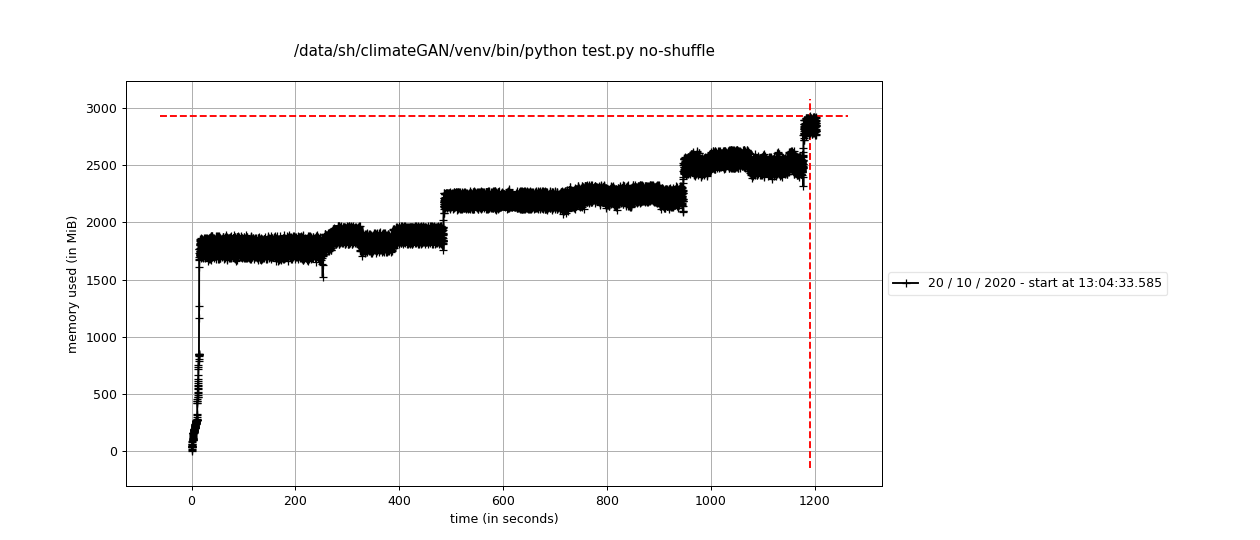
Log:
epoch:  0
epoch:  1
epoch:  2
epoch:  3
epoch:  4
epoch:  5
About this issue
- Original URL
- State: closed
- Created 4 years ago
- Reactions: 5
- Comments: 35 (18 by maintainers)
I have recently investigated the memory growth observed for OSS version of TensorFlow when
shuffleis used. The conclusion of my investigation is that the memory growth is because of poor performance of the memory allocator (TensorFlow OSS uses system malloc by default). In my experiments, switching to use TCMalloc (details below) resulted in constant memory usage (and program speedup).For the evaluation, I used the following simple input pipeline:
When executed on workstation, it produces the following output:
I then installed tcmalloc using
sudo apt-get install libtcmalloc-minimal4and used it for the same program, as follows:Not only the gradual memory growth disappeared, but the program also ran 2x faster.
Any tips on what to do if the tcmalloc LD_PRELOAD only works occasionally?
LD_PRELOAD="/lib/x86_64-linux-gnu/libtcmalloc_minimal.so.4" python script.pyand it worked.It only worked 3 or 4 times so far (out of maybe 50 runs).
Using Ubuntu 20.04 amd64.
This may explain the issue we’re seeing here: https://blog.cloudflare.com/the-effect-of-switching-to-tcmalloc-on-rocksdb-memory-use/.
This may be related to how glibc works for smaller allocations, the ones that are not mmaped. IIUC, glibc
freedoes not actually return the memory to the system in those cases. E.g. if you run thisand run as follows
the leak disappears. Forcing mmap everywhere also “works”
Using tcmalloc is still ~2x faster however.