tensorflow: Failed to get device attribute 13 for device 0
When I’am trying to run Yolo detection examples, I got that error:
2020-02-02 21:39:00.821721: I tensorflow/stream_executor/platform/default/dso_loader.cc:44] Successfully opened dynamic library cudart64_101.dll
WARNING:tensorflow:From C:\Users\Dominux\AppData\Local\Programs\Python\Python37\lib\site-packages\tensorflow_core\python\ops\resource_variable_ops.py:1635: calling BaseResourceVariable.__init__ (from tensorflow.python.ops.resource_variable_ops) with constraint is deprecated and will be removed in a future version.
Instructions for updating:
If using Keras pass *_constraint arguments to layers.
2020-02-02 21:39:03.863436: I tensorflow/stream_executor/platform/default/dso_loader.cc:44] Successfully opened dynamic library nvcuda.dll
2020-02-02 21:39:04.431694: I tensorflow/core/common_runtime/gpu/gpu_device.cc:1555] Found device 0 with properties:
pciBusID: 0000:02:00.0 name: GeForce MX230 computeCapability: 6.1
coreClock: 1.531GHz coreCount: 2 deviceMemorySize: 2.00GiB deviceMemoryBandwidth: 44.76GiB/s
2020-02-02 21:39:04.437212: I tensorflow/stream_executor/platform/default/dso_loader.cc:44] Successfully opened dynamic library cudart64_101.dll
2020-02-02 21:39:04.444498: I tensorflow/stream_executor/platform/default/dso_loader.cc:44] Successfully opened dynamic library cublas64_10.dll
2020-02-02 21:39:04.450110: I tensorflow/stream_executor/platform/default/dso_loader.cc:44] Successfully opened dynamic library cufft64_10.dll
2020-02-02 21:39:04.453997: I tensorflow/stream_executor/platform/default/dso_loader.cc:44] Successfully opened dynamic library curand64_10.dll
2020-02-02 21:39:04.459404: I tensorflow/stream_executor/platform/default/dso_loader.cc:44] Successfully opened dynamic library cusolver64_10.dll
2020-02-02 21:39:04.464501: I tensorflow/stream_executor/platform/default/dso_loader.cc:44] Successfully opened dynamic library cusparse64_10.dll
2020-02-02 21:39:04.477818: I tensorflow/stream_executor/platform/default/dso_loader.cc:44] Successfully opened dynamic library cudnn64_7.dll
2020-02-02 21:39:04.480586: I tensorflow/core/common_runtime/gpu/gpu_device.cc:1697] Adding visible gpu devices: 0
2020-02-02 21:39:09.674559: I tensorflow/core/platform/cpu_feature_guard.cc:142] Your CPU supports instructions that this TensorFlow binary was not compiled to use: AVX2
2020-02-02 21:39:09.678508: F tensorflow/stream_executor/lib/statusor.cc:34] Attempting to fetch value instead of handling error
Internal: failed to get device attribute 13 for device 0: CUDA_ERROR_UNKNOWN: unknown error
My stack:
- Win 10,
- Tensoflow 2.1,
- Intel Core I5,
- Nvidia GeForce MX230 2GB,
- 8GD DDR4
I checked similar issues, but they don’t have solutions. Just despaired people… But it problem was talked about by them only with TF 1.14 - I didn’t find other But how you could notice at me stack above I’m using TF 2.1 already
Please, can you help me! Maybe I’ve got problems with drivers or CUDA software? Any ideas?
About this issue
- Original URL
- State: closed
- Created 4 years ago
- Comments: 39 (6 by maintainers)
Had the same issue, but resolved by updating NVIDIA device drivers to the latest (v446.14). https://www.nvidia.com/download/index.aspx?lang=en-us
So … my friend … I had the same problem and it was solved this way click right in any empty place in Desktop and chose Nvidia Control Panel and the picture explain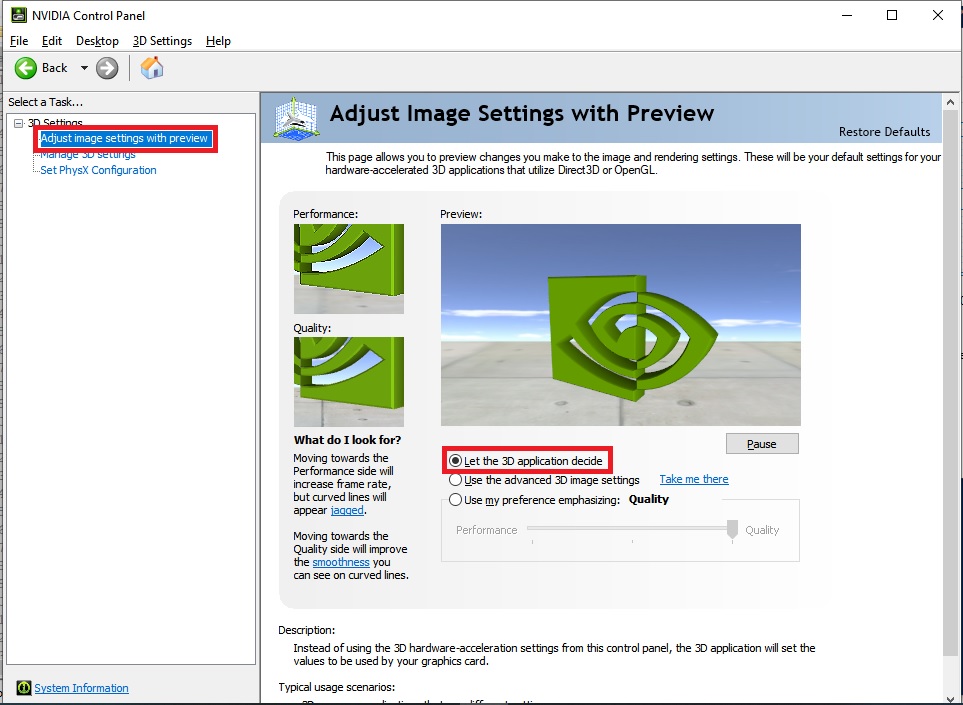
Hello, I got a similar error with Pytorch. I am new to TensorFlow but have experience with Pytorch.
I have…
In my cases, I could solve those errors by simply generating a small tensor on the GPU. In this TensorFlow case, I run the following python code on the terminal.
Unfortunately, I cannot explain why this happens but hope this helps someone.
Thanks for the reply. Can you edit the
detect.pyscript by limiting gpu memory growth. Kill all python sessions/jupyter notebook and just add following lines on top after you import modules indetect.py.