terraform-provider-proxmox: VM creation is broken since 2.9.12 (same issue with last 2.9.14) - Still creating...
Hello, Since 2.9.12, i can’t create new VM with this plugin. I’m forced to use the 2.9.11 version if i want to create my VM.
If i try to use the last 2.9.14 for example, my VM is creating, logs are displaying Still creating… And the VM console loop on this message :
starting serial terminal on interface serial0
Begin: Running /scripts/local-block ... done.
Begin: Running /scripts/local-block ... done.
Begin: Running /scripts/local-block ... done.
Begin: Running /scripts/local-block ... done.
Begin: Running /scripts/local-block ... done.
Begin: Running /scripts/local-block ... done.
Begin: Running /scripts/local-block ... done.
Begin: Running /scripts/local-block ... done.
Begin: Running /scripts/local-block ... done.
Begin: Running /scripts/local-block ... done.
done.
Gave up waiting for root file system device.  Common problems:
 - Boot args (cat /proc/cmdline)
   - Check rootdelay= (did the system wait long enough?)
 - Missing modules (cat /proc/modules; ls /dev)
ALERT!  UUID=12092ad3-fa12-45b2-23b6-f12a038d6ea2 does not exist.  Dropping to a shell!
(initramfs)
Then i need to delete the VM, rollback to version 2.9.11, replay and it’s ok.
I’m using a simple genericcloud debian 11 template.
About this issue
- Original URL
- State: closed
- Created 4 years ago
- Reactions: 5
- Comments: 15 (1 by maintainers)
In my instance, the default LSI SCSI controller was the one that wouldn’t boot (producing the error shown in OP) but if I manually edit the VM to use ‘VirtIO SCSI’ it boots fine!
I confirmed by downgrading to 2.9.11 that my VMs got created with ‘VirtIO SCSI’ by default in that version, and for some reason are using LSI as default in >2.9.12, which will not boot.
The workaround for me is setting
scsihw = "virtio-scsi-pci"on my vm resources.I think I finally figured out the underlying reason.
Before 2.9.12, I did not set a boot attribute on any of my VM resources. This didn’t cause any obvious problems before, but what actually happened was that the empty boot attribute caused that no boot device was selected in the boot order of the VM when it got created in Proxmox. However, this didn’t cause any immediate problems, because the the fallback behaviour of Proxmox when no boot device is set is that it uses the first disk, and display a small warning when you edit the boot order.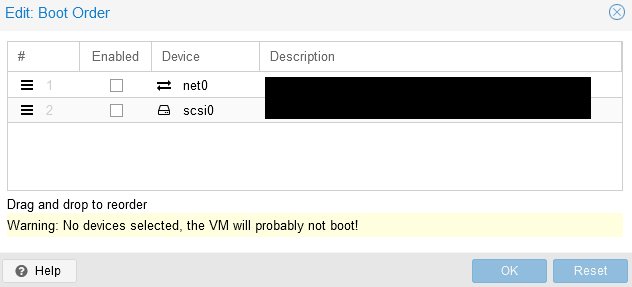
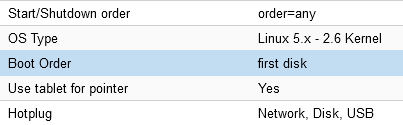
I checked just now, and all of my VM’s created via Terraform before 2.9.12 show this warning. But alas, as everything was working, I’m guessing no one ever complained.
Then with 2.9.12 (maybe by this change 5d8bebc) the boot order fallback now sets network boot as valid boot device first, and no other device as enabled. As I never defined a boot order, only network boot was selected, and my VM got stuck in a boot loop of trying to boot via network device, not finding anything as the “real” disk I wanted it to boot from wasn’t enabled on the VM, and then rebooting and doing it all over again.
I fixed it properly now on my end by adding a boot attribute to my VM resources. I already tested and this did indeed fix the problem for me.
As to avoid others having this problem, would it be possible to require the boot value ? Or at least fail if it’s not set ? I do not know too much about go or how this project is written to know if this is possible, but it could stop others from having this same problem.
this issue still exist ^_^" please reopen
This worked perfectly on 2.9.14, thanks!
Looked into it a bit more.
The boot order of my VM created by Terraform was set to “first disk, any CD-ROM, any net”. When I tried editing this, I noticed that the scis0 disk was put in the 2nd boot order and not enabled. After enabling it and setting it as first boot target, my machine booted successfully with the VirtIO SCSI controller.