terraform-provider-proxmox: [BUG] Resizing Disk issue
Hi Guys,
There seems to be an issue when you resize disk, while terraform does show its going todo it correctly, whats actaully happening is it creates a new disk instead which is then blank so it then can’t boot.
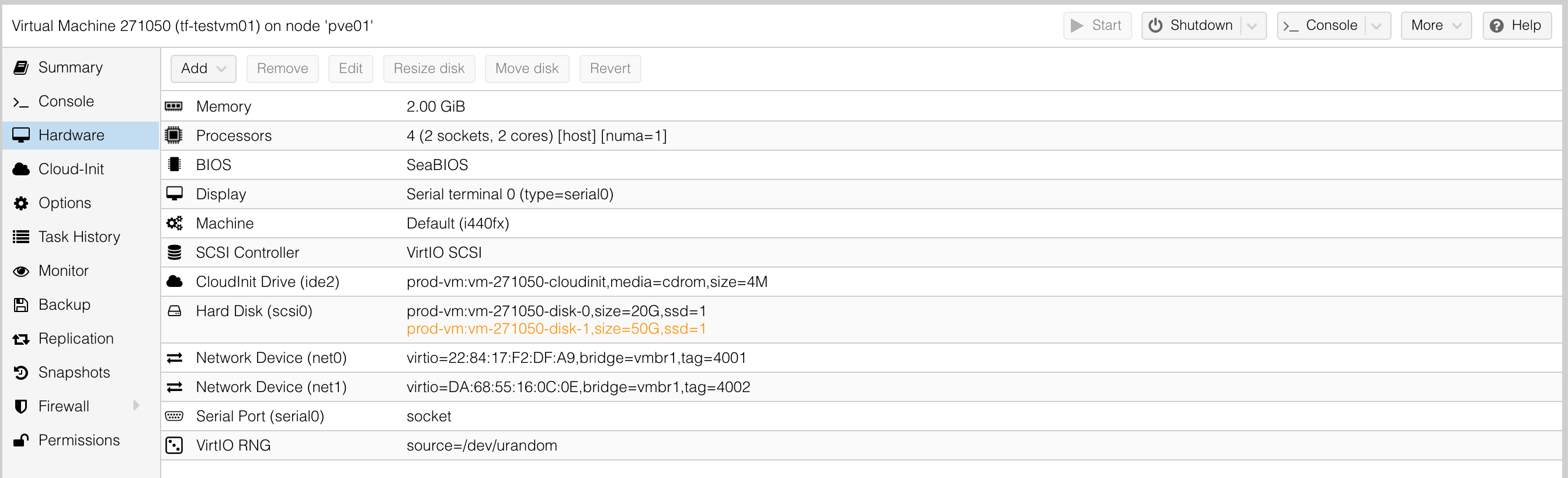
You can tell this as if you check the UI as its running, you can see its trying to craete a new one to replce old, where usually you would only see it change size.
I have tried adding in slot as id is no longer supported, but this did not help.
After initial creation
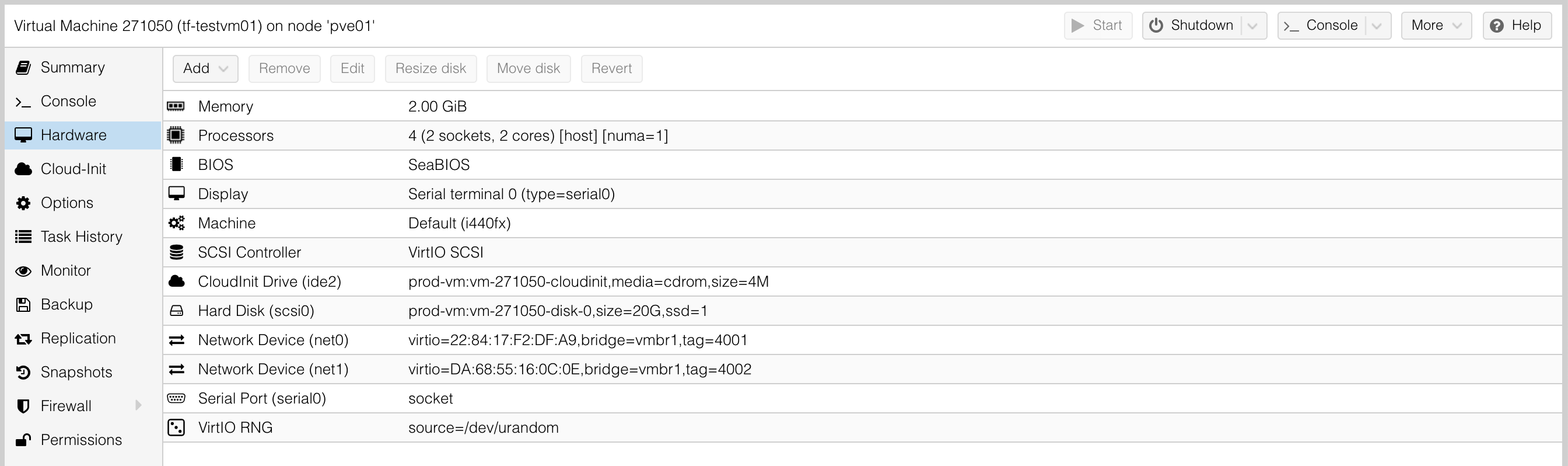
While second apply is done, after size change in manifest. You can see its not going to destory it, but update in-place, but thats not what happens.
❯ terraform apply
proxmox_vm_qemu.vm[0]: Refreshing state... [id=pve01/qemu/271050]

An execution plan has been generated and is shown below.
Resource actions are indicated with the following symbols:
  ~ update in-place

Terraform will perform the following actions:

  # proxmox_vm_qemu.vm[0] will be updated in-place
  ~ resource "proxmox_vm_qemu" "vm" {
        id                     = "pve01/qemu/271050"
        name                   = "tf-testvm01"
        # (37 unchanged attributes hidden)

      ~ disk {
          ~ size        = "20G" -> "50G"
            # (13 unchanged attributes hidden)
        }


        # (3 unchanged blocks hidden)
    }

Plan: 0 to add, 1 to change, 0 to destroy.

Do you want to perform these actions?
  Terraform will perform the actions described above.
  Only 'yes' will be accepted to approve.

  Enter a value:
❯ terraform apply
proxmox_vm_qemu.vm[0]: Refreshing state... [id=pve01/qemu/271050]

An execution plan has been generated and is shown below.
Resource actions are indicated with the following symbols:
  ~ update in-place

Terraform will perform the following actions:

  # proxmox_vm_qemu.vm[0] will be updated in-place
  ~ resource "proxmox_vm_qemu" "vm" {
        id                     = "pve01/qemu/271050"
        name                   = "tf-testvm01"
        # (37 unchanged attributes hidden)

      ~ disk {
          ~ size        = "20G" -> "50G"
            # (13 unchanged attributes hidden)
        }


        # (3 unchanged blocks hidden)
    }

Plan: 0 to add, 1 to change, 0 to destroy.

Do you want to perform these actions?
  Terraform will perform the actions described above.
  Only 'yes' will be accepted to approve.

  Enter a value: yes

proxmox_vm_qemu.vm[0]: Modifying... [id=pve01/qemu/271050]
proxmox_vm_qemu.vm[0]: Still modifying... [id=pve01/qemu/271050, 10s elapsed]
proxmox_vm_qemu.vm[0]: Still modifying... [id=pve01/qemu/271050, 20s elapsed]
proxmox_vm_qemu.vm[0]: Still modifying... [id=pve01/qemu/271050, 30s elapsed]
proxmox_vm_qemu.vm[0]: Still modifying... [id=pve01/qemu/271050, 40s elapsed]
proxmox_vm_qemu.vm[0]: Modifications complete after 45s [id=pve01/qemu/271050]

Apply complete! Resources: 0 added, 1 changed, 0 destroyed.
After the apply finishes, you now see the disk-1 not disk-0 showing. The machine then gets stuck in a reboot loop because theres now now OS on the disk (its blank).
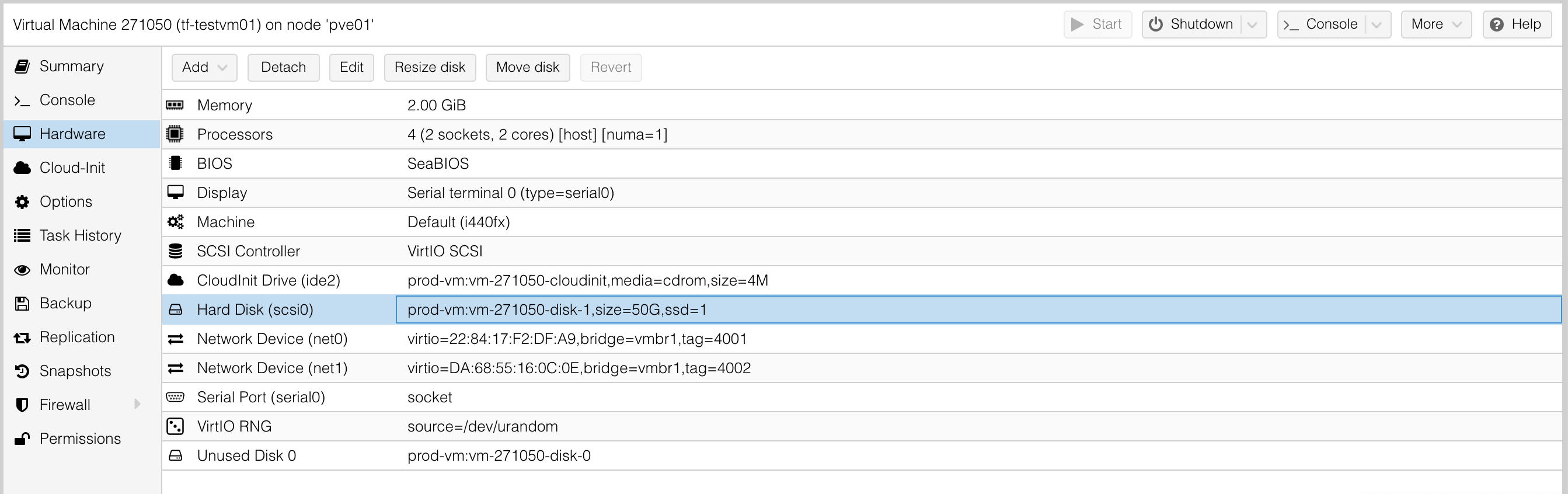
Now if you just resize disk via UI while machine is on, it just changes size, it doesn’t create a new one, so im not sure why terraform is behaving like this.
You can also see on the zfs dataset that its created an extra one, didnt delete the original either, it just created another disk then removed original (just not data). It should of just adjusted the size of the original and not reaplce it.
root@pve01:~# zfs list|grep 27
rpool/prod/vm/vm-271050-cloudinit   135K  5.62T      135K  -
rpool/prod/vm/vm-271050-disk-0     1.35G  5.62T     1.35G  -
rpool/prod/vm/vm-271050-disk-1     99.5K  5.62T     99.5K  -
What should of happened is, it should of just adjusted the size of disk-0.
To duplicate this issue easily, you can see my example code below. Just change size after initial build and re-apply to see issue.
# https://github.com/Telmate/terraform-provider-proxmox/blob/master/docs/resource_vm_qemu.md

terraform {
  required_providers {
    proxmox = {
      source  = "telmate/proxmox"
      version = "~> 2.6.5"
    }
  }
}

provider "proxmox" {
  pm_parallel       = 4
  pm_tls_insecure   = true
  pm_api_url        = var.pm_api_url
  pm_password       = var.pm_password
  pm_user           = var.pm_user
}

resource "proxmox_vm_qemu" "vm" {

  #
  # Machine Specifications
  #

  count             = 1
  name              = var.vm_hostname
  desc              = var.vm_desc
  vmid              = var.vm_id

  target_node       = var.pm_node

  cpu               = var.vm_cpu
  numa              = true
  memory            = var.vm_memory

  cores             = var.vm_cores
  sockets           = var.vm_sockets

  clone             = var.vm_template
  full_clone        = true

  pool              = var.vm_pool

  agent             = 1
  os_type           = "cloud-init"

  hotplug           = "network,disk,usb,memory,cpu"
  scsihw            = "virtio-scsi-pci"
  bootdisk          = "scsi0"
  boot              = "c"

  disk {
    slot            = 0
    size            = "20G"
    storage         = "prod-vm"

    type            = "scsi"
    ssd             = "true"
  }

  vga {
    memory = 0
    type   = "serial0"
  }

  #
  # Connectivity
  #

  # net/linux (vLAN 4001)
  network {
      model = "virtio"
      bridge = "vmbr1"
      tag = 4001
  }

  network {
      model = "virtio"
      bridge = "vmbr1"
      tag = 4002
  }

  ipconfig0 = "ip=${var.vm_ip}/24,gw=${var.vm_gw}"
  ipconfig1 = "ip=172.27.2.50/24"

  # Terraform
  ssh_user = "ubuntu"
  ssh_private_key = file("${path.module}/keys/id_rsa_terraform")

  # User public SSH key
  sshkeys = file("${path.module}/keys/id_rsa_netspeedy.pub")

  provisioner "remote-exec" {

    connection {
      type     = "ssh"
      user     = "root"
      host     = var.vm_ip
      private_key = file("${path.module}/keys/id_rsa_terraform")
    }

    inline = [
      "ip a"
    ]
  }

  #
  # Lifecycle
  #
  lifecycle {
    ignore_changes  = [
      network
    ]
  }

}
Any ideas on fix?
Only solution I have right now is to ignore the disks and manually make changes but that kinda defeats the object of terraform.
About this issue
- Original URL
- State: closed
- Created 4 years ago
- Reactions: 3
- Comments: 29 (1 by maintainers)
Hi,
I have the same problem. When the disk is resized, a new blank disk is created and the original one switches to the Unused disk state.
terraform version 1.0.1 telmate/proxmox provider 2.7.1
also facing this issue.
I use version telmate/proxmox v2.9.14
The problem is current:
Hi guys,
Found a solution that works now, here it is
Even resizing a disk works 😃
Hope it can help
Fred
I am experiencing a similar issue however it is a bit worse than just regrowing the disk. Any attempt to run terraform again (re-sizing the disk or not) will create a new blank disk. So simply applying your terraform apply twice will casue this provider to create a new disk (even if you have made no changes at all).
Should this be reopened?
Our strategy has been to update the disk size in the proxmox web UI, and then edit the TF state. It works, but is definitely not ideal or how it should be.
Currently no I haven’t, only work around I am using is to destory and rebuild with the new disk values. Thankfully most of my stuff is ansiblized so not a major issue but for some this is. Its a pain to do but thankfully I dont need to resize too oftern.