symfony: symfony/console: the error message is displayed strangely
Symfony version(s) affected
6.1.6
Description
When a completely wrong command is entered, the error message is displayed correctly(as block).
When a command is entered with an error in the one letter and the console offers its own version of the command, the error message is displayed strangely, it seems that instead of
formatBlock($errorMessages, 'error', true);
you call some wrong code, so that the red color instead of a block spreads over the entire terminal.

How to reproduce
1.register one command ‘clear-cache’ 2.run with error ‘console clear-cashe’
Possible Solution
No response
Additional Context
No response
About this issue
- Original URL
- State: closed
- Created 2 years ago
- Comments: 20 (20 by maintainers)
Commits related to this issue
- bug #47883 [Console] Fix error output on windows cli (Maximilian.Beckers) This PR was submitted for the 6.1 branch but it was squashed and merged into the 4.4 branch instead. Discussion ---------- ... — committed to symfony/symfony by chalasr 2 years ago
- Update Application.php https://github.com/symfony/symfony/issues/47862#issuecomment-1282195961 — committed to aleksandr-shevchenko/symfony by aleksandr-shevchenko 2 years ago
- Update Application.php https://github.com/symfony/symfony/issues/47862#issuecomment-1282195961 — committed to aleksandr-shevchenko/symfony by aleksandr-shevchenko 2 years ago
- Update Application.php https://github.com/symfony/symfony/issues/47862#issuecomment-1282195961 — committed to aleksandr-shevchenko/symfony by aleksandr-shevchenko 2 years ago
- bug #47907 [Console] Update Application.php (aleksandr-shevchenko) This PR was merged into the 4.4 branch. Discussion ---------- [Console] Update Application.php | Q | A | ------------... — committed to symfony/symfony by fabpot 2 years ago
- Update Application.php https://github.com/symfony/symfony/issues/47862#issuecomment-1282195961 — committed to symfony/console by aleksandr-shevchenko 2 years ago
Please no 😃
new FormatterHelper()is fine here and avoids an unnecessary service locator usage that should hopefully be deprecated at some point (ref https://github.com/symfony/symfony/issues/21417#issuecomment-275388348)To illustrate what @chalasr means, I just tried your example in a new 6.1 project and this is the result: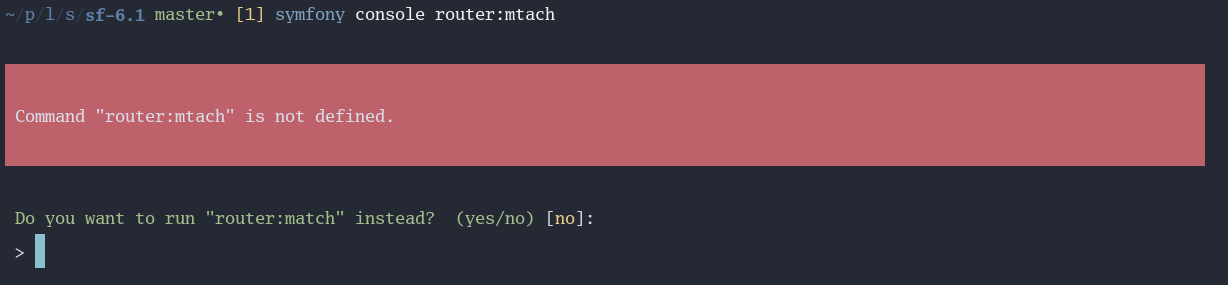
(
clear-cacheis not a command in Symfony by default, I expect this is your own console utility?)