ngx-datatable: When columnMode is 'flex' column width cannot be adjusted.
I’m submitting a …
[x] bug report => search github for a similar issue or PR before submitting
[ ] feature request
[ ] support request => Please do not submit support request here
Current behavior When setting a ngx-datatable to [columnMode]=“‘flex’” the table headers are still draggable (for resizing columns) however the table itself does not change in size.
Expected behavior I’d expect either the column headers to not be draggable when columnMode is flex or I’d expect the columns to re-adjust in size when column headers are dragged.
Reproduction of the problem The demo for Column>Flex at http://swimlane.github.io/ngx-datatable/ reproduces this issue.
What is the motivation / use case for changing the behavior? I’d say the current way it works is not expected behaviour.
Please tell us about your environment: OSX 10.11.6
-
Table version: 6.3.0
-
Angular version: 2.4.6
-
Browser: Chrome Version 56.0.2924.87, Safari Version 10.0.2
-
Language: Typescript 2.1.0
About this issue
- Original URL
- State: closed
- Created 7 years ago
- Reactions: 12
- Comments: 17 (1 by maintainers)
It seems like you need to define flexGrow for it to work. See the demo: https://github.com/swimlane/ngx-datatable/blob/master/demo/columns/column-flex.component.ts
ok, this is still broken though.
Set [canAutoResize]=“false” on column solves the problem.
I have tried various ways to get this to work, all without success: [columnMode]=“‘flex’” [columnMode]=“flex” columnMode=“flex”
I have the same problem like @spazworm, the columns’ width is working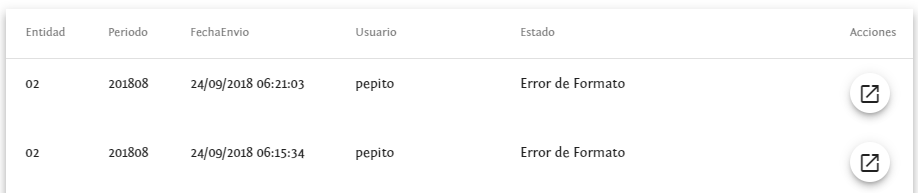
But when I resize the columns’ headers just the headers change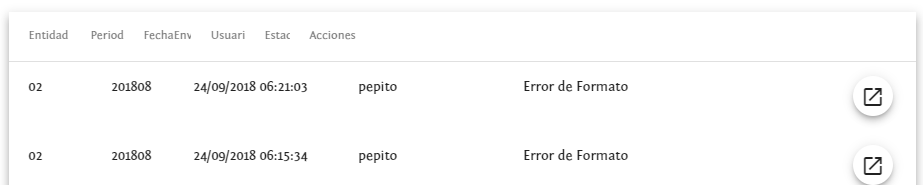
This is my code:
adding on to @westito , I was initially putting this in the table… <ngx-datatable-column [canAutoResize]=“false” ></ngx-datatable-column>
Working
[columnMode]="'flex'"to<ngx-datatable>tag and[flexGrow]="0/1/2/3/4/..."with[minWidth]="number"or[maxWidth]="number"Closing due to latest comments and age.