ngx-charts: Pie chart chart show incorrect percentage
I’m submitting a … (check one with “x”)
[x] bug report => search github for a similar issue or PR before submitting
[ ] feature request
[ ] support request => Please do not submit support request here
Current behavior
Don’t round values in Pie grid chart so much, sample: data = [ { name: ‘first’, value: 1546 }, { name: ‘second’, value: 381 }, { name: ‘next’, value: 38 } ];
it will show 80%, 20%, 2% that in summarize => 102%
Expected behavior
Must be “78.7%”, “19.4%”, “1.9%”
Reproduction of the problem
Use sample data above
What is the motivation / use case for changing the behavior?
It’s weird for user to see values that in total will be more than 100 percent
Please tell us about your environment:
- ngx-charts version: 4.0.3
- Angular version: 2.4.5
- Browser: [ Chrome ]
- Language: [TypeScript 2.0.3]
About this issue
- Original URL
- State: open
- Created 7 years ago
- Reactions: 1
- Comments: 38 (3 by maintainers)
Commits related to this issue
- fix issue #201 Pie chart chart show incorrect percentage — committed to ssleptsov/ngx-charts by ssleptsov 7 years ago
- fix issue #201 Pie chart chart show incorrect percentage (#202) * fix issue #201 Pie chart chart show incorrect percentage * package build for internal use * Revert "package build for internal ... — committed to swimlane/ngx-charts by ssleptsov 7 years ago
- fix issue #201 Pie chart chart show incorrect percentage (#202) * fix issue #201 Pie chart chart show incorrect percentage * package build for internal use * Revert "package build for internal ... — committed to ChargePoint/ngx-charts by ssleptsov 7 years ago
- {feat): Added options for formatting the name, value and percentage values in the advanced legend component. Added to be used in the advanced pie chart component. Should help with #201 — committed to ruarfff/ngx-charts by ruarfff 6 years ago
- (feat): Added options for formatting the name, value and percentage values in the advanced legend component. Added to be used in the advanced pie chart component. Should help with #201 — committed to ruarfff/ngx-charts by ruarfff 6 years ago
- (feat): Added options for formatting the name, value and percentage values in the advanced legend component. Added to be used in the advanced pie chart component. Should help with #201 — committed to ruarfff/ngx-charts by ruarfff 6 years ago
- (feat): Added options for formatting the name, value and percentage values in the advanced legend component. (#719) Added to be used in the advanced pie chart component. Should help with #201 — committed to swimlane/ngx-charts by ruarfff 6 years ago
- Fix percentage issue #201 — committed to giuliohome/ngx-charts by giuliohome 3 years ago
@yuveliremil This issue solves the problem of
percentageFormattingnot working; it can be done now, and for now, it works.with animations=true not working decimal in percent
This is the fix in the count.directive.ts I’m going to post a pull request
I’m using 7.4.0 / 8.1 and also have the same issue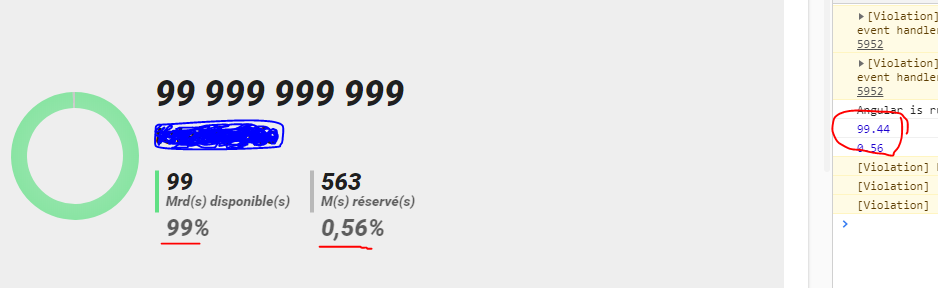
Advanced piechart
What does percentageFormatting stand for? Because i’m formating values (as you can see in console) but at the end it’s still parsed and reformated by ngx-chart source code
Right @VictorCavalcante , indeed the source code is taking
valueFormattingonly*ngIf="!animations"if not animations!It should be easy to fork and “fix” and see what happen…
Version 16.0.0 and this issue is still happening. The only workaround that works for Pie Grid is disabling the animations, like this:
Still definitely not a good solution.
@yuveliremil Definitely not a good solution, but it’s a Workaround.
I think 2 things should happen:
NaN.intvalues, unless we tell it to show 2 decimal points.Any thoughts on this?