sway: Hitman game launcher is not clickable
- Sway Version:
sway version 1.2 (Sep 26 2019, Arch Linux)
- Debug Log:
No useful log in journalctl:
Sep 30 22:35:40 ansan /usr/lib/gdm-wayland-session[1650]: >>> Adding process 31201 for game ID 863550
Sep 30 22:35:40 ansan /usr/lib/gdm-wayland-session[1650]: >>> Adding process 31213 for game ID 863550
Sep 30 22:35:40 ansan /usr/lib/gdm-wayland-session[1650]: Fontconfig warning: "/etc/fonts/conf.avail/05-reset-dirs-sample.conf", line 6: unknown element "reset-dirs"
Sep 30 22:35:41 ansan /usr/lib/gdm-wayland-session[1650]: ERROR: ld.so: object '/home/jattali/.local/share/Steam/ubuntu12_32/gameoverlayrenderer.so' from LD_PRELOAD cannot be preloaded (wrong ELF class: ELFCLASS32): ignored.
Sep 30 22:35:41 ansan /usr/lib/gdm-wayland-session[1650]: Game update: AppID 863550 "", ProcID 31184, IP 0.0.0.0:0
Sep 30 22:35:41 ansan /usr/lib/gdm-wayland-session[1650]: Setting breakpad minidump AppID = 863550
Sep 30 22:35:41 ansan /usr/lib/gdm-wayland-session[1650]: Steam_SetMinidumpSteamID:  Caching Steam ID:  76561198001543971 [API loaded no]
Sep 30 22:35:41 ansan /usr/lib/gdm-wayland-session[1650]: ERROR: ld.so: object '/home/jattali/.local/share/Steam/ubuntu12_32/gameoverlayrenderer.so' from LD_PRELOAD cannot be preloaded (wrong ELF class: ELFCLASS32): ignored.
Sep 30 22:35:41 ansan /usr/lib/gdm-wayland-session[1650]: ERROR: ld.so: object '/home/jattali/.local/share/Steam/ubuntu12_32/gameoverlayrenderer.so' from LD_PRELOAD cannot be preloaded (wrong ELF class: ELFCLASS32): ignored.
Sep 30 22:35:41 ansan /usr/lib/gdm-wayland-session[1650]: Game update: AppID 863550 "", ProcID 31229, IP 0.0.0.0:0
Sep 30 22:35:41 ansan /usr/lib/gdm-wayland-session[1650]: Setting breakpad minidump AppID = 863550
Sep 30 22:35:41 ansan /usr/lib/gdm-wayland-session[1650]: Steam_SetMinidumpSteamID:  Caching Steam ID:  76561198001543971 [API loaded no]
Sep 30 22:35:41 ansan /usr/lib/gdm-wayland-session[1650]: >>> Adding process 31220 for game ID 863550
Sep 30 22:35:41 ansan /usr/lib/gdm-wayland-session[1650]: >>> Adding process 31222 for game ID 863550
Sep 30 22:35:41 ansan /usr/lib/gdm-wayland-session[1650]: >>> Adding process 31229 for game ID 863550
- Configuration File:
Nothing specific (IMO).
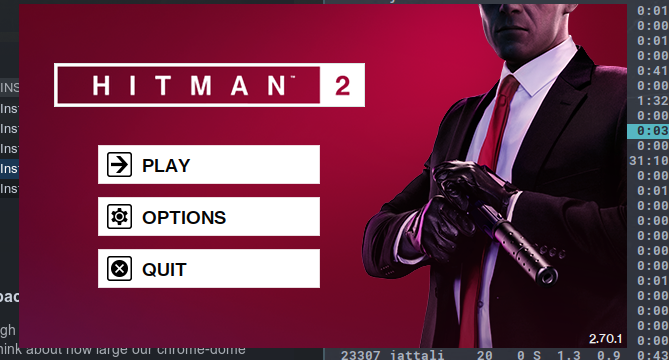
Finally, explain the steps you took in plain English to reproduce the problem below. Simply launch Hitman through Steam. The game launcher appears but none of the 3 buttons are clickable. It’s as if the window does not exist. I tried to look for it using swaymsg -t get_tree but I cannot find it. Any interaction with the buttons simply go through and are received by whatever window is underneath.
See screenshot.
Not sure if this is as sway bug or a steam bug. Sorry for the noise if I put this in the wrong place.
- Stack Trace, if sway crashes:
No crash
About this issue
- Original URL
- State: closed
- Created 5 years ago
- Reactions: 3
- Comments: 17 (2 by maintainers)
This occurs with the LOTRO launcher and the EVE online launchers as well, when run from Steam or just using standard WINE. To play these games I run dwm since they don’t work with Sway.
The LOTRO launcher I know uses Qt4, maybe it has something to do with that?
Unsure about Hitman, but the LOTRO and EVE launchers will follow you through workspaces in addition to being unclickable/unmovable
I have the same problem. As a workaround, I adapted flibitijibibo’s Shenmue 1 & 2 workaround to work with Hitman 2:
Assuming you have Wine installed:
winegcc launcher.c -o Launcher.exeYou can also compile with mingw if you have that installed. The only difference is that there won’t be a Launcher.exe.so to copy.
This will bypass the launcher entirely, allowing the game to work until the bug is fixed.