hear: Error: On-device recognition is not supported for en-US
I have Mac Mini (M1), MacOS Monterey 12.5.1 (21G83).
After attempt to launch hear I see the following:
./hear -s
ar-SA
ca-ES
cs-CZ
da-DK
de-AT
de-CH
de-DE
el-GR
en-AE
en-AU
en-CA
en-GB
en-ID
en-IE
en-IN
en-NZ
en-PH
en-SA
en-SG
en-US
en-ZA
es-419
es-CL
es-CO
es-ES
es-MX
es-US
fi-FI
fr-BE
fr-CA
fr-CH
fr-FR
he-IL
hi-IN
hi-IN-translit
hi-Latn
hr-HR
hu-HU
id-ID
it-CH
it-IT
ja-JP
ko-KR
ms-MY
nb-NO
nl-BE
nl-NL
pl-PL
pt-BR
pt-PT
ro-RO
ru-RU
sk-SK
sv-SE
th-TH
tr-TR
uk-UA
vi-VN
wuu-CN
yue-CN
zh-CN
zh-HK
zh-TW
But nevertheless I can not transcribe any audio with the following error:
./hear  -d -i ./test.m4a
2023-03-09 19:20:01.767 hear[21203:2358806] Required assets are not available for Locale:en-US
Error: On-device recognition is not supported for en-US
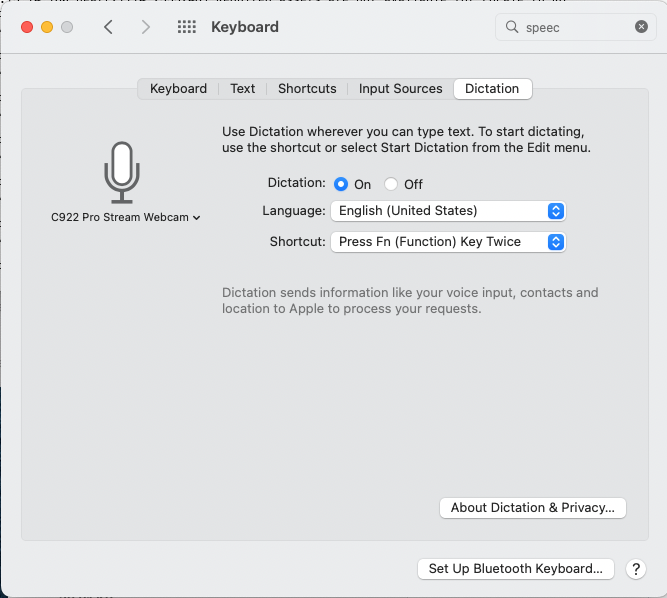
Here are the settings of dictation (see the screenshot).
What am I missing?
About this issue
- Original URL
- State: open
- Created 4 years ago
- Reactions: 1
- Comments: 16 (2 by maintainers)
You can fix it by first running hear without the
-dflag on, so that MacOS fetches all the needed data, and then you can use your usual commandI was able to resolve my issue by enabling dictation and waiting a few minutes:
I was able to get this to work in Ventura 13.5.1 by going to Finder > Edit > Start Dictation.
Once Dictation was running, I could then run the
hear -d -i filename.mp3 > output.txtcommand in the terminal successfullyit really works. you need to download the proper dictation language to your hd first (config > Translation Languages); and then add
-l en-AUfor Australian English andhearwill choose that as dictation language for transcription. don’t forget to add ‘-p’ for punctuation!@fluxpiada how to download the languages ?