LSP-pyright: Default to simple path/name search if can't find anything?
Im used to SublimeCodeIntel that would simply look for same class names/methods in specified paths. This way I could quickly access imported modules/classes etc.
With pyright, I understand that it tries to do more sophisticated things, but at the same time, when it fails, it won’t find anything, which is quite useless. Maybe there is a way to fallback to some simpler imports detection if pyright cant figure out where that import is coming from?
For example I use odoo and include odoo in my project, yet it can’t detect most imports properly.
This is my current project config json:
{
  "include": [
    "src",
    "scripts",
  ],
  "ignore": [
    "entrypoint"
  ],
}
This is one of odoo files I opened:
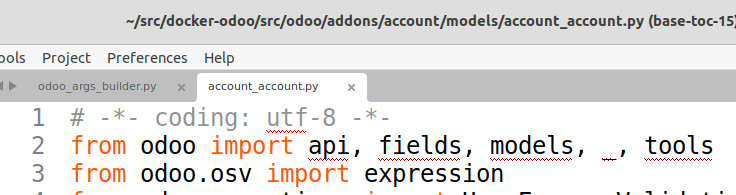
For example if I hover over api, it shows error: "api" is unknown import symbol Pyright: reportGeneralTypeIssues. Clicking on that just redirects to pyright configuration documentation github page…
Here is a link to odoo source, to if you need to see how various modules are imported etc: https://github.com/odoo/odoo/ Here is file I tested locally: https://github.com/odoo/odoo/blob/15.0/addons/account/models/account_account.py
I guess pyright would not be able to properly recognize inherited classes, etc? Because odoo inherits indirectly, somewhat similarly as django, like:
class AccountAccount(models.Model):
    _name = "account.account"
    _inherit = ['mail.thread']
Where you only specify base Model, but business model is inherited via _inherit attribute. As I see it can’t see any super implementations of some methods.
P.S. odoo project for me locally is acting like a separate directory, which later is just copied to docker image to be built.
About this issue
- Original URL
- State: closed
- Created 3 years ago
- Comments: 19 (1 by maintainers)
Here is sample repo that I was able to reproduce same issue (opening stubs instead of real code): https://github.com/oerp-odoo/sample-for-pyright