vscode-styled-components: Incorrect cursor position after css autocomplete
Describe the bug (including copyable syntax) CSS autocomplete cursor position af The cursor is right before the last character of the last word.
Screenshot
justify-conten/*the cursor is currently here*/t: ;

To Reproduce
Add any css property, then hit enter on any suggestions.

Expected behavior The cursor should be BETWEEN the colon and the semi colon
display: /*the cursor should be here*/ ;
Build environment (please complete the following information):
- OS: Mac OS Catalina 10.15.7
- VSCode Version: 1.65
- Extension Version 1.72
Additional context This bug only appeared after I updated vscode to 1.65
About this issue
- Original URL
- State: closed
- Created 2 years ago
- Reactions: 13
- Comments: 15 (1 by maintainers)
For me the problem was in vscode-styled-components extension but from another author, not Styled Components. So check your extension and remove all wrong ones if you have them and install “vscode-styled-components” from Styled Components
For me the update did nothing to fix the issue. However removing a conflicting vscode-styled-components extension did. So double check you have the correct VS Code extension installed.
I am still having this issue in v1.7.4, vscode 1.68.1, macos 12.4
Same problem here.
I downgraded VS Code to 1.64.2 and now the cursor it’s working correctly.
I just reInstalled any extensions that related to styled-components and now works fine
I have the same problem, this solution worked for me, at least temporarily!
my solution is “git clone” this project and “yarn”,fix the code in src/insertColonCommand.ts like below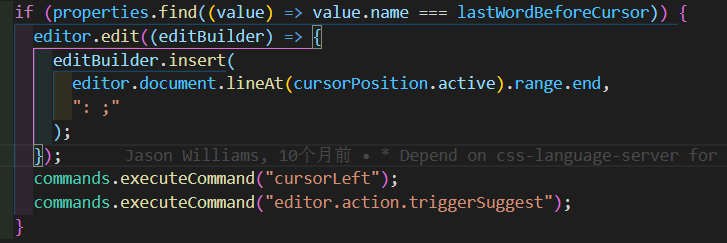
then “npx vsce package”,use the generated vsix file,and it works