styled-components: SSR Memory Leak with v5 release candidate 2
Environment
Default, Baseline
## System:
 - OS: macOS 10.15
 - CPU: (12) x64 Intel(R) Core(TM) i7-8850H CPU @ 2.60GHz
 - Memory: 3.11 GB / 32.00 GB
 - Shell: 5.6.2 - /usr/local/bin/zsh
## Binaries:
 - Node: 10.15.1 - ~/.nvm/versions/node/v10.15.1/bin/node
 - Yarn: 1.19.1 - ~/****/****/applications/site/node_modules/.bin/yarn
 - npm: 6.4.1 - ~/.nvm/versions/node/v10.15.1/bin/npm
## npmPackages:
 - babel-plugin-styled-components: ^1.10.0 => 1.10.6
 - styled-components: ^4.0.0 => 4.4.1
After upgrade to RC 2
## System:
 - OS: macOS 10.15
 - CPU: (12) x64 Intel(R) Core(TM) i7-8850H CPU @ 2.60GHz
 - Memory: 3.11 GB / 32.00 GB
 - Shell: 5.6.2 - /usr/local/bin/zsh
## Binaries:
 - Node: 10.15.1 - ~/.nvm/versions/node/v10.15.1/bin/node
 - Yarn: 1.19.1 - ~/****/****/applications/site/node_modules/.bin/yarn
 - npm: 6.4.1 - ~/.nvm/versions/node/v10.15.1/bin/npm
## npmPackages:
 - babel-plugin-styled-components: ^1.10.0 => 1.10.6
 - styled-components: ^5.0.0-rc.2 => 5.0.0-rc.2
Notes: Both environments use TypeScript, Next.JS and latest versions of react
Steps to Reproduce
- Use the
_document.jsfile found in thewith-styled-componentsexample of next.js. - Have styled-components 4.4.1 installed.
- Run application using N|Solid from nodesource. Also could probably get this information by attaching chrome inspector to node.
- Run
npx loadtest -c 5 --rps 10 -k -t 90 http://localhost:8080/ - See that memory usage has peaks and valleys, RSS and Heap memory allocation move together. External memory barely moves.
- install release candidate 2
- repeat the steps above.
- See that Heap allocation remains consistent, MORE consistent than in 4.4.1, but RSS and External memory allocation seem to climb indefinitely until the application crashes under load.
- Look at memory snapshot and see that ServerStyleSheet is massive, at around 2 gigabytes, and the server is holding onto array buffers and strings that seem to reference styles.
Memory Timeline In N|Solid on version 4.4.1

Memory Timeline in N|Solid on Version 5 RC 2

Comparison of Heap snapshots

RC 2 is on the left. The snapshots were taken as close to the same point as possible (immediately following the load test that was run with the same stats: 5 concurrent threads, keep-alive connections, 10 requests per second for 90 seconds). The only change between the two is upgraded to RC 2.
About this issue
- Original URL
- State: closed
- Created 5 years ago
- Reactions: 2
- Comments: 66 (24 by maintainers)
Commits related to this issue
- allocate cGS instances from the stylesheet instead fixes #2913 Previously the cGS instance count was managed locally in the cGS factory, which works fine client-side but will never be reset properly... — committed to styled-components/styled-components by quantizor 4 years ago
- allocate cGS instances from the stylesheet instead (#2947) * remove an unnecessary allocation in cGS * allocate cGS instances from the stylesheet instead fixes #2913 Previously the cGS insta... — committed to styled-components/styled-components by quantizor 4 years ago
And with that, v5 is ready ^_^
Was able to get the
vsmembuild into production this afternoon and so far, so good. We had previously seen errors after about an hour - release has been out for just about 2 hours and memory usage is completely flat. Will continue to monitor and post here if there is any change. For now it looks fixed. Thank you so much![UPDATE] - All weekend in production on this release and no memory leak issues.
There were no changes to theme propagation in that build. Might want to use yarn resolutions to ensure the same exact version of the library is used everywhere, etc
On Wed, Jan 8, 2020 at 10:00 AM Jason Aslakson notifications@github.com wrote:
We’ve faced the same issue with stable v5: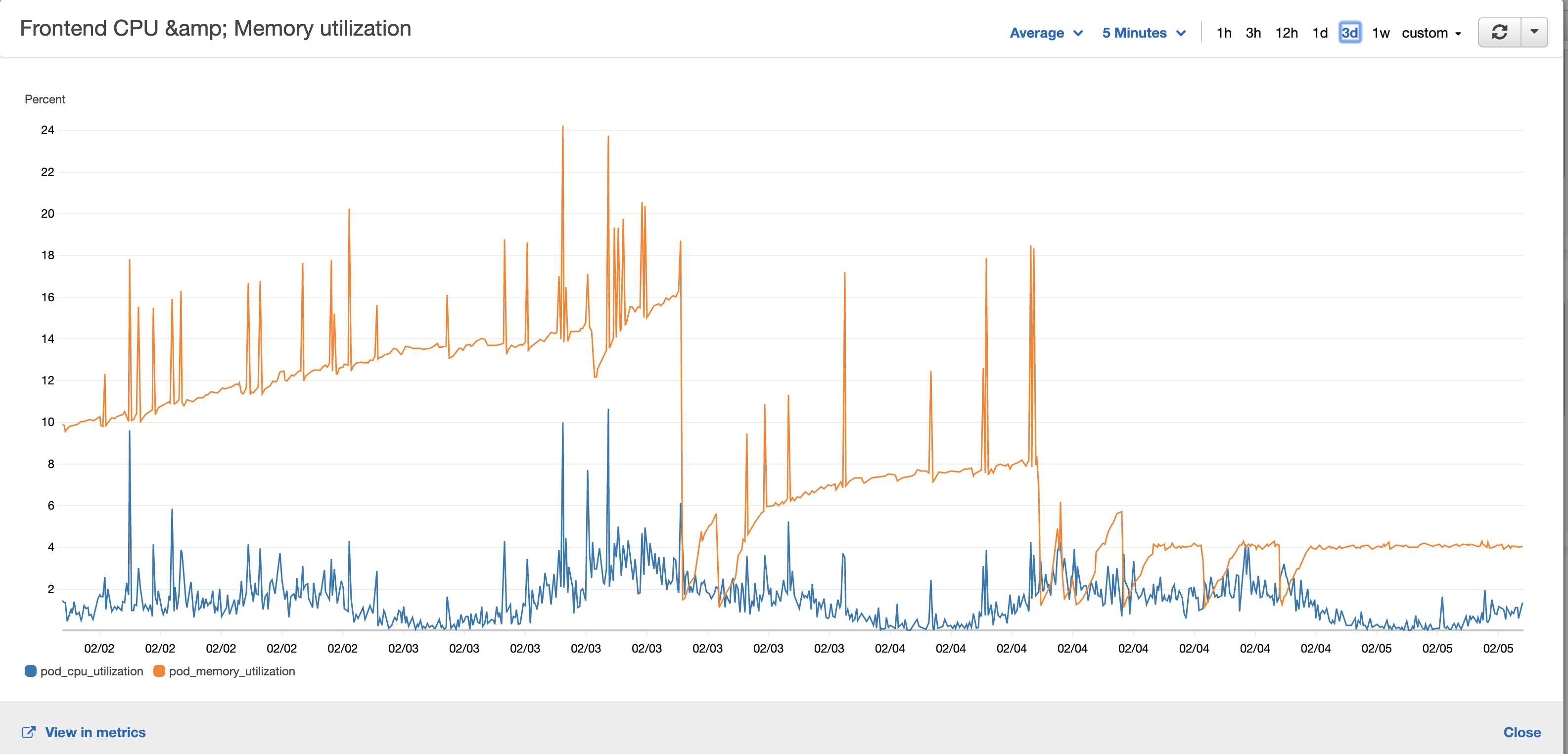
Source is too large. You can see memory usage increased between deploys. After rolling back to v4 there is a stable memory utilization (04.02). I can guarantee we don’t have dynamically created SC, but we use dynamic loading feature in nextjs framework.@homoky im currently working on adding a warning for this, so people won’t accidentally run into that again https://github.com/styled-components/styled-components/pull/2998
You guys rock! Especial thanks to @probablyup and @brad-decker … wish we coulda helped more but its the thick of NFL playoff time so we had to be reserved… cant wait to try this out again
Great work, @probablyup – definitely resolved. Not only is it resolved, but this is also lower memory use on the server than version 4
Hmm I’d hope React would drop that since during SSR unmount effects will never be called… might be a bug on their end.
Just today we bumped our prod instance up to RC2 after having passed our automated and manual regression tests in our staging environment. Approx 1hr after releasing, we saw a spike in memory usage that brought our site down. We restarted the dynos and all was well until another hour had passed - did this twice while investigating the problem. Found this thread and reverted our version change and the problem has gone away.
we use next.js and we do use
createGlobalStyle- here’s a snippet of how it’s used in our_app.jsfile:The
resetimport is an exported template string that’s basically:Please let me know if there’s a better/alternate way to use
createGlobalStyle.Here’s a snapshot of our metrics dashboard, showing memory usage - the vertical line just after 9 and during the final spike are when we released/rolled back the RC2 change: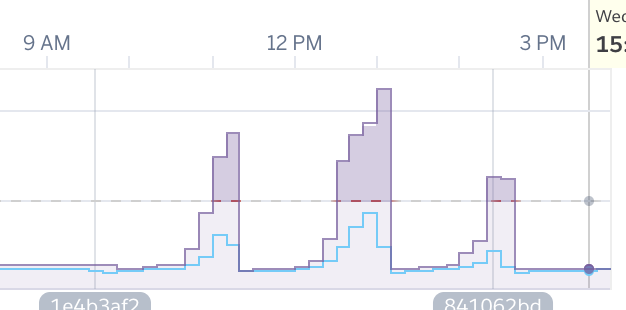
@mxstbr ah ok, so instead of calling
createGlobalStyleinside render functions, create them on top level and parametrize them with props. I‘ll check my usages. Would be helpful though if an unsafe usage ofcreateGlobalStylecould somehow produce a compiler/linter error or at leased a console error.