streamlit: Unable to use Streamlit behind HTTP proxy due to websocket errors
Checklist
- I have searched the existing issues for similar issues.
- I added a very descriptive title to this issue.
- I have provided sufficient information below to help reproduce this issue.
Summary
Streamlit app is running inside a docker container behind a NGINX proxy under /dashboard/ path.
The docker container is started as follows:
docker run -d -p 49500:8080 $DOCKER_IMAGE
Where 49500 is the external port, and 8080 is the internal NGINX port.
NGINX forward all requests to http://ip:49500/dashboard/ to the Streamlit app running in the internal port 8081.
The Streamlit app is started as follows:
streamlit run script.py --server.port=8081 --server.baseUrlPath="/dashboard/" --browser.gatherUsageStats=false --theme.base="light" --server.enableCORS=false --server.enableXsrfProtection=false &
Accessing the Streamlit app using the IP address works fine e.g. http://ip:49500/dashboard/.
However, while accessing the Streamlit app using a HTTP reverse proxy does not work e.g.
https://server.domain.com:8443/cloud-automation-service/services/6/endpoints/mlops-dashboard-gui-92-6/.
Our HTTP reverse proxy forwards:
https://server.domain.com:8443/cloud-automation-service/services/6/endpoints/mlops-dashboard-gui-92-6/
to:
http://0.0.0.0:49500/dashboard/
Screenshot 01

Screenshot 02
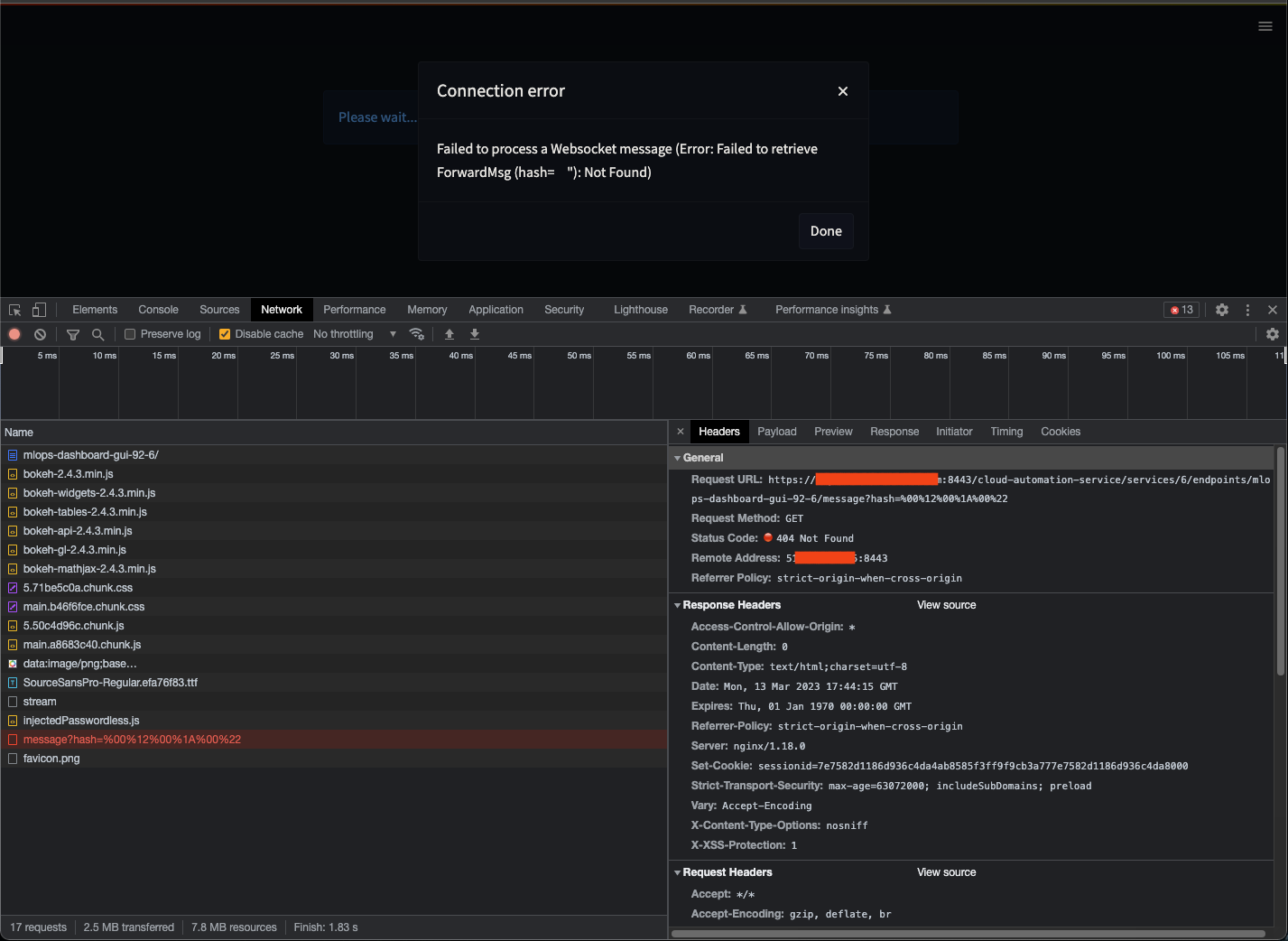
Checking the logs from the HTTP reverse proxy it shows the Websocket was closed: [please ignore the IP addresses and ports]
2023-01-25 17:01:02.423 [qtp1454870101-30359] DEBUG org.ow2.proactive.pca.service.proxy.websocket.PCAWebSocketFilter - PCA Proxy received WebSocket request
2023-01-25 17:01:02.496 [qtp1454870101-30359] DEBUG org.ow2.proactive.pca.service.proxy.websocket.ClientWebSocketCreator - Handling WebSocket request for PSA service [1] with target service URL [ws://server.domain.com:53179/dashboard/stream]
2023-01-25 17:01:02.498 [qtp1454870101-30359] DEBUG org.ow2.proactive.pca.service.proxy.websocket.ClientWebSocket - WebSocket Proxy got connection from client: /78.199.116.24:53056
2023-01-25 17:01:02.529 [qtp1454870101-30359] DEBUG org.ow2.proactive.pca.service.proxy.websocket.ServiceWebSocketCreator - Web Socket Upgrade Request Headers : {Origin=[https://server.domain.com:8443/], X-Forwarded-Host=[server.domain.com:8443], X-Forwarded-Proto=[https], X-Forwarded-For=[78.199.116.24, 62.210.106.13], Accept-Language=[en-US,en;q=0.9,fr;q=0.8,pt;q=0.7,de;q=0.6], Accept-Encoding=[gzip, deflate, br], X-Forwarded-Server=[62.210.106.13]}
2023-01-25 17:01:02.552 [HttpClient@45312537-31978] DEBUG org.ow2.proactive.pca.service.proxy.websocket.ServiceWebSocket - WebSocket Proxy connected to service ws://server.domain.com:53179/dashboard/stream
2023-01-25 17:01:02.552 [HttpClient@45312537-31978] DEBUG org.ow2.proactive.pca.service.proxy.websocket.ServiceWebSocket - WebSocket session: WebSocketSession[websocket=JettyListenerEventDriver[org.ow2.proactive.pca.service.proxy.websocket.ServiceWebSocket],behavior=CLIENT,connection=WebSocketClientConnection@6ad8dbba::SocketChannelEndPoint@6ee75239{l=/127.0.0.1:59568,r=server.domain.com/127.0.1.1:53179,OPEN,fill=-,flush=-,to=1/3600000}{io=0/0,kio=0,kro=1}->WebSocketClientConnection@6ad8dbba[s=ConnectionState@2be5d181[OPENING],f=Flusher@362d70c5[IDLE][queueSize=0,aggregateSize=-1,terminated=null],g=Generator[CLIENT,validating],p=Parser@1a8478b1[ExtensionStack,s=START,c=0,len=0,f=null]],remote=WebSocketRemoteEndpoint@4ea68742[batching=true],incoming=JettyListenerEventDriver[org.ow2.proactive.pca.service.proxy.websocket.ServiceWebSocket],outgoing=ExtensionStack[queueSize=0,extensions=[],incoming=org.eclipse.jetty.websocket.common.WebSocketSession,outgoing=org.eclipse.jetty.websocket.client.io.WebSocketClientConnection]]
2023-01-25 17:01:02.683 [qtp1454870101-27141] DEBUG org.ow2.proactive.pca.service.proxy.websocket.ClientWebSocket - WebSocket Proxy received a close connection request from client /78.199.116.24:53056. Code: 1006, Disconnected
2023-01-25 17:01:02.683 [qtp1454870101-27141] DEBUG org.ow2.proactive.pca.service.proxy.websocket.ServiceWebSocket - WebSocket Proxy received a close request from client server.domain.com/127.0.1.1:53179. Code: 1006, Disconnected.
Reproducible Code Example
import streamlit as st

st.write("Hello, World!")
Steps To Reproduce
No response
Expected Behavior
The expected behavior is to be able to access the Streamlit app as follows

Current Behavior
The current behavior is

Is this a regression?
- Yes, this used to work in a previous version.
Debug info
- Streamlit version: 1.11.1
- Python version: 3.8.12
- Operating System: Debian GNU/Linux 11 (bullseye)
- Browser: Chrome, Firefox
- Virtual environment: Docker
Additional Information
No response
Are you willing to submit a PR?
- Yes, I am willing to submit a PR!
About this issue
- Original URL
- State: closed
- Created 4 years ago
- Comments: 26 (1 by maintainers)
Regarding
location /streamandlocation ^~ /healthz, they have changed place to/_stcore/streamand_stcore/healththat’s probably why/streamand/healthzwere not working anymore, you may need to rename them in your nginx conf. Yourlocation /is passing everything through so that works too.Check out https://github.com/streamlit/streamlit/pull/5534/files for most of the endpoints renaming. There should be a public doc about it one day!
Hi everyone,
@andrewssobral not sure if this is related to your issue, but I have very similar setups (streamlit in docker running behind a nginx) and ran into a similar error. I have like a ‘standard nginx config’ that I use for all deployments that looks like:
That proved working for some time now, but with the latest version of streamlit, a new deployment threw the same error as you describe. To me it seems like streamlit rebuilt some stuff regarding the usage of websockets. I tried to add the websocket proxy pass configuration to the
location /like:I am not a websocket expert and also not really sure what I did, but for me that did the trick and now also the container shipping with the latest streamlit version works fine.
This is still an issue for us. The connection to the app from the client is established but it keeps loading for ever. Therefore, we cannot use Streamlit in our network.
All other libraries providing similar functionality we have tested so far work perfectly well. This includes Flask, Plotly Dash and Gradio.
The case of Gradio is interesting because, even though it does not strictly depend on WebSocket, we observe WebSocket traffic, which means that the protocol itself is not blocked.
For Flask and Dash we are still relying on the Werkzeug server, which does not depend on WebSocket, even though it seems to use it just for rerouting. Perhaps it is the same for Gradio.
The D&J Transit Services is the Formerly D&J Ambulette Services is located at 1200 Zerega Avenue, Bronx, NY 10462
Works for me with streamlit 1.33.0 with Apache mod_proxy using this conf :
Had to try out a bit, but it works for me with this nginx-config:
And this is my .streamlit/config.toml:
Works on my machine.
I’m running Streamlit with
--server.enableCORS=false --server.enableXsrfProtection=falseI think it started working when I set this lineproxy_set_header Connection $connection_upgrade;Here’s my nginx.conf
this is still an issue for us also. From the console:
Hello @sebimarkgraf @LukasMasuch , Thank you for your feedback. I will test again using the latest version of Streamlit and check if the reverse proxy is stripping the query parameters. I will get back to you as soon as possible.