streamlink: Streamlink Crashing after Commercial
Bug Report
- This is a bug report and I have read the contribution guidelines.
Description
Streamlink will either crash after a 15 second commercial break or will operate slowly after the 15 second commercial break at startup.
Expected / Actual behavior
After typing in my streamlink command: streamlink twitch.tv/xqcow best --hls-live-edge 1 --twitch-low-latency
I should jump right into the live edge of the stream. Instead, I will end up watching a commercial placeholder, and then most of the time crash my VLC media player afterwards. I am currently building an application as well that pipes my streamlink output into FFMPEG, and this pipe will break as well.
Reproduction steps / Explicit stream URLs to test
- … Type in the command streamlink twitch.tv/channel_name best --hls-live-edge 1 --twitch-low-latency
- … Wait out the new 15 second commercial timeout
- … By this point it should have crashed. If it did not then exit VLC media player and try again
Log output
streamlink twitch.tv/xqcow best --hls-live-edge 1 --twitch-low-latency --loglevel debug [cli][debug] OS: Windows 10 [cli][debug] Python: 3.6.6 [cli][debug] Streamlink: 1.5.0 [cli][debug] Requests(2.24.0), Socks(1.7.1), Websocket(0.57.0) [cli][info] Found matching plugin twitch for URL twitch.tv/xqcow [cli][debug] Plugin specific arguments: [cli][debug] --twitch-low-latency=True (low_latency) [plugin.twitch][debug] Getting live HLS streams for xqcow [utils.l10n][debug] Language code: en_US [cli][info] Available streams: audio_only, 160p (worst), 360p, 480p, 720p, 720p60, 1080p60 (best) [cli][info] Opening stream: 1080p60 (hls) [plugin.twitch][info] Low latency streaming (HLS live edge: 1) [stream.hls][debug] Reloading playlist [plugin.twitch][info] This is not a low latency stream [stream.hls][debug] First Sequence: 0; Last Sequence: 2 [stream.hls][debug] Start offset: 0; Duration: None; Start Sequence: 2; End Sequence: None [stream.hls][debug] Adding segment 2 to queue [cli][debug] Pre-buffering 8192 bytes [cli][info] Starting player: “C:\Program Files\VideoLAN\VLC\vlc.exe” [cli.output][debug] Opening subprocess: “C:\Program Files\VideoLAN\VLC\vlc.exe” --input-title-format twitch.tv/xqcow - [stream.hls][debug] Download of segment 2 complete [cli][debug] Writing stream to output [stream.hls][debug] Reloading playlist [stream.hls][debug] Adding segment 3 to queue [stream.hls][debug] Download of segment 3 complete [stream.hls][debug] Reloading playlist [stream.hls][debug] Adding segment 4 to queue [stream.hls][debug] Download of segment 4 complete [stream.hls][debug] Reloading playlist [stream.hls][debug] Adding segment 5 to queue [stream.hls][debug] Download of segment 5 complete [stream.hls][debug] Reloading playlist [stream.hls][debug] Adding segment 6 to queue [stream.hls][debug] Download of segment 6 complete [stream.hls][debug] Reloading playlist [stream.hls][debug] Adding segment 7 to queue [stream.hls][debug] Download of segment 7 complete [stream.hls][debug] Reloading playlist [stream.hls][debug] Adding segment 8 to queue [stream.hls][debug] Adding segment 9 to queue [stream.hls][debug] Download of segment 8 complete [stream.hls][debug] Reloading playlist [stream.hls][debug] Adding segment 10 to queue [cli][info] Player closed [stream.segmented][debug] Closing worker thread [stream.segmented][debug] Closing writer thread [cli][info] Stream ended [cli][info] Closing currently open stream…
Additional comments, screenshots, etc.
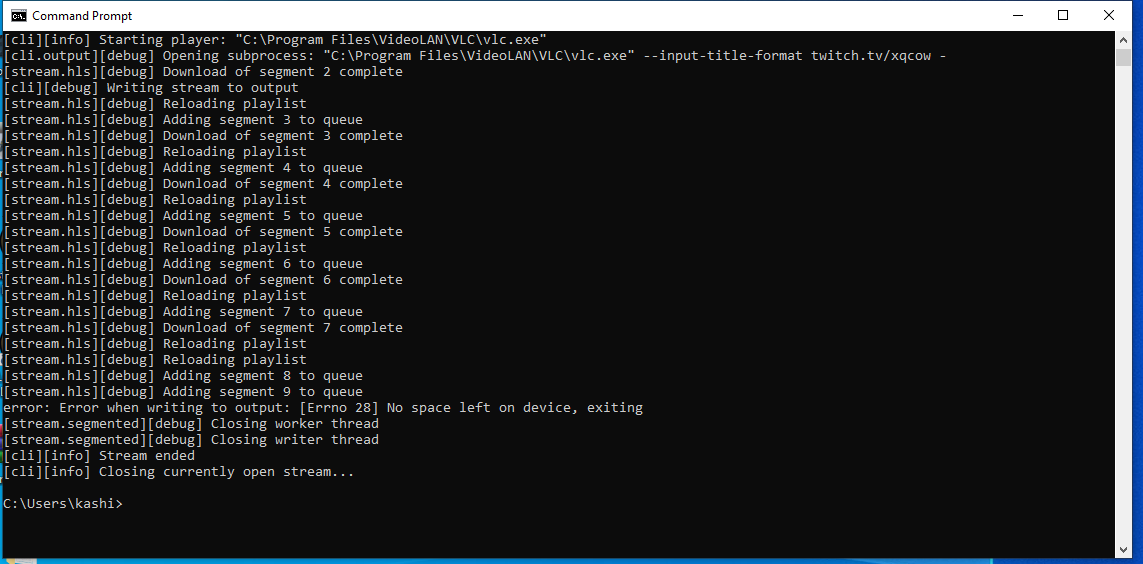
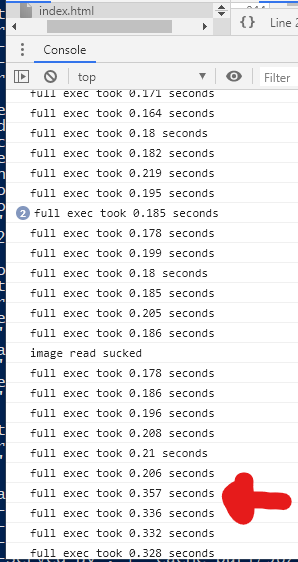
I got the error in the first screenshot once and that’s it. All other crashes were due to the log provided above.
Regarding the console image, the execution times used to range from 0.15ms to 0.2ms tops, and now executions times will approach at times 2seconds+. Interestingly enough it always runs great through the commercial. I am not sure if this is any help to the streamlink team but I figured I should provide all the information I possibly could.
Love Streamlink? Please consider supporting our collective. Thanks!
About this issue
- Original URL
- State: closed
- Created 4 years ago
- Comments: 31 (10 by maintainers)
This is a player issue caused by the way of how Streamlink works, and VLC is especially terrible at it.
All that Streamlink can do is output a single stream. In regards to HLS streams, HLS segments, which are MPEG-TS containers, need to be concatenated to yield a cohesive stream. This is how HLS streaming works. However, when there are two different streams in the same HLS playlist with different encodings, those segments will get concatenated “incorrectly”. This is called a stream discontinuity, and since Streamlink’s output is just a single stream of concatenated MPEG-TS chunks without any metadata, it is causing some players (or their demuxers/decoders) to crash, as the output is not a correctly encoded stream.
Other players, like MPV for example, are more resilient to this and thus handle it better without crashing.
Players which are reading HLS streams directly, eg. when using Streamlink’s --player-passthrough=hls parameter, or also web players, can see the annotated metadata in the HLS playlist and know when a discontinuity happens, so they can simply treat the segments which come after a discontinuity as a new stream to demux/decode, just like when playing the next entry of a regular media playlist.
This means that if your player has issues with this, you will either have to filter out ads, or pass the resolved HLS stream URL through to your player and let it read the HLS stream instead, but then, you will lose all the benefits Streamlink offers, like filtering ads, low latency streaming, customizable live-edge value, buffers, etc.
The only solution that could make Streamlink work with those bad players is implementing an HLS proxy, so that it doesn’t output a single stream. Then the player can connect to the proxy and can still access all the metadata that’s available, and discontinuities can be handled gracefully if no ads or any other unwanted secondary stream gets filtered out. This is also the solution to the VOD seeking issue, because players reading HLS streams have access to the timing metadata. But implementing an HLS proxy is rather complex, error prone, uncertain, and nobody is willing to do this.
No, Streamlink is not crashing. Your player is, which will result in Streamlink terminating its process. This is happening due to the discontinuity in Streamlink’s output stream when two different streams, namely the ad and the regular stream, get concatenated. This is no issue on their web player, because it’s reading an HLS stream directly and can thus react to discontinuities, but Streamlink can’t tell the player that there’s a discontinuity in a single output stream.
Filter out ads with
--twitch-disable-ads, if your player can’t handle it, or use a different player or try to upgrade it.#3164