streamlink: plugins.youtube Refer to #3724 "Unable to open URL: https://youtube.com/get_video_info" when using "--retry-streams"
Plugin Issue
- This is a plugin issue and I have read the contribution guidelines.
- I am using the latest development version from the master branch.
Description
Continuation of the issue of #3724 , problem sprung up again despite it being temporarily fixed for a few weeks.
Reproduction steps / Explicit stream URLs to test
Refer to #3724 Any URL for a YouTube livestream that has not gone live yet.
Log output
C:\>streamlink --loglevel debug
[cli][debug] OS:         Windows 10
[cli][debug] Python:     3.8.7
[cli][debug] Streamlink: 2.1.2+24.g5579278
[cli][debug] Requests(2.25.1), Socks(1.7.1), Websocket(1.0.1)
[cli][debug] Arguments:
[cli][debug]  --loglevel=debug
[cli][debug]  --rtmpdump=C:\Program Files (x86)\Streamlink\rtmpdump\rtmpdump.exe
[cli][debug]  --ffmpeg-ffmpeg=C:\Program Files (x86)\Streamlink\ffmpeg\ffmpeg.exe
Additional comments
Same errors as before
[cli][error] Unable to open URL: https://youtube.com/get_video_info (404 Client Error: Not Found for url: https://www.youtube.com/get_video_info?video_id=wQtZrQj8AHQ&html5=1&el=detailpage)
[cli][error] Unable to open URL: https://youtube.com/get_video_info (404 Client Error: Not Found for url: https://www.youtube.com/get_video_info?video_id=wQtZrQj8AHQ&html5=1&el=detailpage)
[cli][error] Unable to open URL: https://youtube.com/get_video_info (404 Client Error: Not Found for url: https://www.youtube.com/get_video_info?video_id=wQtZrQj8AHQ&html5=1&el=detailpage)
Edit: Note, this happens on upcoming streams that have not gone live yet, not streams that have already been archived or deleted.
For example, on the upcoming WWDC apple live stream that’s in 2 days in June 7 (https://www.youtube.com/watch?v=0TD96VTf0Xs) , I get the error, whether it be within 10 seconds of trying or 2+ minutes.
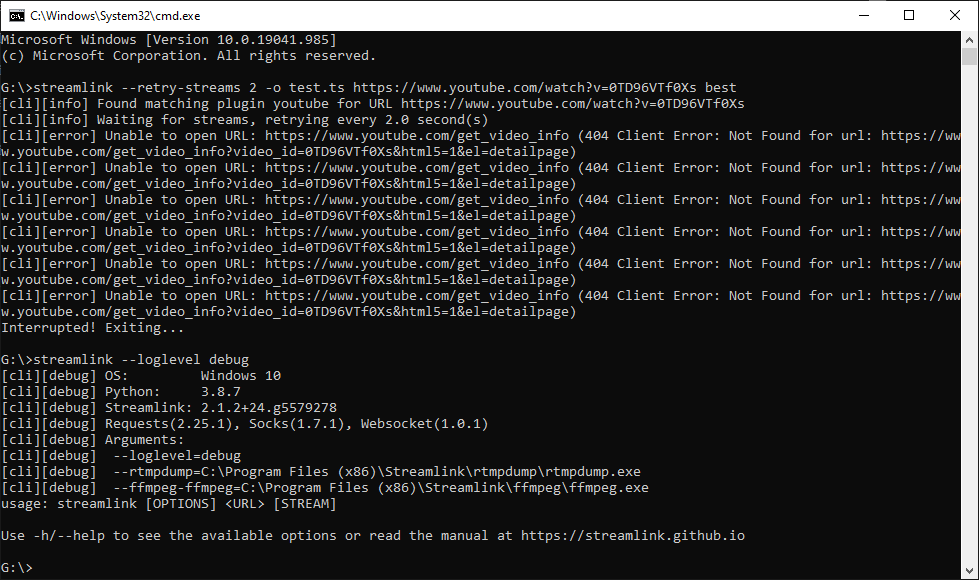
Please note this is something that I have been doing for months, with “–retry-streams” without problem until the first occurrence, which led to #3724 issue thread to be made and then a minor fix that worked for 2 weeks before the opening of this issue thread.
The command I am using for streamlink for streams to record is
streamlink --retry-streams 2 -o <filename>.ts <youtube link> <quality>
so for example with the Apple WWDC, it would be
streamlink --retry-streams 2 -o test.ts https://www.youtube.com/watch?v=0TD96VTf0Xs best
What is supposed to happen is that after retrying x amount of times in y amount of seconds, it is supposed to just eventually start recording and outputting the file when the stream does become live when it checks via the --retry-streams and that should be all it should be doing.
But instead after a certain period it will give the errors and ignore recording even after a stream goes live until the command is interrupted and tried again.
About this issue
- Original URL
- State: closed
- Created 3 years ago
- Comments: 17 (7 by maintainers)
https://github.com/streamlink/streamlink/issues/3779#issuecomment-860099900
Open the link in your web browser, open the dev-tools (F12), go the network tab, press ctrl+f, search for the cookie name, find any of the resulting HTTP requests and copy the cookie value from the HTTP headers field, which is in the format
cookie: key1=value1; key2=value2; ....@xanek, please stop adding the same comments over and over again.
The
--http-cookieoption does not take a cookies.txt file. It’s used as:--http-cookie cookie_name=cookie_value