storybook: "Show code" shows the code in wrong mode
Describe the bug After update from 6.4.x to 6.5.x “Show code” shows the code in “code” mode instead of “auto”. If click “reset controls” or change any value in controls then the source is shown in “auto” mode.
To Reproduce
- open story -> Docs
- click “Show code”
Result - “code”:
(args, { argTypes }) => ({
    props: Object.keys(argTypes),
    components: { badge: BadgeComponent },
    template: '<badge v-bind="$props">Text example</badge>',
})
Expected result - “auto”:
<template><badge>Text example</badge></template>
- Click “reset controls”
Result - source is changed to correct mode:
<template><badge>Text example</badge></template>
Additional context “@storybook/addon-a11y”: “^6.5.9”, “@storybook/addon-actions”: “^6.5.9”, “@storybook/addon-essentials”: “^6.5.9”, “@storybook/addon-links”: “^6.5.9”, “@storybook/addon-postcss”: “^2.0.0”, “@storybook/builder-webpack5”: “^6.5.9”, “@storybook/manager-webpack5”: “^6.5.9”, “@storybook/vue”: “^6.5.9”,
About this issue
- Original URL
- State: closed
- Created 2 years ago
- Reactions: 5
- Comments: 20 (2 by maintainers)
@Hanawa02 I am also using bootstrap-vue and have the same issue. One thing I noticed is that when passing
autotodocs.source.typestorybook previews the code as rendered output@oemer-sellwerk you’re missing the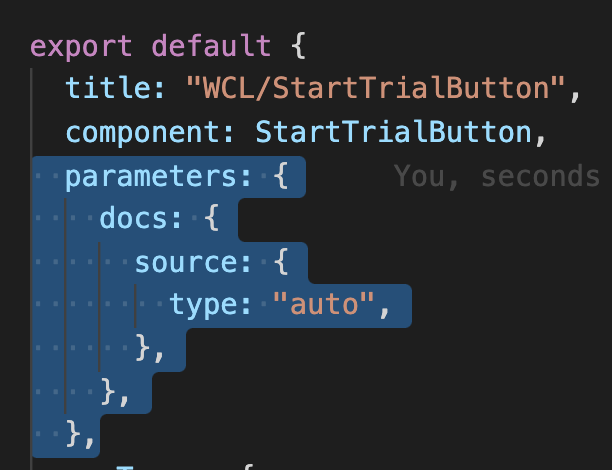
sourcein your story-file-level parameters:@jevgenigavrilov Thanks for pointing that out!
Sadly this is not working when I try to set it globally, only when I do it for individual stories, and that is not scalable 😢
Do you know if there is any trick to applying this to all stories?
I tried adding it to
parametersand also todecoratorsinpreview.jsSame problem after upgrading. any solution?