storybook: Proposition: show errors instead of warnings when story falls during its initialization before it has registered itself
It’s not actually a bug, but I think am not the only one who was faced with this problem. I’ve spent many hours on debugging, but finally I found where the problem was. I hope my experience will help other people.
Bug or support request summary
I was faced with the next problem:
- client-side manager app knows about all possible stories files (e.g. list of
*.stories.tsxfiles) - it
require-s them one by one - it’s supposed that they should be registered
- but when some of them fails during their initialization it doesn’t show any error
- instead it shows a warning (
_client.logger.warn) - many developers hide “warnings” by default, because typically it’s too verbose information
So when some story fails:
- the developer doesn’t see an error in the browser console
- he also doesn’t see any error in the terminal
- the only thing that he sees - there’s 1 less story in the stories tree
It may be too sophisticated to figure out that there’s a problem and how to solve it. I got into such a situation. It looks like everything is perfect, but you know that should be another one story. And you don’t know where to dig to find a problem.
Steps to reproduce
In my case it was the next problem:
- I use a custom webpack config
- One of my stories
imports a file that throws an error (bug in my app) - So the story fails with an error right after the storybook code
requires it - StoryBook client code ignores the story and doesn’t show any error
- But it shows a warning
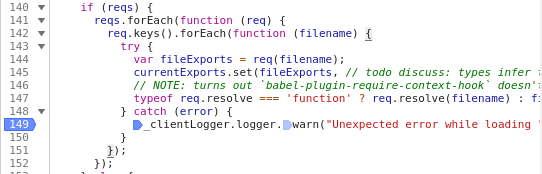
On the client side there’s this code ^. It caught the error. The error contains everything the developer needs to know about the problem and to solve it. But it may be hidden from him because the storybook preview app handles it like it’s a warning.
Please specify which version of Storybook and optionally any affected addons that you’re running
- @storybook/react 6.1.9
Work summary
I think there’re at least two possible improvements:
- replace
warnwitherror - or just make in configurable
In my humble opinion error is much better, because those errors are almost ever fatal or the like. But I may not know something important…
Also may be it’s not a bad idea to write something about possible important warnings in the documention in a chapter like “troubleshooting”. I tried to google how to troubleshoot storyview but wasn’t succced in it.
About this issue
- Original URL
- State: closed
- Created 4 years ago
- Reactions: 2
- Comments: 16 (8 by maintainers)
Please dont close unresolved issues
I reproduced the mini example: https://github.com/faiwer/storybook-13366
It’s pretty simple. There’re only 2 story-files:
./src/a.stories.tsx./src/b.stories.tsxEach of them has one story inside. But the 2nd file (
b) has animport './error'line. Thiserror.tsxthrows an error. I just immitated my real situation as simple as I could. Of course in the real world code there will be something more complicated than justthrow new Error.What do we have in result?
UI doesn’t have
bstory:Terminal doesn’t show any error: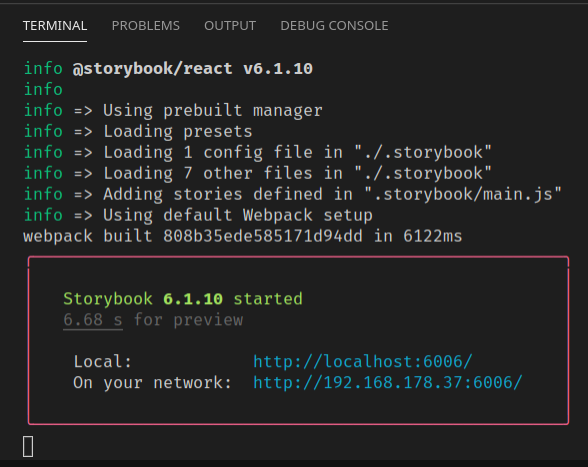
Chrome doesn’t show any error: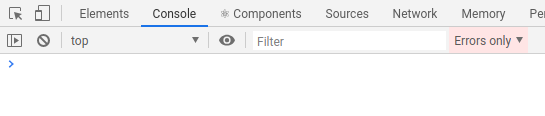
But there’s a problem. The story is not shown. And there’s no information about what was wrong with it. Hm…
But actually It is there: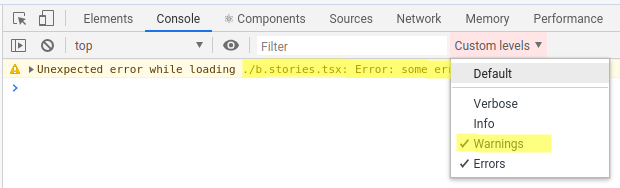
Why does it happen? Why does it show a warning instead of an error? Because of this code: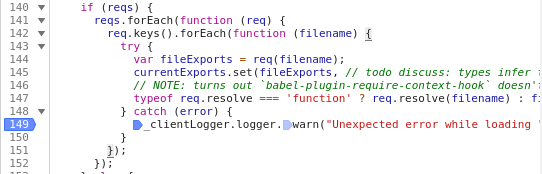
As you can see it deliberately shows a warning. Not an error.
Ok. But you may ask - what’s the problem? Warning is shown? Hm… I think there’re many developers who hides warnings in the applications because there’re too many irrelevant information:
And the problem is - when you don’t know that the error is in “warnings” section - you don’t have a clue how to debug this issue 😃
So my proposition is: just replace
.warnwith.error, at least because it’s an error 😃I’m confused. Is this a Storybook warning that you’d like to yield an error? Or just client-side log warnings in general? This looks like a very specific bug in your code, I’m not sure how Storybook would help you with that.