storybook: Controls not working
Describe the bug
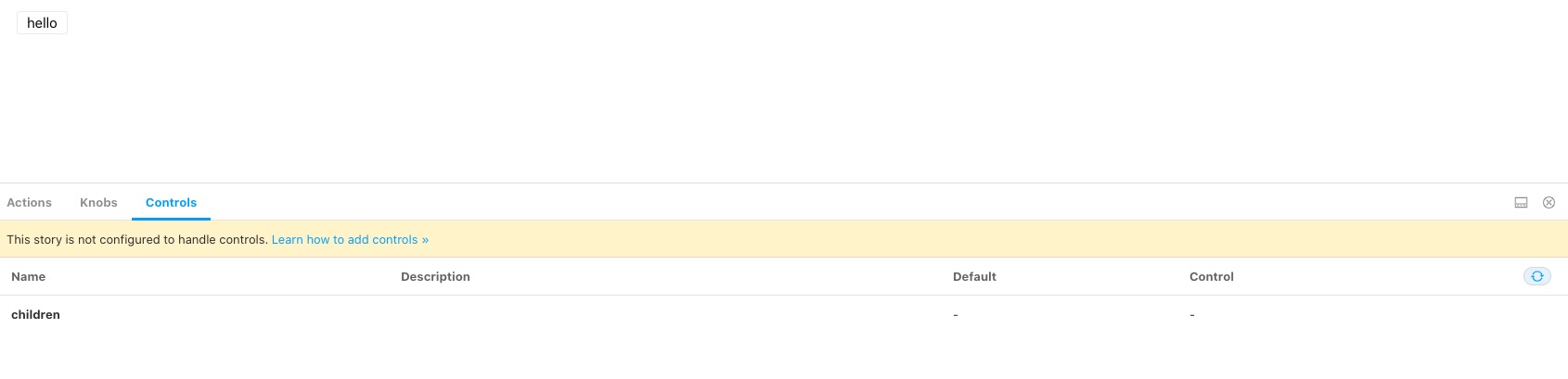
I followed the tutorial that is being described in this article. Controls tab is being displayed but there is a message saying that This story is not configured to handle controls. Learn how to add controls » and controls can’t be used.
To Reproduce Steps to reproduce the behavior:
- Create a story and paste the following code (same code provided in the tutorial)
import React from 'react'
import { Button } from '@storybook/react/demo';
export default { title: 'Button/Controls', component: Button };
export const Basic = (args: any) => <Button {...args} />;
Basic.args = { children: 'hello' };
Expected behavior Able to edit controls
Screenshots
Additional context
"@storybook/addon-actions": "^6.0.13",
    "@storybook/addon-controls": "^6.0.13",
    "@storybook/addon-knobs": "^6.0.13",
    "@storybook/addon-links": "^6.0.13",
    "@storybook/addons": "^6.0.13",
    "@storybook/preset-create-react-app": "^3.1.4",
    "@storybook/react": "^6.0.13",
About this issue
- Original URL
- State: closed
- Created 4 years ago
- Reactions: 9
- Comments: 35 (16 by maintainers)
Commits related to this issue
- Add repro for #12153 — committed to storybookjs/storybook by shilman 4 years ago
I am currently working with Gatsby + Storybook + Typescript and storybook is not auto-detecting controls for any of the components. eg-
But, everything starts working when I make the component into a named export, instead of a default export.
Thanks for replying! I was playing with this just now, and somehow got it to work by replacing:
with:
Even though the doc doesn’t say so. 🤯
Wow. I was banging my head against the wall, went through all the docs but stumbled upon your post. I’ve changed my code to:
and voila … it works.
Does anybody have any idea how to annotate Angular components for Storybook to pick up the fields on its own?
For me the problem is solved when I give my component a named export:
As the docs of
react-docgen-typescriptmention:Warning: only named exports are supported. If your project uses default exports, you still need to include named exports for react-docgen-typescript.So add a named export and you are good to go 👍
Thank you @shilman, excellent!
@astorije For historical reasons, the docs addon contains the code that does the auto-inference. So in 6.0 you’ll need to add that to get auto-generated controls. You can disable the docs tab if you don’t want it to be part of your UI.
You can also specify
argTypesby hand: https://github.com/storybookjs/storybook/blob/next/addons/controls/README.md#my-controls-arent-being-auto-generated-what-should-i-doIt’s not required to specify
.args–you typically use those to specify the initial value of the args in the stories, since each story will have different settings.Reverting back to 6.0.0 for playbook-react, addon-controls and addon-docs fixed the issue for me!
This currently works.