Steeltoe: Steeltoe.Extensions.Logging.SerilogDynamicLogger not working as expected
Describe the bug
I have a .net core 2.2 application which is deployed in PCF 2.4.12. Configured Serilog and enabled dynamic console to adjust the log levels without restarting the application. But unfortunately the number of loggers appearing PCF Apps Manager is just 1. Upon adjusting the levels, there is no effect.
Steps to reproduce
Steps to reproduce the behavior:
- Deploy https://github.com/SteeltoeOSS/Samples/tree/master/Management/src/AspDotNetCore/CloudFoundry after integrating Serilog.
- Configure Serilog dynamic console like below
public static void Main(string[] args)
        {
            var host = new WebHostBuilder()
                .UseKestrel()
                .UseCloudFoundryHosting()
                .UseContentRoot(Directory.GetCurrentDirectory())
                .UseIISIntegration()
                .UseStartup<Startup>()
                .ConfigureAppConfiguration((builderContext, config) =>
                {
                    config.SetBasePath(builderContext.HostingEnvironment.ContentRootPath)
                        .AddCommandLine(args)
                        .AddJsonFile("appsettings.json", optional: false, reloadOnChange: true)
                        .AddJsonFile($"appsettings.{builderContext.HostingEnvironment.EnvironmentName}.json", optional: true)
                        .AddCloudFoundry()
                        .AddEnvironmentVariables();
                })
                .UseSerilog((hostingContext, loggerConfiguration) => loggerConfiguration
                     .ReadFrom.Configuration(hostingContext.Configuration)
                     .WriteTo.Trace())
                .ConfigureLogging((builderContext, loggingBuilder) =>
                {
                    loggingBuilder.AddConfiguration(builderContext.Configuration.GetSection("Logging"));
                    loggingBuilder.AddDebug();
                    // Add Serilog Dynamic Logger
                    loggingBuilder.AddSerilogDynamicConsole();
                })
                .Build();

            host.RunWithTasks();
Expected behavior
Number of loggers appearing in PCF Apps Manager should be matching the typed ILogger<T> used in the application and upon the adjusting the log levels, log statements should appear accordingly.
Environment (please complete the following information):
- Platform: PCF 2.4.12
- OS: Linux
- .NET Version : .net core 2.2
- Steeltoe Version: 2.3.0
- Any other library versions to note
About this issue
- Original URL
- State: closed
- Created 5 years ago
- Comments: 25 (13 by maintainers)
@ani00763 yes, I can confirm this sample is having that issue both locally and on cf. let me investigate and get back.
@ani00763, I did download and push this to cloud foundry and it works fine for me. Make sure you are adjusting log levels for the correct namespace. For this sample you posted: search for DynamicSerilogTestingApi and adjust the controller log levels. In my case, I changed it from Trace to Error and then can only see error logs.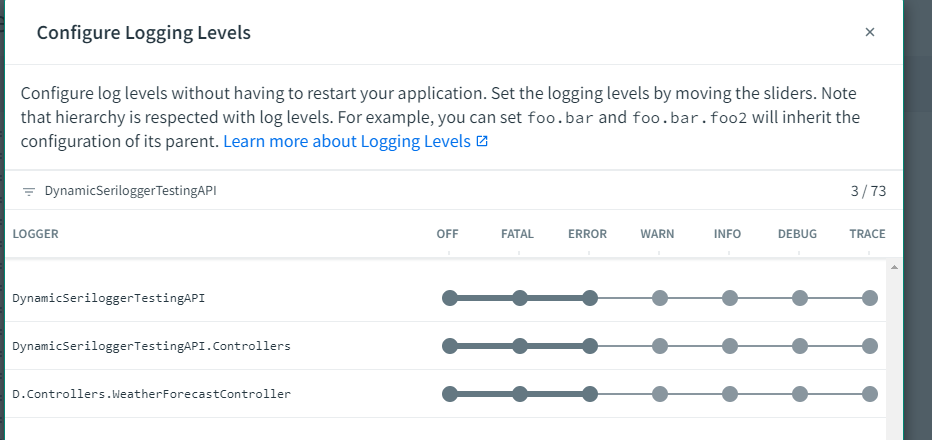
hey @sajanep I saw your response on SO. I will take a look. github.com/SteeltoeOSS/Samples/tree/master/Management/src/… with the changes mentioned in Program.cs above and put the Serilog configuration in appsettings.json like mentioned in my first post.