starship: Starship is slow within rust directories
Current Behavior
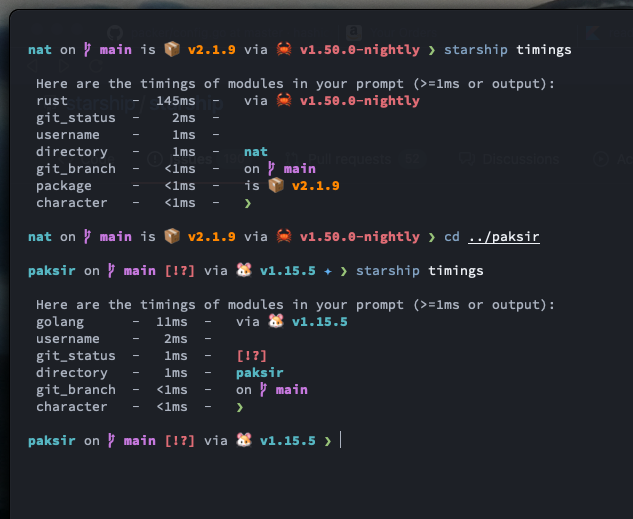
In rust project directories starship takes a considerably longer about of time to re-appear as the prompt.
Expected Behavior
I would expect starship to be just as fast as in other directories.
Additional context/Screenshots
Environment
- Starship version: 0.47.0
- fish version: fish, version 3.1.2
- Operating system: Mac OS 11.2.0
- Terminal emulator: Alacritty
Relevant Shell Configuration
#!/usr/bin/env fish
set fish_greeting ""

fish_vi_key_bindings
set fish_cursor_default line
set fish_cursor_insert line
set fish_cursor_replace_one underscore
set fish_cursor_visual block
set -U __done_min_cmd_duration 5000

alias :o='nvim'
alias git='hub'
alias :e='vim'
alias b='brew'
alias c='cargo'
alias ping='gping'
alias :q='exit'
alias ..="cd .."
alias ...="cd ../.."
alias ....="cd ../../.."
alias .....="cd ../../../.."
alias ......="cd ../../../../.."
alias brewup='brew update; brew upgrade; brew upgrade --cask; brew cleanup; brew doctor'
alias cat='bat'
alias nat='natls -lgn'
alias ls='nat'
alias l='ls -h'
alias wclock='watch -n1 "date '+%D%n%T'|figlet -k"'
alias vim='nvim'
alias vi='nvim'
alias v='nvim'
alias rm='trash'
alias brave='open -a "/Applications/Brave Browser Dev.app/"'

set -x PATH $HOME/bin /usr/local/sbin /usr/local/bin /usr/bin /bin /usr/sbin /sbin $HOME/.cargo/bin $HOME/.projects/bin $HOME/Library/Python/2.7/bin $HOME/.local/bin $HOME/go/bin /usr/local/texlive/2020/bin/x86_64-darwin /usr/local/opt/qt/bin /usr/local/opt/python@3.9/bin $HOME/.deno/bin
source $HOME/.cargo/env
thefuck --alias | source
[ -f /usr/local/share/autojump/autojump.fish ]; and source /usr/local/share/autojump/autojump.fish
set -q GHCUP_INSTALL_BASE_PREFIX[1]; or set GHCUP_INSTALL_BASE_PREFIX $HOME
test -f /Users/willlane/.ghcup/env ; and set -gx PATH $HOME/.cabal/bin /Users/willlane/.ghcup/bin $PATH
set -Ux EDITOR nvim
set -Ux VISUAL nvim
zoxide init fish | source
eval (opam env)
starship init fish | source
Starship Configuration
[line_break]
disabled = true

[aws]
disabled = true
About this issue
- Original URL
- State: closed
- Created 4 years ago
- Comments: 24 (13 by maintainers)
Adding this here so it doesn’t get lost
I’m not exactly sure why this works but my shell lag reduced significantly after adding a
./rust-toolchainfile with my version specified, so if you want to reduce shell lag this is something you can try. I don’t exactly understand what all this stuff means. I’m not a Rust developer so I don’t know what the./rust-toolchainfile does or what cargo is doing when it installs all those things or why the versions change to be Mac specific then back to generic after, but I do know that 34ms is noticeably better than 106ms. Not ideal (all other languages I use are <10ms) but better than nothing.@Rajendrasinh-AI Yeah I also have it disabled right now
Unfortunately I’m not aware of any other ways to query the version other than, say, reimplementing the version querying part in rustup.
And there doesn’t seem to be any prior art to get inspiration from, as the prompts are possibly the only existing program that needs fast output for version info.
But we may just ask the rustup devs and see if they have any better ideas.
Unfortunately, that’s not how starship is set up :\
Starship runs once every time the prompt is drawn. This is basically the only way that we know of to run starship without getting into particulars of daemonization of processes across many different platforms, but it also means that caching things between invocations gets a little tricky. It took a bit of hackery just to get per-session warnings working correctly.
In addition, I think there’s a concern with correctness in the case of rustup, because
exec_rustc_version()has to be run once per directory. I’m allowed to change the rustup toolchain in a directory viarustup override, so the rustc version that’s valid in one project may be wrong in another (e.g. right now I’m working through the CS3210 course at GATech, and I have to use 1.37-nightly for that, so in that directory, the version is 1.37.0-nightly and in my other directories, it’s the stable version).