spyder: Variable Explorer & Numba - Unable to retrieve the values . . .
Issue Report Checklist
- Searched the issues page for similar reports
- Read the relevant sections of the Spyder Troubleshooting Guide and followed its advice
- Reproduced the issue after updating with
conda update spyder(orpip, if not using Anaconda) - Could not reproduce inside
jupyter qtconsole(if console-related) - Tried basic troubleshooting (if a bug/error)
- Restarted Spyder
- Reset preferences with
spyder --reset - Reinstalled the latest version of Anaconda
- Tried the other applicable steps from the Troubleshooting Guide
- Completed the Problem Description, Steps to Reproduce and Version sections below
Problem Description
Hi Guys, using a numba-jit function inside a class method causes the “Spyder was unable to retrieve the value of this variable from the console. . . .” error when trying to view the class instance in the variable explorer.
What steps reproduce the problem?
Given the following code:
from numba import jit

class Testclass_1():
    def __init__(self):
        pass

    def using_nb_test(self, a):
        a = nb_test(a) # COMMENT THIS OUT TO SHOW NO ERROR
        print(a)


@jit(nopython=True)#, nogil=True, cache=True)
def nb_test(a):
    return a+1

if __name__ == '__main__':
    testclass_1 = Testclass_1()
    testclass_1.using_nb_test(1)
After executing this code (Run File), double clicking on testclass_1 in the Variable Explorer will show the error.
Additional info: The filepath is in the Pythonpath. Error confirmed on a second computer.
What is the expected output? What do you see instead?
I expect to see the class object information, like I see it when commenting out a = nb_test(a) # COMMENT THIS OUT TO SHOW NO ERROR. Instead I see the error.
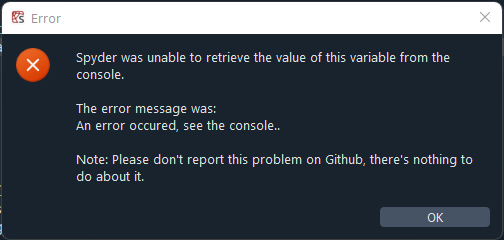
This error first occurred with an other, more complex class that I use in a project. But without making any changes, sometimes the error is shown and sometimes everything works fine. It’s like chasing ghosts, I could not figure out what really is the problem. But it seems like it has something to do with the numba function, that is used in one of the class methods, just like in the reduced example shown above. But that’s also the reason why I report this, even though the error message told me not to do it. It seems odd, that sometimes it works, and sometimes not.
Paste Traceback/Error Below (if applicable)
None
Versions
- Spyder version: 5.3.2
- Python version: 3.8.10 (using an external interpreter 3.9.12 in a virtualenv)
- Qt version: 5.15.2
- PyQt version: 5.15.7
- Operating System name/version: Windows 11 Home
Dependencies
# Mandatory:
atomicwrites >=1.2.0                 :  1.4.1 (OK)
chardet >=2.0.0                      :  5.0.0 (OK)
cloudpickle >=0.5.0                  :  2.1.0 (OK)
cookiecutter >=1.6.0                 :  2.1.1 (OK)
diff_match_patch >=20181111          :  20200713 (OK)
intervaltree                         :  None (OK)
IPython >=7.31.1;<8.0.0              :  7.34.0 (OK)
jedi >=0.17.2;<0.19.0                :  0.18.1 (OK)
jellyfish >=0.7                      :  0.9.0 (OK)
jsonschema >=3.2.0                   :  4.7.2 (OK)
keyring >=17.0.0                     :  23.6.0 (OK)
nbconvert >=4.0                      :  6.5.0 (OK)
numpydoc >=0.6.0                     :  1.4.0 (OK)
paramiko >=2.4.0                     :  2.11.0 (OK)
parso >=0.7.0;<0.9.0                 :  0.8.3 (OK)
pexpect >=4.4.0                      :  4.8.0 (OK)
pickleshare >=0.4                    :  0.7.5 (OK)
psutil >=5.3                         :  5.9.1 (OK)
pygments >=2.0                       :  2.12.0 (OK)
pylint >=2.5.0;<3.0                  :  2.14.4 (OK)
pyls_spyder >=0.4.0                  :  0.4.0 (OK)
pylsp >=1.5.0;<1.6.0                 :  1.5.0 (OK)
pylsp_black >=1.2.0                  :  1.2.1 (OK)
qdarkstyle >=3.0.2;<3.1.0            :  3.0.3 (OK)
qstylizer >=0.1.10                   :  0.2.1 (OK)
qtawesome >=1.0.2                    :  1.1.1 (OK)
qtconsole >=5.3.0;<5.4.0             :  5.3.1 (OK)
qtpy >=2.1.0                         :  2.1.0 (OK)
rtree >=0.9.7                        :  1.0.0 (OK)
setuptools >=49.6.0                  :  63.1.0 (OK)
sphinx >=0.6.6                       :  5.0.2 (OK)
spyder_kernels >=2.3.2;<2.4.0        :  2.3.2 (OK)
textdistance >=4.2.0                 :  4.3.0 (OK)
three_merge >=0.1.1                  :  0.1.1 (OK)
watchdog                             :  2.1.9 (OK)
zmq >=22.1.0                         :  23.2.0 (OK)

# Optional:
cython >=0.21                        :  0.29.30 (OK)
matplotlib >=3.0.0                   :  3.5.2 (OK)
numpy >=1.7                          :  1.22.4 (OK)
pandas >=1.1.1                       :  1.4.3 (OK)
scipy >=0.17.0                       :  1.8.1 (OK)
sympy >=0.7.3                        :  1.10.1 (OK)

# Spyder plugins:
spyder_terminal.terminalplugin 1.2.2 :  1.2.2 (OK)
PIP LIST
backcall          0.2.0
cloudpickle       2.1.0
colorama          0.4.5
debugpy           1.6.2
decorator         5.1.1
entrypoints       0.4
ipykernel         6.15.1
ipython           7.34.0
jedi              0.18.1
jupyter-client    7.3.4
jupyter-core      4.11.1
llvmlite          0.38.1
matplotlib-inline 0.1.3
nest-asyncio      1.5.5
numba             0.55.2
numpy             1.22.4
packaging         21.3
parso             0.8.3
pickleshare       0.7.5
pip               22.0.4
prompt-toolkit    3.0.30
psutil            5.9.1
Pygments          2.12.0
pyparsing         3.0.9
python-dateutil   2.8.2
pywin32           304
pyzmq             23.2.0
setuptools        62.1.0
six               1.16.0
spyder-kernels    2.3.2
tornado           6.2
traitlets         5.3.0
wcwidth           0.2.5
wheel             0.37.1
About this issue
- Original URL
- State: open
- Created 2 years ago
- Comments: 18 (10 by maintainers)
Ok, that sounds like a very interesting idea. For that I think we should simply import and run our UMR before users try to open a variable in the Variable Explorer.
However, given that that could impact Spyder’s stability (I don’t know how it could affect the running application under all possible circumstances), I think we should leave it for Spyder 6.
@mrclary, @ccordoba12, thanks for the explaination and outview
@Scoooooba, I can reproduce your issue. We do not implement a caching system for the variable explorer. However, this is what is happening:
cloudpickle) and received by the Variable Explorer.We are currently looking into features of
cloudpicklethat may mitigate issues related to inaccessible packages or modules. However, in your MWE, this is not the issue. Here, the issue is thatTestclassmodule is loaded into Spyder’s runtime environment and not replaced when the class is changed. You can see this without restarting Spyder and without restarting the IPython Console.Testclassfromsys.modulesYou can repeat the process after changing back
check = Falseand restore the inspection (and the spinner stops as well).This is not a practical work-around, by an means, but merely illustrates the mechanisms at play. This is Python’s standard treatment of imported modules: if it already exists in
sys.modulesit does not do anything.@ccordoba12 @dalthviz, as we endeavor to improve Variable Explorer, perhaps we should also consider leveraging or replicating the User Module Reloader for use with the Variable Explorer.
Thank you! Not having to install spyder multiple times (in each virtualenv) would be nice, but this workaround solves the problem for me 😃