spyder: Spyder not launching when Kite installation is faulty
Issue Report Checklist
- Searched the issues page for similar reports
- Read the relevant sections of the Spyder Troubleshooting Guide and followed its advice
- Reproduced the issue after updating with
conda update spyder(orpip, if not using Anaconda) - Could not reproduce inside
jupyter qtconsole(if console-related) - Tried basic troubleshooting (if a bug/error)
- Restarted Spyder
- Reset preferences with
spyder --reset - Reinstalled the latest version of Anaconda
- Tried the other applicable steps from the Troubleshooting Guide
- Completed the Problem Description, Steps to Reproduce and Version sections below
Problem Description
Spyder crashing upon startup.
I have just installed anaconda3 on this computer (a first time install), and updated anaconda and spyder to the newest versions. Initially it worked fine, but having forgotten numpy, I closed down, and installed it. When trying to open spyder4 again it would not work. I have restarted my pc, uninstalled and reinstalled anaconda and spyder a few times, and never have I gotten spyder to open again.
What steps reproduce the problem?
- Fresh install of conda from website (64-Bit Graphical Installer for python 3.7)
- In the conda prompt write
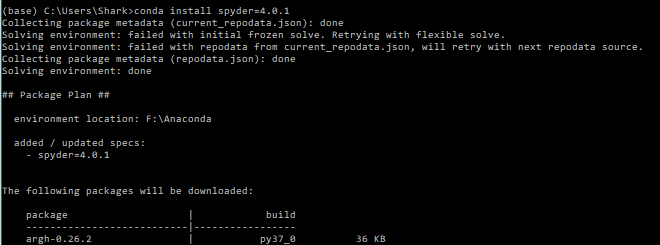
conda update anacondafollowed byconda install spyder=4.0.1(Note to 2: When updating anaconda it’ll post some debugging lines, and when installing spyder it’ll fail with initial frozen solve to solve the environment and commence debugging at the end - see screenshots for all) - Run
spyder --reset - Launch spyder
What is the expected output? What do you see instead?
Pops up with the traceback instead of opening spyder.
Paste Traceback/Error Below (if applicable)
Traceback (most recent call last):
File "F:\Anaconda\lib\site-packages\spyder\app\mainwindow.py", line 3718, in main
mainwindow = run_spyder(app, options, args)
File "F:\Anaconda\lib\site-packages\spyder\app\mainwindow.py", line 3559, in run_spyder
main.setup()
File "F:\Anaconda\lib\site-packages\spyder\app\mainwindow.py", line 960, in setup
self.completions.start()
File "F:\Anaconda\lib\site-packages\spyder\plugins\completion\plugin.py", line 292, in start
client_info['plugin'].start()
File "F:\Anaconda\lib\site-packages\spyder\plugins\completion\kite\plugin.py", line 141, in start
self.kite_process = run_program(path)
File "F:\Anaconda\lib\site-packages\spyder\utils\programs.py", line 214, in run_program
return subprocess.Popen(fullcmd, **subprocess_kwargs)
File "F:\Anaconda\lib\subprocess.py", line 775, in __init__
restore_signals, start_new_session)
File "F:\Anaconda\lib\subprocess.py", line 1178, in _execute_child
startupinfo)
OSError: [WinError 193] %1 is not a valid Win32 application
Versions
- Spyder version: 4.0.1
- Python version: 3.7.4 (also tried 3.7.6 with no change)
- Qt version: 5.9.7
- PyQt version: 5.9.2
- Operating System name/version: Windows 10
Dependencies
I'm assuming this is if spyder is launchable - which it isn't for me. (cannot find this)
Pictures of prompt window (from note to 2)


About this issue
- Original URL
- State: closed
- Created 7 years ago
- Comments: 16 (9 by maintainers)
Alright, thanks a lot. Spyder works again.
Definitely, please open a PR for that.
Alright, that fixed it. Thanks a lot, would’ve never found this on my own 😃
Okay, so it seems kite has made a folder on my machine with that path, however it doesn’t have an uninstaller. I get the same message when trying to install kite. I’ll try to manually remove the folder and check it (I’ll need to install a few things again as I reinstalled conda and used the 3.3.6 version of spyder)
When I first launched spyder (the time it worked) it asked if I wanted to install Kite, which I just accepted. The install failed and installer closed, and I thought nothing more of it. I cannot find kite using Window’s add/remove programs feature, so I don’t know if there are some files from it remaining from the failed install.
If you have Kite installed, please uninstall it. That should solve your problem.
@dalthviz, do you know what’s happening in this case?