spaceship-prompt: SPACESHIP_PROMPT_ADD_NEWLINE option does not work
Is there an existing issue for this?
- Yes, I have searched the existing issues
- Yes, I have checked troubleshooting page
The problem
The option SPACESHIP_PROMPT_ADD_NEWLINE is not working as it should be. When I set it to “true”, the terminal breaks in two lines.

Relevant Zsh configuration
SPACESHIP_PROMPT_ORDER=(
  user          # Username section
  dir           # Current directory section
  host          # Hostname section
  git           # Git section (git_branch + git_status)
  hg            # Mercurial section (hg_branch  + hg_status)
  exec_time     # Execution time
  line_sep      # Line break
  jobs          # Background jobs indicator
  exit_code     # Exit code section
  char          # Prompt character
)
SPACESHIP_USER_SHOW=always
SPACESHIP_PROMPT_ADD_NEWLINE=false
SPACESHIP_CHAR_SYMBOL="➜"
SPACESHIP_CHAR_SUFFIX=" "
SPACESHIP_PROMPT_SEPARATE_LINE=false
What is version of Spaceship are you using?
v4.2.0
What is version of Zsh are you using?
zsh 5.8.1 (x86_64-ubuntu-linux-gnu)
What operation system are you running?
Linux Ubuntu 22.04.1
Do you use any Zsh framework or plugin manager?
zinit
Which terminal emulator do you use?
GNOME Terminal
Additional information
No response
About this issue
- Original URL
- State: open
- Created 2 years ago
- Reactions: 2
- Comments: 16 (2 by maintainers)
@AlxndrPsclt Unfortunatly, for me it happens every time I start or clear the terminal.
It did not work. It’s still like the first screenshot =(
That’s weird I’m using Oh My Zsh version
50a526fand spaceship version4.6.1(both latest version) on myM1 Mac, using those exacts configs, and I am getting the new line after I clear the console (usingiTerm) The only workaround that is working for me is settingSPACESHIP_RPROMPT_ADD_NEWLINE=trueMaybe it is OS related?https://user-images.githubusercontent.com/53226883/199289546-a657798b-343f-4f06-b47d-0f8f874b0540.mov
I have the same bug. I reinstall omz and Spaceship, but the error isn’t fixed.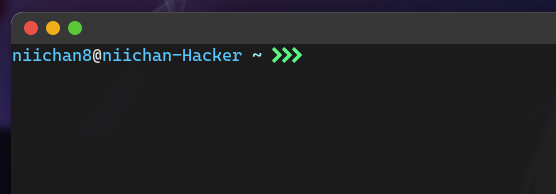
Yes, whenever I start or clear the terminal, the cursur bugs to new line like that
Hi, I encounter the same exact problem.
I’m not sure if this is really a ADD_NEWLINE problem; because this behaviour is only happenning for the FIRST prompt when open a terminal. After I execute a first command, the other lines are as expected. When I use tab to autocomplete something, the missing line appears.
The video makes it clearer.
Relevant Zsh configuration: SPACESHIP_PROMPT_ORDER=( user host dir git char)
SPACESHIP_PROMPT_ASYNC=false SPACESHIP_PROMPT_ADD_NEWLINE=false SPACESHIP_PROMPT_SEPARATE_LINE=false SPACESHIP_CHAR_SYMBOL=" ⚡" SPACESHIP_HOST_PREFIX=“@” SPACESHIP_DIR_PREFIX=“:” SPACESHIP_PROMPT_SUFFIXES_SHOW=false SPACESHIP_GIT_PREFIX=" on " SPACESHIP_DIR_TRUNC=4 SPACESHIP_DIR_SHOW=true SPACESHIP_HOST_SHOW=always SPACESHIP_USER_SHOW=always SPACESHIP_USER_COLOR=“blue”
What is version of Spaceship are you using? v4.2.6
What is version of Zsh are you using? zsh 5.8.1 (x86_64-alpine-linux-musl)
What operation system are you running? Alpine linux 3.16.2
Do you use any Zsh framework or plugin manager? oh-my-zsh
Which terminal emulator do you use? st
I’ll gladly help you with any other feedback that could be of use.