Masonry: v1.1.0 crash with UIView margins
New Issue Checklist
🚫 If this template is not filled out your issue will be closed with no comment. 🚫
- I have looked at the Documentation
- I have filled out this issue template.
Issue Info
| Info | Value |
|---|---|
| Platform | ios |
| Platform Version | 9.X & 10.X |
| Masonry Version | 1.1.0 |
| Integration Method | cocoapods |
Issue Description
Crash: -[UIView mas_bottomMargin]: unrecognized selector sent to instance 0x7fe34460a6a0
Possibly other margin methods too.
Worked with Masonry v1.0.2
Edit:
[UIView mas_bottomMargin] was working with Masonry 1.0.2 in XCodes 8.3.3 (8E3004b) and 9.0 (9A235), tested in devices and simulators iOS 9.X and 10.X.
Using Masonry v1.1.0 crashes with unrecognized selector, in any of the XCodes and simulators mentioned above, even after Project -> clean + clean build folder + manually deleting derived data.
I’m using MAS_SHORTHAND_GLOBALS
A quick difference I see is in View+MASAdditions.h, when defining mas_xxxMargin, its within conditional block:
- Masonry v1.0.2:
#if TARGET_OS_IPHONE || TARGET_OS_TV - Masonry v1.1.0:
#if (__IPHONE_OS_VERSION_MIN_REQUIRED >= 80000) || (__TV_OS_VERSION_MIN_REQUIRED >= 9000)
My application’s __IPHONE_OS_VERSION_MIN_REQUIRED is 90000
Edit 2:
I downloaded the repo and ran the Example project’s Margins example and it did not crash.
I then decided to create a simple test project to try and reproduce the crash and I was able to.
My test project consisted of a Podfile with only Masonry 1.1.0 pod:
platform :ios, '9.0'

target 'test' do
  pod 'Masonry', '1.1.0'
end
My project’s deployment target was 9.0 (and afterwards tested with 10.3), a single view controller with this code:
#import <Masonry/Masonry.h>

...

- (void)viewDidLoad {
    [super viewDidLoad];
    // Do any additional setup after loading the view, typically from a nib.

    UIView *tmp = [[UIView alloc] init];
    tmp.backgroundColor = [UIColor blueColor];
    [self.view addSubview:tmp];
    [tmp mas_makeConstraints:^(MASConstraintMaker *make) {

        make.left.right.equalTo(self.view);
        make.height.equalTo(@20);
        make.bottom.equalTo(tmp.superview.mas_bottomMargin);
    }];
}
Crash:
2017-09-21 12:52:31.898 test[47946:212235] *** Terminating app due to uncaught exception 'NSInvalidArgumentException', reason: '-[UIView mas_bottomMargin]: unrecognized selector sent to instance 0x7ffcdda05420'
*** First throw call stack:
(
	0   CoreFoundation                      0x000000010b0c4b0b __exceptionPreprocess + 171
	1   libobjc.A.dylib                     0x000000010ab29141 objc_exception_throw + 48
	2   CoreFoundation                      0x000000010b134134 -[NSObject(NSObject) doesNotRecognizeSelector:] + 132
	3   CoreFoundation                      0x000000010b04b840 ___forwarding___ + 1024
	4   CoreFoundation                      0x000000010b04b3b8 _CF_forwarding_prep_0 + 120
	5   test                                0x0000000108ca5940 __29-[ViewController viewDidLoad]_block_invoke + 608
	6   test                                0x0000000108cb7ada -[UIView(MASAdditions) mas_makeConstraints:] + 138
...
Edit 3: Sample project: test.zip
Edit 4:
As @robertjpayne said, use_frameworks! could be used as workaround if you are able to (which isn’t my case).
I’ve researched a bit more and found that, even though my Podfile states I target iOS 9, each individual pod has its own deployment target. I checked the Masonry pod and found it is targeting iOS 6, leading to the crash. My workaround was setting each pod minimum deployment target equal to my project’s with a post install hook as such:
post_install do |installer|
  installer.pods_project.targets.each do |target|
    target.build_configurations.each do |config|
      config.build_settings['IPHONEOS_DEPLOYMENT_TARGET'] = '9.0'
    end
  end
end
Reference: https://stackoverflow.com/a/37289688/1077288
About this issue
- Original URL
- State: open
- Created 7 years ago
- Reactions: 6
- Comments: 43 (16 by maintainers)
by command “pod install --verbose”, I find cocoapods install masonry with 6.0 which decided in Masonry.podspec
so click Pods->Masonry, search “deployment target” in “Build Settings”, check if it is 6.0, and choose version you want
@robertjpayne “ios deployment_target” was set to “6.0”, so __IPHONE_OS_VERSION_MIN_REQUIRED equals to 60000, mas_leftMargin、mas_rightMargin were not implemented, but they were declared 😂
I don’t think this is an issue related cocoapods, the cocoapods uses the main app project’s deployment target when running
pod installat the first time only, AFAIK. However, this library’s deployment target is iOS 6.0 in the podspec file, then the precompiler should support all the above iOS systems. The margins (leftMarginsandbottomMargin) is supported on iOS 8 only, those symbols shouldn’t be occurred in the main project code which has an iOS 6/7 deployment target. It should be a kind of compiling error there.The new introduced macros in 1.1.0 get the hint.
#if TARGET_OS_IPHONE || TARGET_OS_TV@robertjpayne
@robertjpayne the test project is working now when using the master branch, tested in XCode 9 on iOS 10 & 11. Though I have warnings about some enumerations in masonry being partial (I don’t recall if they are new or not)
I notice there is a Waring for my project after pods install, Xcode 10 will automatically change iOS deployment target to the right one.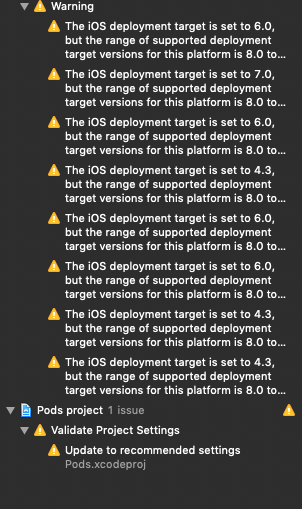
@robertjpayne when adding files to project, i take no error. But podding it cause ‘unrecognized selector sent to instance xxx’.
xcode 8.3.3 build the lasted version will cash when use XXXMargin . so i don’t think so it’s a weird xcode issuse.