skeleton: typescript errors when assigning `class` attribute to LightSwitch
Current Behavior
LightSwitch seems to support adding custom classes
$: classesBase = `${cTrack} ${$$props.class ?? ''}`;
Steps To Reproduce
<LightSwitch class="top-10 right-10 absolute hover:ring-secondary-500-400-token" />
The above works, however, since the props don’t declare the class prop it leads to a type error
Error: Type 'string' is not assignable to type 'never'. (ts)
Anything else?
No response
About this issue
- Original URL
- State: closed
- Created 4 years ago
- Comments: 23 (23 by maintainers)
@AgarwalPragy Here’s the thing though - you’re the only one of thousands of folks to use Skeleton to report this issue. I know for a fact the LightSwitch is used fairly regularly. You can scan for it in the “Use By” projects and see it exists on the majority of projects. So if this was a common issue it would be occurring for everyone.
There’s something about your setup that’s treating things differently so we’ll need to investigate to find out the solution. But modifying the code for everyone to solve an issue that (at present) resides with one user is far from ideal.
We’ll continue troubleshooting with you to get to the bottom of this, but I want to make it clear that right now you’re an outlier, not the norm. So until we can figure out why, we will not be implementing any particular change. This is a common troubleshooting scenario, so we’ll continue forward until we figure out what’s up.
If you can answer the couple items below, this will help with our debugging process:
FYI I’m just coming online for the day, so I haven’t had a chance to try your reproduction yet. But I will asap and report back.
umm… this seems to be automagically fixed? 🤣
Both Skeleton and Sveltekit have received updates. Not sure which contributed to the fix. Still, since it is no longer an issue, I’m closing it 👍
@AgarwalPragy @niktek Sorry for the delay, it’s been a busy week. I’ve finally had a chance to return to this. Here’s my findings.
Using Agarwal’s repro in the main branch or
with-eslintbranches I am seeing the class error on the LightSwitch:Viewing the
LightSwitch.svelte.d.tsI see the following, note that[x: string]: never;is present:However, testing another CLI project generate on my computer, I get different results. No error with class, the the
d.tsfile shows typeany:So nothing really new to add here, other than I can reproduce this error with Agarwal’s repro, but not with a newly generated CLI app. Until we can find out the reason this type differs we’re roadblocked unfortunately.
But, given we now know the issue is introduced as initialization of the project, I’ve created a zip of a CLI project generated locally on my machine. Feel free to use this as a temporary starting point for new projects until we figure this out. This is based on v0.92.2.
skeleton-0-92-2.zip
We have a new release dropping on Tuesday of next week - if nothing else maybe give that a shot? I’ll sync with Nik to see if we can come up with any other ideas. Sorry for the issues!
No that’s the problem - the code that you quoted about the indexer:
makes zero sense as that would be about using component as
<ComponentName>[someprop]- which is not the case, it has nothing to do with the class prop.Ok, we are on Mac mini’s - there is something definitely needs to be investigate so that we are at least ware of what is going on. Will report back when I’ve done so.
I think something else is going on here. I did a new app via CLI with TS enabled and have the following in my +page.svelte:
Running svelte-check returns 0 errors for me: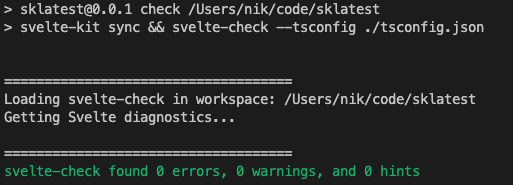
Any chance you’re running a TS nightly VS Code extension, or some other global TS config is creeping into your project ? Can you show your package.json? (Actually it won’t be package.json as you said you created it from CLI). Maybe list your VSCode extensions ?