MagiskOnEmulator: Unable to produce a successfull Magisk install on AVD Manager created emulators
I’m running Windows 10.
I’ve tried using the Pixel 3a XL emulator with the following API/Targets:
- API: 30 Target: Android 11.0 (Google APIs) x86
- API 29 Target: Android 10 (Google APIs) x86
Following the steps in the read me to install the Canary build results in the following:
A fully working emulator with Magisk Manager installed, but Magisk not installed.
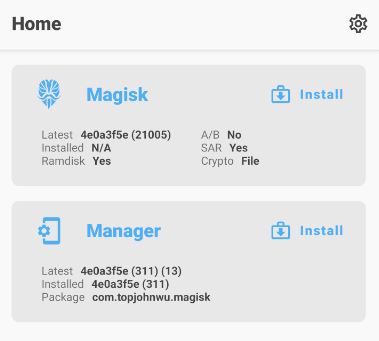
This isn’t Canary specific from what I can tell. I haven’t been able to succeed when not using the canary flag.
My expectation of this script is to run ./path.bat canary on a the fresh ramdisk.img and end up with a fully rooted android emulator w/ Magisk installed and Magisk Manager.
Is this the goal of the script? Is that what the expected behavior should be, or is it possible that I am missing a step?
Also, thank you guys for working on this project! This process has always been an absolute pain in the ass. I appreciate it!
EDIT: I just ran through the ReadMe again on a Pixel 3a XL Android 11.0 API 30 x86 emulator and ended up with the same result. I’ve went through the process probably 15 times now and haven’t ended up with a successful install.
Best wishes!
About this issue
- Original URL
- State: closed
- Created 4 years ago
- Reactions: 1
- Comments: 30 (16 by maintainers)
I have just actually done it 😃. finally. Magisk and EdXposed installed .
Normally you shouldn’t perform any other steps other than the ones documented to have magisk working. It’s better to open a separate issue and provide as much info as you can, to further look into the issue.