serverless: Environment variables are not defined using SSM
I’m trying to use SSM to populate the environment variables, but for some reason it only works when I run the function locally. When the lambda runs on AWS, the process.env doesn’t have the added variables.
I’m following the docs: https://www.serverless.com/framework/docs/providers/aws/guide/variables/#reference-variables-using-the-ssm-parameter-store Also this blog post: https://www.serverless.com/blog/serverless-secrets-api-keys
serverless.yml
# NOTE: update this with your service name
service: my-service

# Create an optimized package for our functions
package:
  individually: true

plugins:
  - serverless-bundle # Package our functions with Webpack
  - serverless-offline

variablesResolutionMode: 20210326 # It enables complete support for "ssm" variables resolution
provider:
  name: aws
  runtime: nodejs14.x
  stage: prod
  region: us-east-1
  lambdaHashingVersion: 20201221
  iam:
    role:
      statements:
        - Effect: 'Allow'
          Action:
            - ssm:GetParameter
          Resource:
            Fn::Join:
              - ':'
              - - arn:aws:ssm
                - Ref: AWS::Region
                - Ref: AWS::AccountId
                - /my-path/my-path-env/*

functions:
  sendPrompts:
    handler: records/service.sendPromptMessages
    environment:
      API_URL: ${ssm:/my-path/my-path-env/API_URL}
      STREAM_CHAT_API_KEY: ${ssm:/my-path/my-path-env/STREAM_CHAT_API_KEY}
      STREAM_CHAT_SECRET_KEY: ${ssm:/my-path/my-path-env/STREAM_CHAT_SECRET_KEY}
      SENDBIRD_APP_ID: ${ssm:/my-path/my-path-env/SENDBIRD_APP_ID}
      SENDBIRD_API_TOKEN: ${ssm:/my-path/my-path-env/SENDBIRD_API_TOKEN}
      SENTRY_DSN: ${ssm:/my-path/my-path-env/SENTRY_DSN}
    events:
      - schedule:
          rate: cron(0 20 * * ? *)
          description: 'Cron Every afternoon at 1pm PST every day'
process.env content running the function locally output
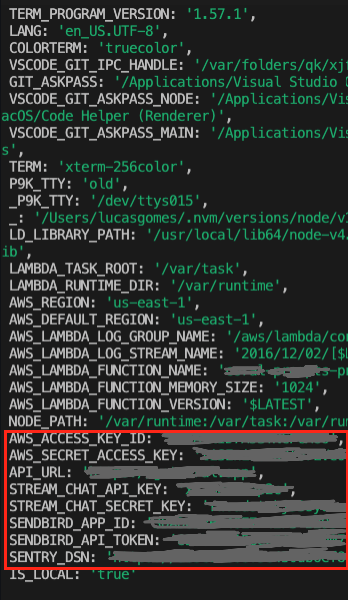
process.env content running the function on AWS output

Installed version
Framework Core: 2.49.0
Plugin: 5.4.3
SDK: 4.2.3
Components: 3.12.0
About this issue
- Original URL
- State: closed
- Created 3 years ago
- Comments: 18 (7 by maintainers)
@Lucasdsk you might want to update your serveless.yml with the latest update you have made; I believe you have also tried with - /my-path/my-path-env/* and it didn’t work either