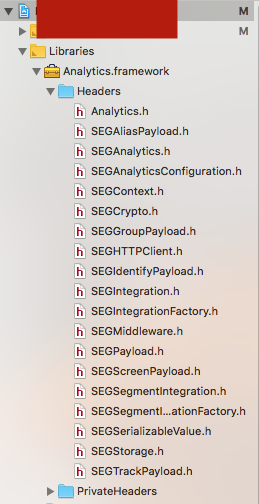
analytics-react-native: 'Analytics/SEGAnalytics.h' file not found
When following the React Native install instructions, I get a error
'Analytics/SEGAnalytics.h' file not found
About this issue
- Original URL
- State: closed
- Created 6 years ago
- Comments: 20 (9 by maintainers)
ok, so some further updates on this: a better way is simply to add the analytics-ios lib next to the analytics-react-native one.
I have this in my package.json:
and then I dragged & drop the
node_modules/@segment/analytics-ios/Analytics.xcodeprojproject next to the RNAnalytics oneand then, you don’t need to have the hardcoded .framework in your project anymore because analytics-ios lib will actually make it as a target. you just need to make sure that Analytics.framework is in Embedded Binaries.
BTW, I recommend to do this instead of what the current README point to (the github releases binaries) because these binaries actually don’t work with XCode 10, you will have bad surprise when you try to Archive your app and send to Testflight.
hope this helps
@fathyb the problem is the Framework Search Paths. this fixes the problem:
Analytics.frameworktoRNAnalytics’sBuilding Settings: intoFramework Search Pathsyour put$(SRCROOT)/../../../../iosRNAnalytics’sBuild Phasesyou add aCopy Filesphase where you putAnalytics.framework(basically you can drag and drop the one underRNAnalytics/Frameworkson Xcode) and make sure you have selected “Frameworks” in Destination and clear the Subpath field.Analytics.frameworkunderLink Binary With BinariesofRNAnalytics)thx to @KhalilBellakrid
Sorry for the confusion @caroaguilar! We’ve improved support for users using iOS manually and added E2E tests in
0.0.1-beta.3, could you try it out? It’s based on @gre’s comment (thanks for that!). Be sure to follow the migrations instructions.Please let us know if you’re still experiencing any issues.
Thanks a lot for your time and reply.
For anyone wondering the fix above also works for Carthage (which is lot closer to a manual install than the automatic install CocoaPods offers)
@gre 's Second comment fixed the issue for me minus the first part about including the package in my package.json, since Carthage already fetches the Analytics project. I just had to drag the
Analytics.xcodeprojfrom myCarthage/Checkouts/analytics-ios/directory into XCode Libraries at the same level asRNAnalytics.xcodeprojCheers!
I am getting error when adding the GitHub ref to the package:
npm ERR! premature close? I am also not upgrading, this if just from installing the beta3 fresh.I have tried to use the CocoaPods way as well, and it does not build either.
@gre’s second solution worked, thanks
This is happening to me too. I’m not using Cocoapods, I followed the steps to add segment manually.