rust-analyzer: rust-analyzer failed to load workspace
Using Visual Studio Code Insiders, version:
Version: 1.42.0-insider
Commit: 536757fcc0308b444cbe9ce04f1f013903641ae3
Date: 2020-02-05T16:51:11.916Z
Electron: 6.1.6
Chrome: 76.0.3809.146
Node.js: 12.4.0
V8: 7.6.303.31-electron.0
OS: Linux x64 5.5.2-arch1-1
I have no other extensions installed but rust-analyzer.
I installed rust-analyzer following docs/user/README.md, but when opening any folder or adding it to workspace, it fails with the following error:
rust-analyzer failed to load workspace: No such file or directory (os error 2)
and with information:
workspace loaded, 0 rust packages
This happens with extension and ra_lsp_server build from master and when downloaded from Github releases.
There’s no messages in output.
Rust Analyzer: Status shows:
no workspaces

analysis:
2 (8kb) files
0 (0b) symbols
1 trees, 1 retained
0 trees, 0 retained (macros)


memory:
0b allocated 0b resident
gc 110 seconds ago

requests:
*   1 textDocument/codeAction             5ms
    2 rust-analyzer/inlayHints            1ms
    4 textDocument/documentSymbol         3ms
    3 rust-analyzer/decorationsRequest    6ms
    5 textDocument/codeLens               3ms
    6 textDocument/hover                  0ms
    7 codeLens/resolve                    0ms
    8 textDocument/hover                  0ms
    9 textDocument/codeAction             0ms
   11 rust-analyzer/inlayHints            1ms
I also tried to use latest stable Visual Studio Code, but with no result there either.
I’m using fish-shell, this is my $PATH:
/home/kyu/bin /home/kyu/sys/bin /home/kyu/sys/local/bin /usr/local/sbin
 /usr/local/bin /usr/bin /usr/bin/site_perl /usr/bin/vendor_perl /usr/bin/core_perl
ra_lsp_server is located in /home/kyu/sys/local/bin
(Please, don’t ask why do I have such a weird folder structutre. I’m ashamed of it myself enough.)
About this issue
- Original URL
- State: closed
- Created 4 years ago
- Comments: 42 (10 by maintainers)
@aodhneine I would advise against leaving comments like “no one cares about this issue anymore”. Most people who work on rust-analyzer care a lot about it working great, but at the same time the amount of effort one needs to put in to make this happen far outweighs the available resources.
This in general applies to all open source and closed source projects: inferring that the issue does not get “enough” attention due to the lack of care is not really right (most time the issue is available time) and not really helpful (as it, to put it bluntly, makes the maintainers feel bad).
Thank you for the response! I was really tired and frustrated after three days of no one responding, but I think that letting my frustration out here was inappropiate, and I’m sorry for that.
Nevertheless, I hope that this bug report will help to improve such an awesome project (I used to use it few months ago without issues) and that it’ll be resolved quickly. Feel free to ask if there’s something I can help with.
I still didn’t have resolved the problem, but it seems like no one cares about this issue anymore.
I encountered the same issue, but I managed to resolve it. Here’s how I tackled it:
The directory structure of my worktree is as follows:
Within the
.vscodefolder, there is asettings.jsonfile that contains the following data:As you can observe, I don’t have a
./challenges/Cargo.tomlfile because I initially created that folder as a library usingcargo new --liband later deleted it. This is why the incorrect path exists.To resolve the issue, I simply modified the configuration to make rust-analyzer work again:
Thanks DrSensor! Didn’t try your solution but I did reproduce this issue by opening VSCode from Windows OS instead of from WSL2.
Opening Code from WSL2 terminal “code .” avoids the issue. Bottom left corner of VSCode will show if you’re connected.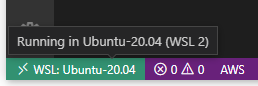
I have a similar error:
I am working inside a dev container, and cargo is installed under “$HOME/.cargo” also present in $PATH.+ I attached the Output of Rust Analyzer Client as well. Rust Analyzer Client Output.txt
Okay, thanks everyone for spending your time trying to fix this. ❤️
Still got the same error:
I also have Windows 10 as host, and Fedora Linux as remote (for develop machine). Using vscode remote feature. And I’m using asdf-vm as rust’s version control.
which cargowill show~/.asdf/shims/cargoas binary path.cargocan be ran in the zsh shell bycargo --version, and it showscargo 1.54.0 (5ae8d74b3 2021-06-22)Trace log: rust-analyzer_cargo-not-exists.txt
Is rust-analyzer running inside or outside the container? Can you get the environment variables of rust-analyzer to check if
~/.cargo/binis indeed inPATH. (egcat /proc/$pid/environ | tr '\0' '\n'where pid is the pid of rust-analyzer as seen inside the container if you run it inside the container or as seen outside the container if you run it outside. In the latter case you may need to run it as root.)@sanket1729 I recommend you to open
Output > Rust Analyzer Clientand if presentOutput > Rust Analyzer Language Server(withoutTrace) and send these logs to us next time you see something weird. And turning this on should also help us:I think I resolved the issue. But I have no idea what happened or how I solved it. I cannot reproduce the bug anymore on my computer.
I just reinstalled the rust one more time using
rustup-init.shand for some reason everything worked correctly.Regardless of this, thank you for the bug report ❤️ ! It is helpful.