rss-bridge: [Instagram] Bridge returned error 500! (18430)
Update 2: A solution has been found thanks to RawkBob! https://github.com/RSS-Bridge/rss-bridge/issues/1617#issuecomment-646679996
This error began fewer than 24 hours ago. I’m running RSS-Bridge on Heroku, then accessing the feed using Feedly.
Below, I have redacted the Instagram username of the users (because I don’t want to reveal who I am following), but the error occurs for multiple, but not all, ALL my Instagram feeds. I have noticed that even if I get this error once for a certain username, I will not necessarily get this error again a second time for that same username. Update: This error now consistently occurs for all my Instagram feeds.
Here is the error message shown in the feed in Feedly:
USERNAME_REDACTED - Instagram Bridge was unable to receive or process the remote website's content!
Error message: `Unable to find username in search result.`
Query string: `action=display&bridge=Instagram&context=Username&u=USERNAME_REDACTED&media_type=all&format=Atom`
Version: `dev.2020-02-26`

    Press Return to check your input parameters
    Press F5 to retry
    Check if this issue was already reported on GitHub (give it a thumbs-up)
    Open a GitHub Issue if this error persists

pauder
Needless to say, the Instagram username does, and has always, existed.
I checked my app logs in Heroku and this is what I see:
app[web.1]: [17-Jun-2020 12:26:43 UTC] PHP Notice:  Trying to get property 'users' of non-object in /app/bridges/InstagramBridge.php on line 67

app[web.1]: [17-Jun-2020 12:26:43 UTC] PHP Warning:  Invalid argument supplied for foreach() in /app/bridges/InstagramBridge.php on line 67

app[web.1]: [17-Jun-2020 12:26:43 UTC] Exception: Unable to find username in search result. in /app/lib/error.php:24

app[web.1]: Stack trace:

app[web.1]: #0 /app/lib/error.php(42): returnError()

app[web.1]: #1 /app/bridges/InstagramBridge.php(73): returnServerError()

app[web.1]: #2 /app/bridges/InstagramBridge.php(228): InstagramBridge->getInstagramUserId()

app[web.1]: #3 /app/bridges/InstagramBridge.php(84): InstagramBridge->getInstagramJSON()

app[web.1]: #4 /app/actions/DisplayAction.php(134): InstagramBridge->collectData()

app[web.1]: #5 /app/index.php(38): DisplayAction->execute()

app[web.1]: #6 {main}
What do you think?
About this issue
- Original URL
- State: closed
- Created 4 years ago
- Reactions: 12
- Comments: 37 (9 by maintainers)
Only the user feed appears to be blocked, the hashtag one still works(?), i haven’t used location
This workaround fixed the user feed for me:-
Put the user id in he username box, or change the bridge url from the username to the user id
e.g. if you wanted an rss feed of the instagram account
you would use
?action=display&bridge=Instagram&context=Username&u=25025320&media_type=all&format=Htmlinstead of
?action=display&bridge=Instagram&context=Username&u=instagram&media_type=all&format=HtmlTo get the user id just visit the profile page in your browser with
?__a=1at the end of the url, theprofilePage_nnnnn is where you get the ide.g. https://www.instagram.com/instagram/?__a=1 and you’ll see
{"logging_page_id":"profilePage_25025320","show_suggested_profiles":true,"show_follow_dialog":false,"graphql":..........Awesome, it works! I added a link to your solution in OP.
I also found another way to get the Instagram user id: Go to any profile and look at the source. Search for
"id":(double quotation mark, id, double quotation mark, colon). The number will appear next to the first"id":match. (Don’t confuse the user id number with an Instagram post id number, which is a 19-digit number also found in the source. The user id number is much shorter.)Now comes the hard part. Redoing all my feeds to replace the username with the user id…
…and hoping Instagram doesn’t block this solution. 😅
According to https://github.com/cloudrac3r/bibliogram/issues/77#issuecomment-642800410, since June 1st Instagram has started blocking Tor, VPNs, proxy services, and cloud hosting providers. Other than running rss-bridge locally, I can’t see a way around the blocking.
This error now occurs consistently for all my Instagram feeds. I’ve updated my first post with this info.
Instagram Bridge is completely broken.
Closing as duplicate of https://github.com/RSS-Bridge/rss-bridge/issues/1891 Instance admins can try this workaround: https://github.com/RSS-Bridge/rss-bridge/issues/1891#issuecomment-816668065 If you don’t have instagram account and you don’t wish to create it - use my instance https://feed.eugenemolotov.ru
Thank you for sharing this discovery. This would explain why teddybeermaniac and gurify can run Instagram Bridge on their PCs without a problem.
Oh no. I’m afraid I’m not very tech savvy and wouldn’t know the first thing about how to do this. The only reason I’m able to use RSS Bridge with Heroku is thanks to the wiki. If running it locally is truly the only solution, I hope some kind soul would be able to add laymen’s instructions to the wiki.
I experienced the same issue, and for some reason, Instagram returns a login page instead of JSON for the search URL generated by the bridge. But it happens only on my server, on my computer it works.
I checked it using wget: Server: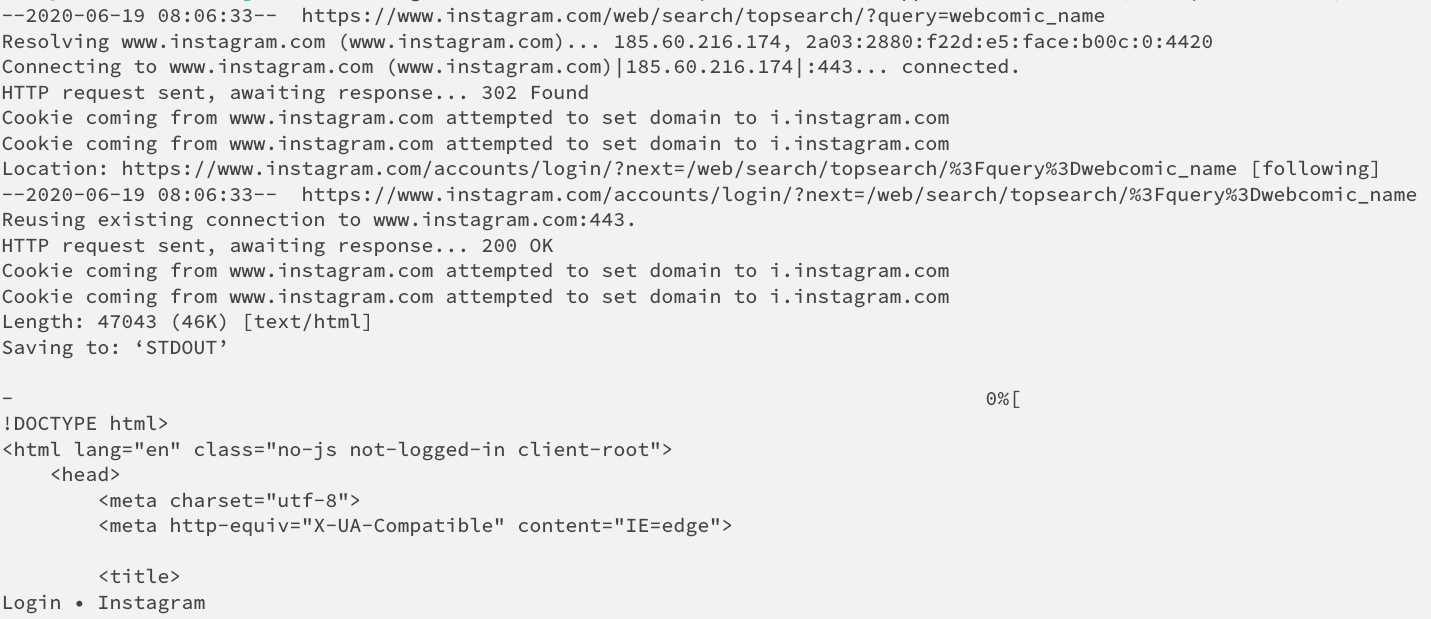 My PC:
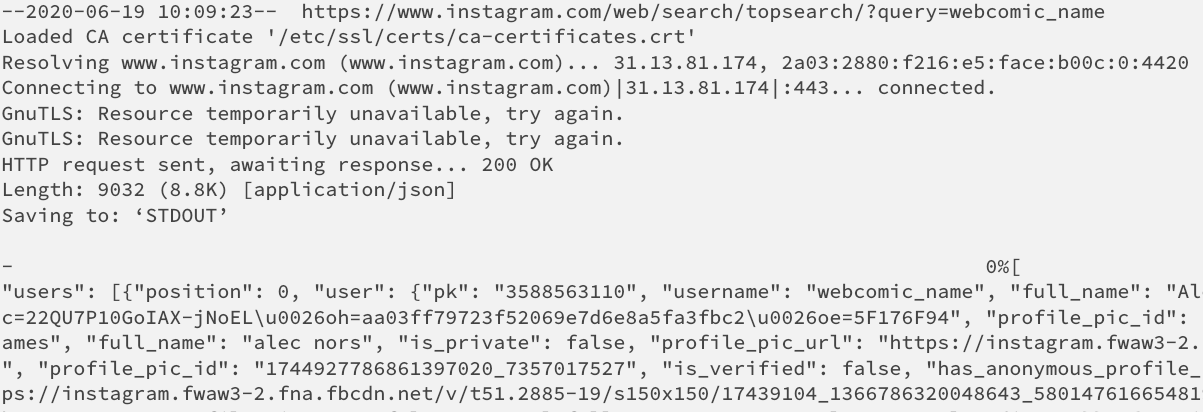
Maybe they introduced some IP-based rate limiting? Also I noticed, that instagram.com resolves to different IPs on the server and on the PC.