rook: rook-ceph-crash-collector-keyring secret not found after node restart
- I installer rook-ceph cluster on 3 node k8s cluster and verified the installation
- After that i stopped the VMs and the restarted on next day
Deviation from expected behavior:
-
I found that “rook-ceph-crashcollector” pods are stuck in Init state forever
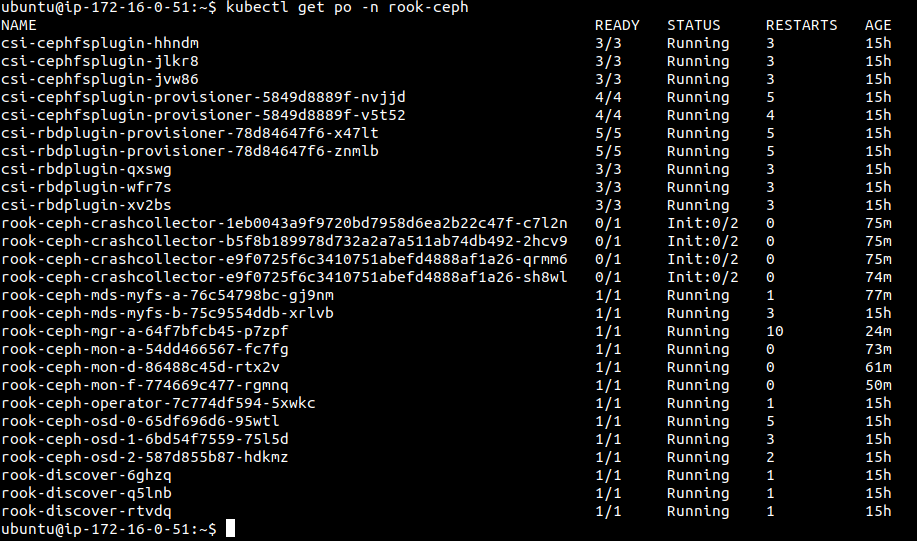
-
when i described that pod i found below logs: Events: Type Reason Age From Message
Warning FailedMount 6m8s (x31 over 74m) kubelet, ip-172-16-0-113.us-east-2.compute.internal Unable to mount volumes for pod “rook-ceph-crashcollector-1eb0043a9f9720bd7958d6ea2b22c47f-c7l2n_rook-ceph(8b80417f-743d-42be-ad47-8c15598bde84)”: timeout expired waiting for volumes to attach or mount for pod “rook-ceph”/“rook-ceph-crashcollector-1eb0043a9f9720bd7958d6ea2b22c47f-c7l2n”. list of unmounted volumes=[rook-ceph-crash-collector-keyring]. list of unattached volumes=[rook-config-override rook-ceph-log rook-ceph-crash rook-ceph-crash-collector-keyring default-token-l2hsq] Warning FailedMount 55s (x45 over 76m) kubelet, ip-172-16-0-113.us-east-2.compute.internal MountVolume.SetUp failed for volume “rook-ceph-crash-collector-keyring” : secret “rook-ceph-crash-collector-keyring” not found
-
I checked secrets in rook-ceph namespaces, i dint find secret with name “rook-ceph-crash-collector-keyring”
Expected behavior: all pods should be in running state even after rebooting/restarting the nodes
How to reproduce it (minimal and precise):
- install rook-ceph cluster on top of 3 node k8s cluster with replicas 3
- shutdown all 3 node
- start all the node
Environment:
- OS (e.g. from /etc/os-release): Ubuntu 18.04
- Kernel (e.g.
uname -a): Linux ip-172-16-0-51.us-east-2.compute.internal 4.15.0-1058-aws #60-Ubuntu SMP Wed Jan 15 22:35:20 UTC 2020 x86_64 x86_64 x86_64 GNU/Linux - Cloud provider or hardware configuration: AWS Normal ubuntu instances with t2.2xlarge
- Rook version (use
rook versioninside of a Rook Pod): rook: v1.2.3; go: go1.11 - Storage backend version (e.g. for ceph do
ceph -v): ceph version 14.2.6 (f0aa067ac7a02ee46ea48aa26c6e298b5ea272e9) nautilus (stable) - Kubernetes version (use
kubectl version): Kubernetes v1.15.3 - Kubernetes cluster type (e.g. Tectonic, GKE, OpenShift): community kubernetes
About this issue
- Original URL
- State: closed
- Created 4 years ago
- Comments: 20 (7 by maintainers)
@leseb Sure, here you go: #6922
maybe clock synchronization,check date on all machine.