ROCm: [Issue]: VAE decode defaults to FP32 causing driver timeout above 1024 pixel with default MIOPEN_FIND_MODE
Problem Description
There is a persistent issue where the VAE decode stage of any ComfyUI workflow will use outsided VRAM compared to other modules and cause black screen, driver timeout, system crashes.
I can get most other nodes to run and accelerate fine, VAE encode, KSampler, CLIP, and even GGUF models in the latest version of ComfyUI now work in Q4 to Q8 quantization, but fixing the VAE decode has been elusive.
I’m using Adrenaline 25.5.1 but it’s an issue that was present in previous versions of Adrenaline as well. I’m using ROCm 6.3.4
I suspect it has something to do with ROCm defaulting to FP32 while the models themselves should be BF16, causing an enormous VRAM overhead. EDIT: I’m not sure it’s a FP32/VRAM issue. In mode 3 it fails while well under VRAM limit.
I have been investigating the issue for a while
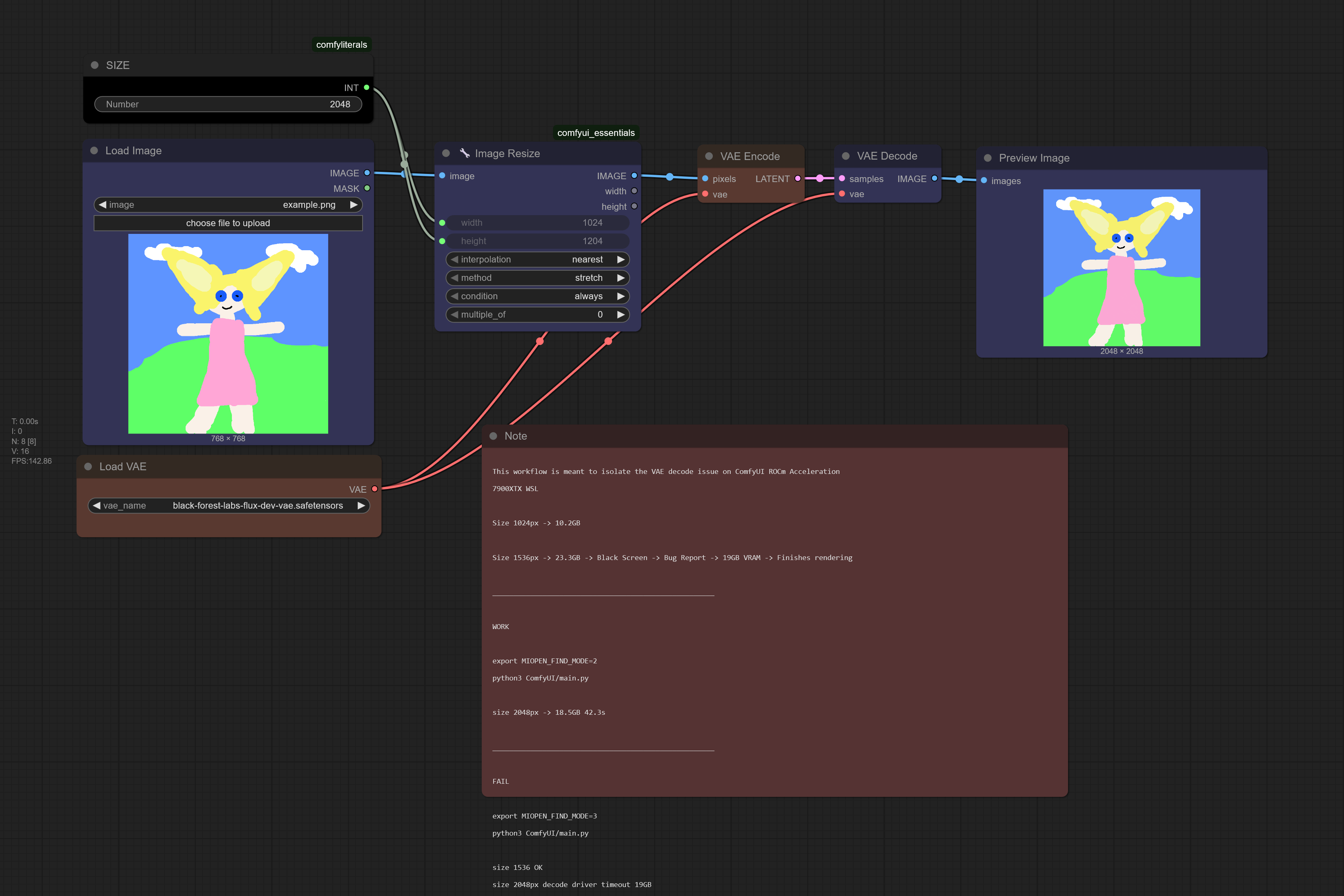
Default MIOPEN_FIND_MODE (5?) FAIL
soraka@TowerOfBabel:~$ python3 ComfyUI/main.py
Behaviour:
- 1024px both VAE encode and VAE decode work fine
- 1536px VAE encode works fine.
- 1536px VAE decode causes a driver timeout at 1536px filling the 24GB VRAM buffer
MIOPEN_FIND_MODE=2 WORKS
Someone online suggested exporting a variable before executing ComfyUI
soraka@TowerOfBabel:~$ export MIOPEN_FIND_MODE=2
soraka@TowerOfBabel:~$ python3 ComfyUI/main.py
Behaviour:
- 1536px both VAE encode and VAE decode work fine using around 13GB VRAM
- 2048px both VAE encode and VAE decode work fine using around 18GB VRAM
MIOPEN_FIND_MODE=3 FAIL
This morning I tried mode 3, it fails, but in a different way from the default
soraka@TowerOfBabel:~$ export MIOPEN_FIND_MODE=3
soraka@TowerOfBabel:~$ python3 ComfyUI/main.py
Behaviour:
- 1536px both VAE encode and VAE decode work fine
- 2048px VAE encode works fine.
- 2048px VAE decode causes a driver timeout while using 16GB VRAM
I read documentation about this flag
It seems to change the way it finds the acceleration. The default seems mode 5? Mode 2 doesn’t cause driver crashes. It seems to suggest worse performance, but I found no performance degradation so far, and other workflows seem to still work fine so far.
EDIT: It does seem somewhat slower E.g. 80s->90s but it’s hard to tell for sure. There is lots of variance involved in running ComfyUI.
I don’t really understand how HIP and ROCm do the acceleration, so I’m not sure why mode 5 causes issues with VAE decode, while mode 2 doesn’t, so I opened a bug report with all the information I collected up to this point, hoping for it to be of some use in case it’s a misbehaviour of mode 5, or the underlying issue is somewhere else.
Operating System
22.04.5 LTS (Jammy Jellyfish)
CPU
13th Gen Intel® Core™ i7-13700F
GPU
AMD Radeon RX 7900 XTX
ROCm Version
rocm6.3.4
ROCm Component
No response
Steps to Reproduce
No response
(Optional for Linux users) Output of /opt/rocm/bin/rocminfo --support
soraka@TowerOfBabel:~$ rocminfo WSL environment detected.
HSA System Attributes
Runtime Version: 1.1 Runtime Ext Version: 1.6 System Timestamp Freq.: 1000.000000MHz Sig. Max Wait Duration: 18446744073709551615 (0xFFFFFFFFFFFFFFFF) (timestamp count) Machine Model: LARGE System Endianness: LITTLE Mwaitx: DISABLED DMAbuf Support: YES
========== HSA Agents
Agent 1
Name: 13th Gen Intel® Core™ i7-13700F Uuid: CPU-XX Marketing Name: 13th Gen Intel® Core™ i7-13700F Vendor Name: CPU Feature: None specified Profile: FULL_PROFILE Float Round Mode: NEAR Max Queue Number: 0(0x0) Queue Min Size: 0(0x0) Queue Max Size: 0(0x0) Queue Type: MULTI Node: 0 Device Type: CPU Cache Info: L1: 49152(0xc000) KB Chip ID: 0(0x0) Cacheline Size: 64(0x40) Internal Node ID: 0 Compute Unit: 24 SIMDs per CU: 0 Shader Engines: 0 Shader Arrs. per Eng.: 0 Memory Properties: Features: None Pool Info: Pool 1 Segment: GLOBAL; FLAGS: FINE GRAINED Size: 32779776(0x1f42e00) KB Allocatable: TRUE Alloc Granule: 4KB Alloc Recommended Granule:4KB Alloc Alignment: 4KB Accessible by all: TRUE Pool 2 Segment: GLOBAL; FLAGS: EXTENDED FINE GRAINED Size: 32779776(0x1f42e00) KB Allocatable: TRUE Alloc Granule: 4KB Alloc Recommended Granule:4KB Alloc Alignment: 4KB Accessible by all: TRUE Pool 3 Segment: GLOBAL; FLAGS: KERNARG, FINE GRAINED Size: 32779776(0x1f42e00) KB Allocatable: TRUE Alloc Granule: 4KB Alloc Recommended Granule:4KB Alloc Alignment: 4KB Accessible by all: TRUE Pool 4 Segment: GLOBAL; FLAGS: COARSE GRAINED Size: 32779776(0x1f42e00) KB Allocatable: TRUE Alloc Granule: 4KB Alloc Recommended Granule:4KB Alloc Alignment: 4KB Accessible by all: TRUE ISA Info:
Agent 2
Name: gfx1100 Marketing Name: AMD Radeon RX 7900 XTX Vendor Name: AMD Feature: KERNEL_DISPATCH Profile: BASE_PROFILE Float Round Mode: NEAR Max Queue Number: 128(0x80) Queue Min Size: 64(0x40) Queue Max Size: 131072(0x20000) Queue Type: MULTI Node: 1 Device Type: GPU Cache Info: L1: 32(0x20) KB L2: 6144(0x1800) KB L3: 98304(0x18000) KB Chip ID: 29772(0x744c) Cacheline Size: 64(0x40) Max Clock Freq. (MHz): 2482000 Internal Node ID: 1 Compute Unit: 96 SIMDs per CU: 2 Shader Engines: 6 Shader Arrs. per Eng.: 2 Coherent Host Access: FALSE Memory Properties: Features: KERNEL_DISPATCH Fast F16 Operation: TRUE Wavefront Size: 32(0x20) Workgroup Max Size: 1024(0x400) Workgroup Max Size per Dimension: x 1024(0x400) y 1024(0x400) z 1024(0x400) Max Waves Per CU: 32(0x20) Max Work-item Per CU: 1024(0x400) Grid Max Size: 4294967295(0xffffffff) Grid Max Size per Dimension: x 4294967295(0xffffffff) y 4294967295(0xffffffff) z 4294967295(0xffffffff) Max fbarriers/Workgrp: 32 Packet Processor uCode:: 542 SDMA engine uCode:: 24 IOMMU Support:: None Pool Info: Pool 1 Segment: GLOBAL; FLAGS: COARSE GRAINED Size: 25101988(0x17f06a4) KB Allocatable: TRUE Alloc Granule: 4KB Alloc Recommended Granule:2048KB Alloc Alignment: 4KB Accessible by all: FALSE Pool 2 Segment: GLOBAL; FLAGS: EXTENDED FINE GRAINED Size: 25101988(0x17f06a4) KB Allocatable: TRUE Alloc Granule: 4KB Alloc Recommended Granule:2048KB Alloc Alignment: 4KB Accessible by all: FALSE Pool 3 Segment: GROUP Size: 64(0x40) KB Allocatable: FALSE Alloc Granule: 0KB Alloc Recommended Granule:0KB Alloc Alignment: 0KB Accessible by all: FALSE ISA Info: ISA 1 Name: amdgcn-amd-amdhsa–gfx1100 Machine Models: HSA_MACHINE_MODEL_LARGE Profiles: HSA_PROFILE_BASE Default Rounding Mode: NEAR Default Rounding Mode: NEAR Fast f16: TRUE Workgroup Max Size: 1024(0x400) Workgroup Max Size per Dimension: x 1024(0x400) y 1024(0x400) z 1024(0x400) Grid Max Size: 4294967295(0xffffffff) Grid Max Size per Dimension: x 4294967295(0xffffffff) y 4294967295(0xffffffff) z 4294967295(0xffffffff) FBarrier Max Size: 32 *** Done *** soraka@TowerOfBabel:~$ python3 -m torch.utils.collect_env /usr/lib/python3.10/runpy.py:126: RuntimeWarning: ‘torch.utils.collect_env’ found in sys.modules after import of package ‘torch.utils’, but prior to execution of ‘torch.utils.collect_env’; this may result in unpredictable behaviour warn(RuntimeWarning(msg)) Collecting environment information… /home/soraka/.local/lib/python3.10/site-packages/torch/cuda/init.py:645: UserWarning: Can’t initialize amdsmi - Error code: 34 warnings.warn(f"Can’t initialize amdsmi - Error code: {e.err_code}") PyTorch version: 2.4.0+rocm6.3.4.git7cecbf6d Is debug build: False CUDA used to build PyTorch: N/A ROCM used to build PyTorch: 6.3.42134-a9a80e791
OS: Ubuntu 22.04.5 LTS (x86_64) GCC version: (Ubuntu 11.4.0-1ubuntu1~22.04) 11.4.0 Clang version: Could not collect CMake version: Could not collect Libc version: glibc-2.35
Python version: 3.10.12 (main, Feb 4 2025, 14:57:36) [GCC 11.4.0] (64-bit runtime) Python platform: Linux-5.15.167.4-microsoft-standard-WSL2-x86_64-with-glibc2.35 Is CUDA available: True CUDA runtime version: Could not collect CUDA_MODULE_LOADING set to: LAZY GPU models and configuration: AMD Radeon RX 7900 XTX (gfx1100) Nvidia driver version: Could not collect cuDNN version: Could not collect HIP runtime version: 6.3.42134 MIOpen runtime version: 3.3.0 Is XNNPACK available: True
CPU: Architecture: x86_64 CPU op-mode(s): 32-bit, 64-bit Address sizes: 39 bits physical, 48 bits virtual Byte Order: Little Endian CPU(s): 24 On-line CPU(s) list: 0-23 Vendor ID: GenuineIntel Model name: 13th Gen Intel® Core™ i7-13700F CPU family: 6 Model: 183 Thread(s) per core: 2 Core(s) per socket: 12 Socket(s): 1 Stepping: 1 BogoMIPS: 4224.01 Flags: fpu vme de pse tsc msr pae mce cx8 apic sep mtrr pge mca cmov pat pse36 clflush mmx fxsr sse sse2 ss ht syscall nx pdpe1gb rdtscp lm constant_tsc rep_good nopl xtopology tsc_reliable nonstop_tsc cpuid pni pclmulqdq vmx ssse3 fma cx16 pcid sse4_1 sse4_2 x2apic movbe popcnt tsc_deadline_timer aes xsave avx f16c rdrand hypervisor lahf_lm abm 3dnowprefetch invpcid_single ssbd ibrs ibpb stibp ibrs_enhanced tpr_shadow vnmi ept vpid ept_ad fsgsbase tsc_adjust bmi1 avx2 smep bmi2 erms invpcid rdseed adx smap clflushopt clwb sha_ni xsaveopt xsavec xgetbv1 xsaves avx_vnni umip waitpkg gfni vaes vpclmulqdq rdpid movdiri movdir64b fsrm md_clear serialize flush_l1d arch_capabilities Virtualization: VT-x Hypervisor vendor: Microsoft Virtualization type: full L1d cache: 576 KiB (12 instances) L1i cache: 384 KiB (12 instances) L2 cache: 24 MiB (12 instances) L3 cache: 30 MiB (1 instance) Vulnerability Gather data sampling: Not affected Vulnerability Itlb multihit: Not affected Vulnerability L1tf: Not affected Vulnerability Mds: Not affected Vulnerability Meltdown: Not affected Vulnerability Mmio stale data: Not affected Vulnerability Reg file data sampling: Mitigation; Clear Register File Vulnerability Retbleed: Mitigation; Enhanced IBRS Vulnerability Spec rstack overflow: Not affected Vulnerability Spec store bypass: Mitigation; Speculative Store Bypass disabled via prctl and seccomp Vulnerability Spectre v1: Mitigation; usercopy/swapgs barriers and __user pointer sanitization Vulnerability Spectre v2: Mitigation; Enhanced / Automatic IBRS; IBPB conditional; RSB filling; PBRSB-eIBRS SW sequence; BHI BHI_DIS_S Vulnerability Srbds: Not affected Vulnerability Tsx async abort: Not affected
Versions of relevant libraries: [pip3] alias-free-torch==0.0.6 [pip3] clip-anytorch==2.6.0 [pip3] dctorch==0.1.2 [pip3] ema-pytorch==0.7.7 [pip3] kokoro-onnx==0.4.2 [pip3] mypy-extensions==1.0.0 [pip3] numpy==1.26.4 [pip3] onnxruntime==1.21.1 [pip3] pytorch-triton-rocm==3.0.0+rocm6.3.4.git75cc27c2 [pip3] torch==2.4.0+rocm6.3.4.git7cecbf6d [pip3] torch-stoi==0.2.3 [pip3] torch-time-stretch==1.0.3 [pip3] torchaudio==2.4.0+rocm6.3.4.git69d40773 [pip3] torchdiffeq==0.2.5 [pip3] torchsde==0.2.6 [pip3] torchvision==0.19.0+rocm6.3.4.gitfab84886 [pip3] triton==3.2.0 [conda] Could not collect
About this issue
- Original URL
- State: open
- Created 2 years ago
- Comments: 21
Commits related to this issue
- Test MIOPEN_FIND_MODE=2 (fail). issue: https://github.com/ROCm/ROCm/issues/4729 — committed to OrsoEric/HOWTO-ComfyUI by OrsoEric 2 years ago
@OrsoEric it doesn’t seem like the naive conv is being used in either case. So
MIOPEN_DEBUG_CONV_DIRECT_NAIVE_CONV_FWD=0has no effect here. MIOPEN_FIND_MODE=2 must be the difference maker.No change. The spike in the graph is the VAE Decode with SDXL at 1024x1024 with BF16. Using offload so that usage is only the VAE, UNet and Text Encoders are not in the GPU VRAM in VAE Decode.
Default:
With MIOPEN_DEBUG_CONV_DIRECT_NAIVE_CONV_FWD=0 :
You don’t need big models to reproduce this, this happens on SDXL and other models too.
VAE decode at 1024x1024 with BF16 tries to use 16 GB VRAM meanwhile FP16 uses 2 GB and FP32 uses 4 GB. BF16 VRAM usage is insanely high and the speed is slower than both FP32 and FP16.
This is with PyTorch 2.7 on SDNext. Using RX 7900 XTX on Arch Linux.
I’ll try friday, I’ll be busy diffusing today and I need it to work. Replicating the OOM on VAE decode is really easy.
I have had a regression in performance with the python 3.12 binaries. I’ll also try with a VENV with the python 3.10 binaries. Hidream takes around 260s which is way too much.
It does not work, it’s the same issue I have with ROCm 6.3.4. With ROcm 6.3 I get driver timeout on VAE decode above 1024px
For sanity I checked with ROCm 6.3.4 with MIOPEN_FIND_MODE=2 and it works, so I am sure the new UV portable environment at least doesn’t cause regression. I am using Python 3.12 wheels this time around with Python 3.12 portable, I didn’t touch the Python 3.10 that Ubuntu 22 uses internally.
As additional check I tried MIOPEN_FIND_MODE=2 on ROCm 6.3 and it works too! the behaviour is very similar between ROCm 6.3.4 and ROCm 6.3
Tests:
Installation ROCm 6.3 WSL
In order to make ROCm binaries work under WSL I need to remember to delete
libhsa-runtime64.so*after downgrading. With UV, installation works a lot better, compared to bare pip.Workflow
Minimal VAE encode decode bug workflow
ROCm 6.3 WSL with default MIOPEN_FIND_MODE 1536px (FAIL)
FAIL DRIVER TIMEOUT on VAE decode
ROCm version
Launch command
ROCm 6.3 WSL with MIOPEN_FIND_MODE=2 2048px (SUCCESS)
FAIL DRIVER TIMEOUT on VAE decode
ROCm version
Launch command
ROCm 6.3.4 WSL with default MIOPEN_FIND_MODE 2048px (FAIL)
FAIL DRIVER TIMEOUT on VAE decode
ROCm version
Launch command
ROCm 6.3.4 WSL with default MIOPEN_FIND_MODE=2 2048px (SUCCESS)
SUCCESS 18GB used
Launch command
So it’s working on rocm 6.3?
I can freely remove torch torchaudio torchvision then install stable+rocm6.3 or nightly+6.4 without any issue.
I see this: Python executable: /usr/bin/python3
Don’t do that. Never use the system python. Always use a virtualenv. That is why it broke.
Do this
Hi @OrsoEric, this is very likely related to https://github.com/ROCm/ROCm/issues/4119. We are aware of this issue and already working on a fix.
I tried rocm 6.4 with comfy. There is some kind of regression here. Even using PYTORCH_HIP_ALLOC_CONF=expandable_segments:True python main.py --use-split-cross-attention --fp16-vae causes oom. vram suddenly spikes and the vae takes a long time more often than not (300+ seconds). While rocm 6.3 uses fp32 vae and the entire image finishes in 55 seconds.
I recommend not using the pytorch rocm 6.4 nightly. Use this one pip3 install torch torchvision torchaudio --index-url https://download.pytorch.org/whl/rocm6.3