DynamixelSDK: [Python][XL320][OpenCM9.04][Raspberry Pi Zero] Problems using OpenCM9.04 as Serial passthrough
- Which DYNAMIXEL SDK version do you use?
- 3.7.51
- Which programming language/tool do you use?
- Python 2.7
- Which operating system do you use?
- Raspbian 10 Buster
- Which USB serial converter do you use?
- OpenCM9.04
- Which DYNAMIXEL do you use?
- XL320
-
Have you searched the issue from the closed issue threads? yes, I haven’t been able to find anyone with the same idea as me.
-
Please describe the issue in detail Hi, I have a Robotis Mini (XL320 servos) robot running an OpenCM9.04 board. I saw in the OpenCM9.04 documentation that the serial pins for the communication with the Dynamixel servos can be accessed using pin 11 and 12 on the board. I am running ROS Melodic on a Raspberry Pi Zero W running Raspbian 10 (Buster) and I thought it would be nice to control the servos using the raspberry Pi Zero W instead of the OpenCM9.04 board (using python = no compiling = quicker development). I have connected the Serial pins from the Pi to the Dynamixel serial pins 11 and 12 on the OpenCM9.04 (I do use a level shifter to step up/down the serial voltage). I have been able to send/receive normal data to/from both controllers. When I try the Dynamixel SDK read_write.py script (or any other script from the SDK python protocol 1.0 directory) it tells me it successfully opened the port and changed the baudrate but no status packets are received…
pi@raspberrypi:~/DynamixelSDK/python/tests/protocol1_0 $ python read_write.py
Succeeded to open the port
Succeeded to change the baudrate
[TxRxResult] There is no status packet!
Press any key to continue! (or press ESC to quit!)
- How can we reproduce the issue?
Hardware:
- Raspberry Pi Zero W
- OpenCM9.04
- XL320 servos
Connections
| Pi Zero | 4 channel bi-directional level shifter | OpenCM9.04 |
|---|---|---|
| UART TX (GPIO14) | -> | RXD_1 (D12) |
| UART RX (GPIO15) | <- | TXD_1 (D11) |
Software:
- Raspberry Pi Zero W: Raspbian Buster (10) running ROS Melodic
- I use /dev/serial0
- OpenCM9.04 on which an empty Arduino sketch has been uploaded
- If I’m not mistaken serial1 is connected to the servos and can be accessed using pins D11 and D12 on the OpenCM9.04 board.
- What is my actual question?
Is this idea even possible, if not, could you explain to me why and if it is possible, how can I resolve my issue? A solution could be to buy a Raspberry Pi Zero hat specifically designed to communicate with Dynamixel servos or buy one of the many USB serial converter Robotis makes, but I would like to try this with the hardware I already own.
I hope my explanation is clear and I hope someone can help me with this 😉
Kind regards,
Benoît
About this issue
- Original URL
- State: closed
- Created 3 years ago
- Comments: 15 (6 by maintainers)
I’ve been able to control the XL320 servos directly from the Raspberry Pi using the OpenCM9.04 as a passthrough board.
I followed this tutorial. In this repository I created my own version (the main difference is that I’m using a Pi zero 2 and the resistor is on the RX line)
Hi @Benoit-LdL
It seems like using OpenCM9.04 as an interface board between the RPi and DYNAMIXEL will require some level of Arduino programming as OpenCM9.04 pins are controlled by the MCU. I thought using communication ICs as passive devices would work, but wasn’t successful in my case with an empty sketch.
Another possible way to do this is connecting RPi and OpenCM9.04 via
Serial3while XL-320 is connected to the DXL ports. This still requires data transfer betweenSerial3andSerial1in Arduino code level, but could be a feasible solution.Since this doesn’t seem related to the issue of DYNAMIXEL SDK, it would be great if you can keep updating the status on ROBOTIS Community below so that other developers who are interested in this can participate. https://community.robotis.us/
You might be also interested in
DYNAMIXEL Hat for Raspberry Pi. Please contact at contactus2@robotis.com and check if there’s any available beta test unit you can try.Thank you.
Hi @Benoit-LdL
I’ve reviewed the connection with the PCB Schematics available from the Download section of OpenCM9.04 and confirmed that the D11/12 are not connected to DXL Port.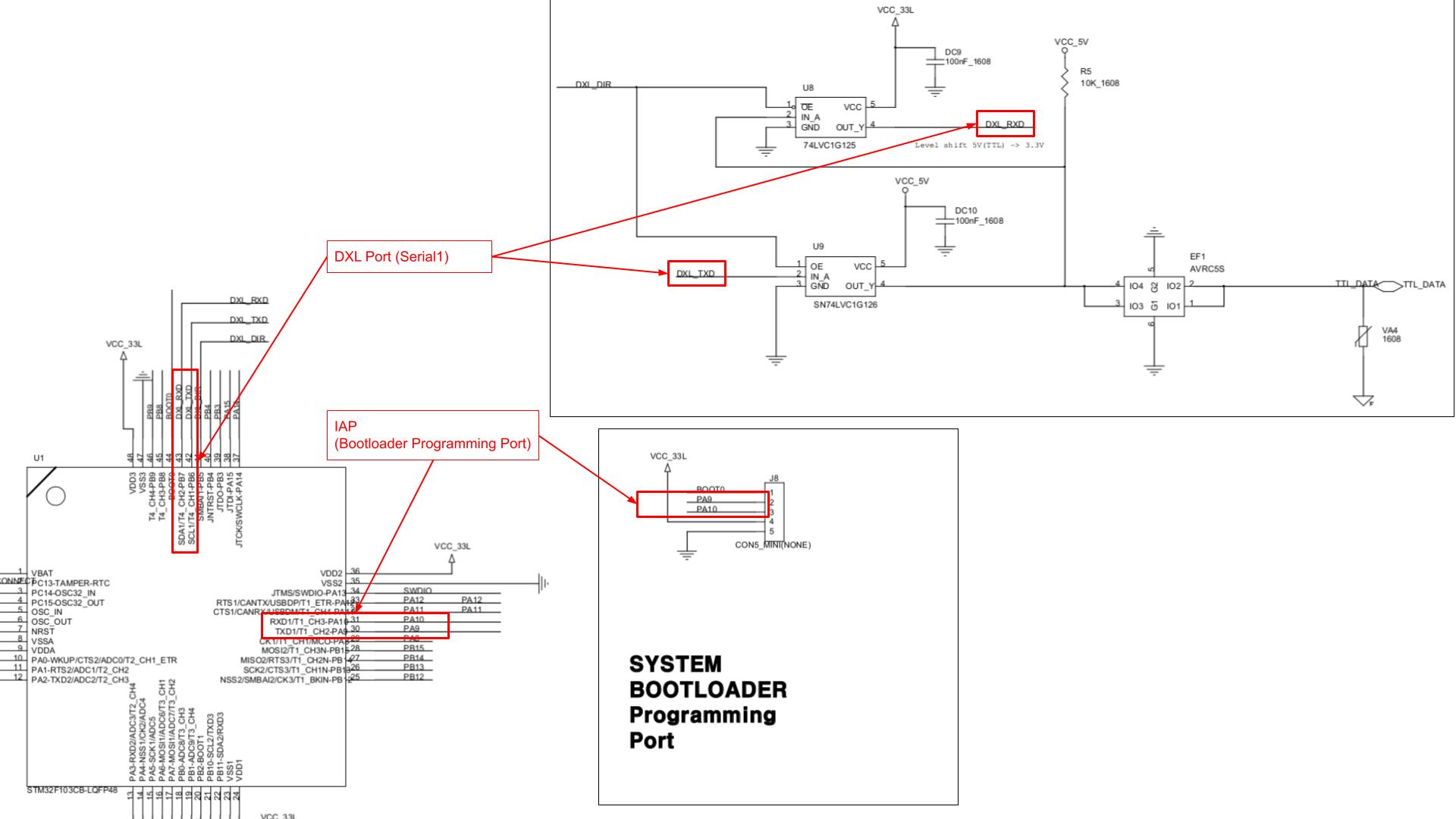
It looks like the eManual is incorrectly describes the Serial1, which isn’t assigned for any Arduino GPIO Pin.
The correct description will be :
You may access to DYNAMIXEL modules that are connected to OpenCM9.04 via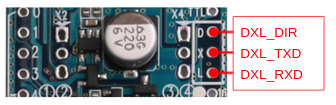
DXLGPIO port (tied to Serial1) as below.In regards with the JTAG / SWD, I’m sorry about the wrong information. D11/D12 are tied to the IAP port on the other side of the JTAG / SWD for bootloader programming.
Thank you for pointing out the issue and we’ll revise the information. Have a great day!