FluentFTP: GetListing(recursive) and DownloadDirectory: failures/reconnects
FTP Server OS: Unix
FTP Server Type: Vsftpd
Client Computer OS: Windows
FluentFTP Version: 43.0.1
Framework: .NET 6 / Worker Service
I am trying to download files from a remote Unix FTP server to a Windows server. It is a .NET 6 worker service which will run once every 24 hours. There are several top level folders (categories) on the remote server and under each of these are folders named after a date, such as 11_3_2022. The service will look under each of the top level folders for sub-folders matching a particular date for that day.
When testing a folder download with 4953 .wav files on FTP server (300 Mb), we usually fail to get between 21 and 27 files. It made no difference if the connection was static or not in our code. The actual failed count is maybe more because quite a few of the downloaded files have a .wav.filepart suffix. UPDATE: Last two runs were both reporting the exact same 27 filenames that failed to download (26 .wav and 1 .wav.filepart files).
When downloading files at some point the client will connect to the PASV port of the server for a file like normal but after the 3 way handshake and the RETR command is sent to the server on the command channel, the command channel TCP connection is reset by the client (TCP RST). This all happens within a fraction of a second. The file never gets sent. The client then reconnects and logs back in and continues downloading the next file but never got the previous one.
        using (var client = new FtpClient(uri, userName, password))
        {
            Connect(client);

            string processDate = "11_3_2022";
            string? directory;

            client.SetWorkingDirectory(ftpServerPath);
            string[] topDirectories = client.GetNameListing(ftpServerPath);
            FtpListItem[] items;
            List<FtpResult> results;

            for (int i = 0; i < topDirectories.Length; i++)
            {
                directory = topDirectories.GetValue(i)?.ToString();
                items = client.GetListing(directory + "/" + processDate, FtpListOption.Recursive);// Match processDate to folder

                if (items.Length == 0) // If no sub-folder matching processDate, then skip
                    continue;
                else
                {
                    string lastTopFolderName = new DirectoryInfo(directory!).Name;
                    string? localTrailingFolders = lastTopFolderName + "\\" + processDate;

                    if (!client.DirectoryExists(callServerPath + localTrailingFolders))
                        Directory.CreateDirectory(callServerPath + localTrailingFolders);

                    int fails = 0;
                    try
                    {
                        results = client.DownloadDirectory(callServerPath + localTrailingFolders + "\\",
                                directory + "/" + processDate, FtpFolderSyncMode.Update);//, FtpLocalExists.Skip

                        foreach (FtpResult item in results)
                            if (!item.IsSuccess)
                            {
                                Console.WriteLine(item.Name + " failed");
                                fails++;
                            }
                        Console.WriteLine("Total failed downloads: " + localTrailingFolders + " " + fails.ToString());
                    }
                    catch (Exception ex) // Not being caught
                    {
                        Console.WriteLine(ex.ToString());
                    }
                }
            }
        }

    public void Connect(FtpClient client)
    {
        client.Config.EncryptionMode = FtpEncryptionMode.Explicit;
        client.Config.DataConnectionType = FtpDataConnectionType.PASV;
        client.Config.DownloadDataType = FtpDataType.Binary;
        client.Config.ValidateAnyCertificate = true;

        client.Connect();
    }
Logs :
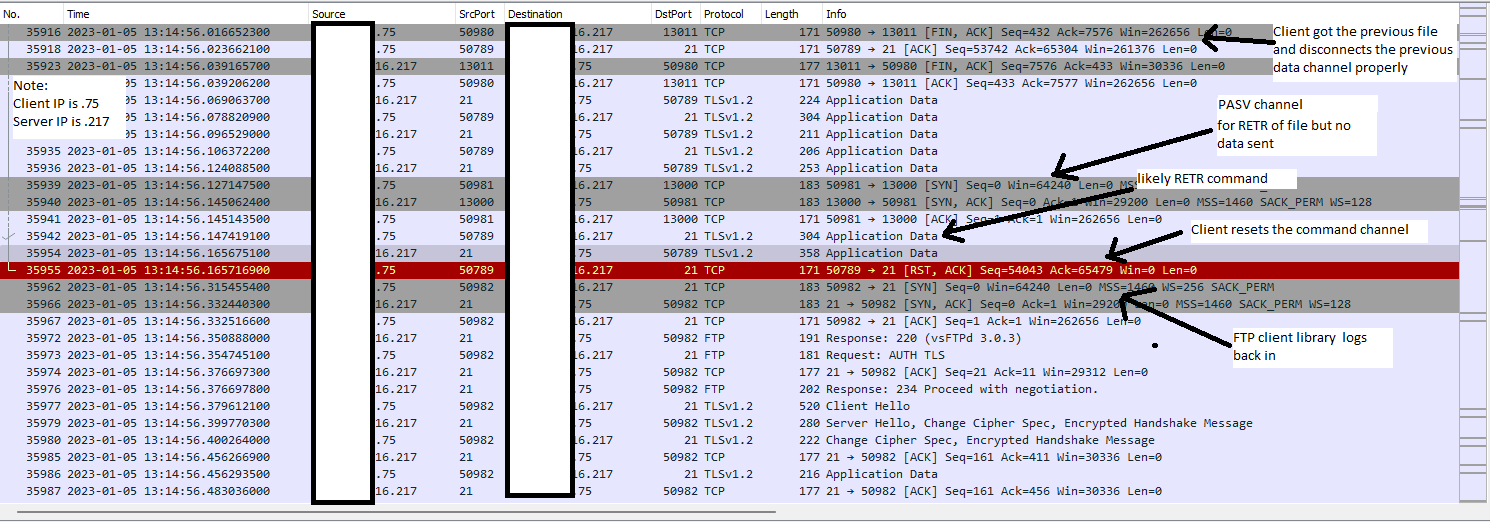
This is what we are seeing from the server logs and network side of things...

Client requests a bunch of files that works just fine...  at some point...
- COMMAND PORT 21: Client PASV command is issued for data channel
- COMMAND PORT 21: Server responds back
- DATA PORT 13000: Client connects to the data channel per the PASV info (3 way handshake only)
- COMMAND PORT 21: Client issues a RETR command (server logs show that being sent)
- COMMAND PORT 21: Server responds back
- COMMAND PORT 21: Client resets this TCP command connection
- DATA PORT 13000: no data ever sent over this port... likely related to the reason that the command port was sent a TCP reset
- COMMAND PORT 21: Client reconnects to command port (3 way hand shake) and logs in again
... The next files are retrieved without any problem... this goes on for awhile and then at some point the above problem happens again.

We are using vsftpd on RHEL 8.7 (Rocky Linux) on the server side.  The ftp rpm package is vsftpd-3.0.3-35.el8.x86_64.

vsftpd logs for that timeframe...

Thu Jan  5 13:14:55 2023 [pid 1841625] [ftpuser1] FTP command: Client "::ffff:x.x.x.75", "SIZE /home/ftpuser1/dire9/SDC/11_3_2022/2192639041 by namechanged@domainchange.com @ 8_11_38 AM.wav"
Thu Jan  5 13:14:55 2023 [pid 1841625] [ftpuser1] FTP response: Client "::ffff:x.x.x.75", "213 7406"
Thu Jan  5 13:14:55 2023 [pid 1841625] [ftpuser1] FTP command: Client "::ffff:x.x.x.75", "PASV"
Thu Jan  5 13:14:55 2023 [pid 1841625] [ftpuser1] FTP response: Client "::ffff:x.x.x.75", "227 Entering Passive Mode (x,x,x,217,50,211)."
Thu Jan  5 13:14:55 2023 [pid 1841625] [ftpuser1] FTP command: Client "::ffff:x.x.x.75", "RETR /home/ftpuser1/dire9/SDC/11_3_2022/2192639041 by namechanged@domainchange.com @ 8_11_38 AM.wav"
Thu Jan  5 13:14:55 2023 [pid 1841625] [ftpuser1] FTP response: Client "::ffff:x.x.x.75", "150 Opening BINARY mode data connection for /home/ftpuser1/dire9/SDC/11_3_2022/2192639041 by namechanged@domainchange.com @ 8_11_38 AM.wav
(7406 bytes)."
Thu Jan  5 13:14:56 2023 [pid 1841621] [ftpuser1] DEBUG: Client "::ffff:x.x.x.75", "SSL version: TLSv1.2, SSL cipher: ECDHE-RSA-AES256-GCM-SHA384, reused, no cert"
Thu Jan  5 13:14:56 2023 [pid 1841621] [ftpuser1] DEBUG: Client "::ffff:x.x.x.75", "SSL shutdown state is: NONE"
Thu Jan  5 13:14:56 2023 [pid 1841621] [ftpuser1] DEBUG: Client "::ffff:x.x.x.75", "SSL shutdown state is: SSL_SENT_SHUTDOWN"
Thu Jan  5 13:14:56 2023 [pid 1841621] [ftpuser1] DEBUG: Client "::ffff:x.x.x.75", "SSL shutdown state is: 3"
Thu Jan  5 13:14:56 2023 [pid 1841625] [ftpuser1] OK DOWNLOAD: Client "::ffff:x.x.x.75", "/home/ftpuser1/dire9/SDC/11_3_2022/2192639041 by namechanged@domainchange.com @ 8_11_38 AM.wav", 7406 bytes, 86.63Kbyte/sec
Thu Jan  5 13:14:56 2023 [pid 1841625] [ftpuser1] FTP response: Client "::ffff:x.x.x.75", "226 Transfer complete."

** The file above was sent just fine

Thu Jan  5 13:14:56 2023 [pid 1841625] [ftpuser1] FTP command: Client "::ffff:x.x.x.75", "SIZE /home/ftpuser1/dire9/SDC/11_3_2022/2192639041 by namechanged@domainchange.com @ 8_12_06 AM(1).wav"
Thu Jan  5 13:14:56 2023 [pid 1841625] [ftpuser1] FTP response: Client "::ffff:x.x.x.75", "213 35486"
Thu Jan  5 13:14:56 2023 [pid 1841625] [ftpuser1] FTP command: Client "::ffff:x.x.x.75", "PASV"
Thu Jan  5 13:14:56 2023 [pid 1841625] [ftpuser1] FTP response: Client "::ffff:x.x.x.75", "227 Entering Passive Mode (x,x,x,217,50,200)."
Thu Jan  5 13:14:56 2023 [pid 1841625] [ftpuser1] FTP command: Client "::ffff:x.x.x.75", "RETR /home/ftpuser1/dire9/SDC/11_3_2022/2192639041 by namechanged@domainchange.com @ 8_12_06 AM(1).wav"
Thu Jan  5 13:14:56 2023 [pid 1841625] [ftpuser1] FTP response: Client "::ffff:x.x.x.75", "150 Opening BINARY mode data connection for /home/ftpuser1/dire9/SDC/11_3_2022/2192639041 by namechanged@domainchange.com @ 8_12_06 AM(1).w
av (35486 bytes)."

* RETR was issued but client resets the command channel connection immediately before any data is sent.

* ftp client now relogs in to start getting the rest of the files (previous one never got sent)

Thu Jan  5 13:14:56 2023 [pid 1841692] FTP command: Client "::ffff:x.x.x.75", "USER ftpuser1"
Thu Jan  5 13:14:56 2023 [pid 1841692] [ftpuser1] FTP response: Client "::ffff:x.x.x.75", "331 Please specify the password."
Thu Jan  5 13:14:56 2023 [pid 1841692] [ftpuser1] FTP command: Client "::ffff:x.x.x.75", "PASS <password>"
Thu Jan  5 13:14:56 2023 [pid 1841691] [ftpuser1] OK LOGIN: Client "::ffff:x.x.x.75"
Thu Jan  5 13:14:56 2023 [pid 1841696] [ftpuser1] FTP response: Client "::ffff:x.x.x.75", "230 Login successful."
Thu Jan  5 13:14:56 2023 [pid 1841696] [ftpuser1] FTP command: Client "::ffff:x.x.x.75", "PBSZ 0"
Thu Jan  5 13:14:56 2023 [pid 1841696] [ftpuser1] FTP response: Client "::ffff:x.x.x.75", "200 PBSZ set to 0."
Thu Jan  5 13:14:56 2023 [pid 1841696] [ftpuser1] FTP command: Client "::ffff:x.x.x.75", "PROT P"
Thu Jan  5 13:14:56 2023 [pid 1841696] [ftpuser1] FTP response: Client "::ffff:x.x.x.75", "200 PROT now Private."
Thu Jan  5 13:14:56 2023 [pid 1841696] [ftpuser1] FTP command: Client "::ffff:x.x.x.75", "OPTS UTF8 ON"
Thu Jan  5 13:14:56 2023 [pid 1841696] [ftpuser1] FTP response: Client "::ffff:x.x.x.75", "200 Always in UTF8 mode."
About this issue
- Original URL
- State: closed
- Created a year ago
- Comments: 43 (1 by maintainers)
@IrishChieftain The decision is not so easy.
It would be nice to know this version number. I have a VsFTPd also, that works fine (with session resumption and everything, with SslStream). But some users have certain versions where we have reports that it does not resume correctly, the session fails.
Our VsFTPd is Version 3.0.3-12 and it works.
In general I would say, stay abreast with updates and get the newest. But it turns out that, for example, my favorite Distro is behind quite a bit, so the above version is not the newest. It is the newest available to me without disrupting my normal install/update regime.
Secondly, using GnuTLS is to be considered an alternative, that has a few caveats:
How you weigh the one or the other depends.
Obviously, those users who cannot update the FTP server, who have no control over the server, would resort to using GnuTLS. From that sentence alone, you can discern the priorities I would adhere to.
Very very good. Thanks.
That value is very similar to the one on my machine / my system. It is beginning to look to me like a systemic issue with SslStream perhaps.
But that also means we must continue to be very wary about the situation on your system.
Means:
It seems that your connection to the server is totally unstable in some other respect, so that an automatic reconnect after about 100 “transactions” of, say 2 commands (like PASV-RETR, for example), which would be 200, is needed. Anything longer than that seems to fail at some point.
What you would really need to do next is to program a little stress test of your own - with increasing sizes of the directories or whatever. I can’t re-read the entire issue and can’t remember: One would want to localize one of the session terminations and analyze in the server log: any special error message? Maybe find this in a Wireshark trace - who terminated? Any Ssl Alerts? I mean, what the heck is going on?
Next, you could, if you feel up to it, consider checking this out with the new FluentFTP.GnuTLS package and try to move away from SslStream entirely.
Actually @robinrodricks suggested coding an API call to find out the limit, lemme try to do that one once I have time.
@IrishChieftain Pick up the newly released V44, please at some time.
Ummh, yes - that’s just a .zip file, isn’t it?
That’s great. But let’s watch this - it’s not solved yet, IMO.
Here is, by @robinrodricks, a nice new Wiki on the topic: Wiki AutoReconnect
I think I will also attach a reference to this issue here in #1030.
I have just completed your suggested step 1 (using 43.0.1 without patch 1127 or 1130). With just a single listing call I was able to download all files with no failures.
I will continue to implement your other suggestions and report back. Thank you so much!
One quick question… will DownloadDirectory download a zipped folder inside a given directory?
Thanks for this and your effort. I am checking it out… and can immediately see a number of noteworthy things.
Let’s keep in mind that you can successfully download 500 files without any hitch at all.
I will get back to you…
The FTP server does not have the tree control. I can’t change that.
Here, I’m running version #1130 which attempts to download two sub-directories with 5 files and 4934 files respectively. I’m running the original code with outer loop which iterates thru 8 top-level directories. SslSessionLength is set to default of 750. Out of 4934 files on FTP server, 4909 downloaded successfully and 25 failed to download (26 per console count).
There was one fail with the error “Unable to read data from the transport connection: An attempt was made to access a socket in a way forbidden by its access permissions”. The others failed silently - they did not throw an IOException for example - and the failed download filenames were not in the console log. When I tried to capture the exception message for the other fails I just got a null reference for the message itself.
Snippet 1 shows the start of the session.
Snippet 2 shows the IOException
Then, I searched the log for “Reconnect due to” and got two results:
Snippets 2, 3, and 4, were contiguous, one after the other - I broke them up for readability
Another thing that was common across my tests - when the listings were being displayed in the console, it would come to a crawl or even pause for a while, then continue. Also, there were a total of 280 "OpenPassiveDataStream(PASV, "RETR…) commands in the log.
SslSessionLength settings of 0 and 750 had approx 26 fails each (out of 4939 files) for both #1127 and #1130. An SslSessionLength value of 20 worked successfully across the board. The question here is what is the sweet spot for SslSessionLength if a folder contains 10,000 files? Our load could get to that.
Snippet 1 is from the start of the log for version #1130 with SslSessionLength=750
Snippet 2 - IOException
Snippet 3 - Reconnect due to disconnected control connection
Snippet 4 - Reconnect due to SslSessionLength reached
I’m waiting to hear back from the person responsible for our FTP server if that is possible.
In the meantime, I am running the following tests for both #1127 and #1130: SslSessionLength: 0, 750 & 20. So far, a setting of 20 is downloading all 4,900+ files from a single folder successfully (recursion working all along).
Thanks @FanDjango for all the testing and repro.
Currently running tests with low values for SslSessionLength (20 and 10) - still getting .filepart files in my local downloads folder for a single call test on a folder of 5,000 files. Getting more successful downloads than before, but just marginally better.
I’ll clone that branch and try it out using the settings you suggested. I’ll grep and prep the log snippets per your suggestions. BTW, this 1130 branch is .NET 5 - will this FluentFTP.dll be compatible with my .NET 6 project?
Will I run the tests (0 & 100) for a single directory of 5,000 files, or will I include the outer loop?
Thanks for all your help!
@IrishChieftain Hold your horses for a moment. I think I have reproduced the problem. Please stand by and I will get back to you.
Some first results of my looking at your snippets and my testing of DownloadDirectory.
Snippet 2: Look at the exception:
An attempt was made to access a socket in a way forbidden by its access permissions.
Then read through issue #1030. You will see that this is probably congruent.
Snippet 1: The many many Dispose messages, it looks to me like there is a huge amount of transactions happening (which should not be happening) causing you to run into the problem described in #1030 very early on.
Conclusion: We need to find out the reason for the many dispose actions. The actual failures are a direct result of these, as you are hitting some SslStream internal limit.
Now, I have just now tested DownloadDirectory and my logs look more like this:
I’d like you to program a small single call to DownLoadDirectory for a known Remote/Local path pair containing maybe 500 files and see if that performs as expected for you. Lemme see the log from that.
I didn’t mean 0. I meant, try a value like 150 or so. Make it really aggressive in reconnecting before the first failures occur.
I’d like to debug and find the two problems, please help with that.
If the transfers you are doing are mission critical, try using
Config.SslSessionLength - Number of FTP responses after which we automatically reconnect to the FTP server. Only honored for SSL connections. Required to fix an IOException edge case on FTPS connections. Set it to 0 to disable automatic reconnection. ** Default: ** 750.
and set it to a rather low level, it will cause planned reconnects on a regular basis. Might work fine for your scenario, but only as a workaround please.
I would like to see the verbose FluentFTP log.
It is ironic - sometime, not often, we need the server log. Hardly ever do we get it. We typically only get the client log. This is my first experience of an issue where the situation is exactly opposite.
Looks like two problems: