maps: [iOS] onRegionDidChange is not called if you swipe and stop the animation
Describe the bug
This happens on iOS (both device and simulator). If you swipe/pan the map in one big motion, and then stop it by pressing down before the animation finishes, onRegionDidChange is not called.
To Reproduce
- Swipe the map
- Stop the animation before it finishes by clicking/pressing on the map to hold it
- Let go (without moving the map)
- Notice that
onRegionDidChangeis not called (the coordinates from the example is not updated)
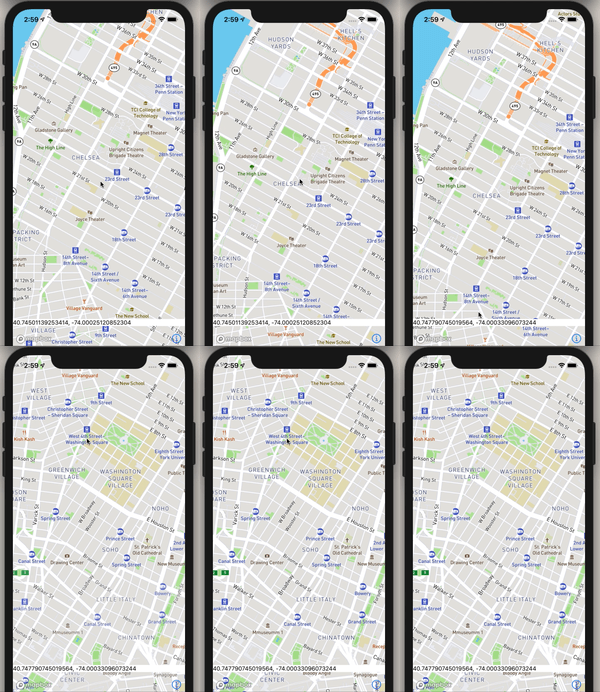
I’ve included an example screen here where I print out the coordinates after region changes. Notice that the coordinates do not update if you follow the above reproduction steps:
Example:
import React, {useState} from 'react';
import {View, Text} from 'react-native';
import MapboxGL from '@react-native-mapbox-gl/maps';

const BugReportExample = () => {
  const [region, setRegion] = useState();
  return (
    <View style={{flex: 1}}>
      <MapboxGL.MapView style={{flex: 1}} onRegionDidChange={setRegion}>
        <MapboxGL.Camera
          centerCoordinate={[-74.00597, 40.71427]}
          zoomLevel={14}
        />
      </MapboxGL.MapView>
      <View
        style={{
          position: 'absolute',
          bottom: 50,
          width: '100%',
          backgroundColor: 'white',
        }}>
        <Text>
          {region
            ? region.geometry.coordinates[1] +
              ', ' +
              region.geometry.coordinates[0]
            : 'No region'}{' '}
        </Text>
      </View>
    </View>
  );
};
export default BugReportExample;
Expected behavior
onDidRegionChange should be called. This works fine on Android.
Screenshots In the example, if you move the region normally the coordinates in the lower white box will be updated.
But if you swipe fast and then press to hold, as noted in the reproduction, the coordinates will not update:
Versions (please complete the following information):
- Platform: iOS
- Device: iPhone XS
- Emulator/ Simulator: yes
- OS: iOS 13.6.1
- react-native-mapbox-gl Version: 8.1.0-rc.2
- React Native Version: 0.63.2
Additional context None
About this issue
- Original URL
- State: closed
- Created 4 years ago
- Comments: 15 (11 by maintainers)
@ferdicus I have debugged the code on iOS and found out that the if-statement (line 493) returns not only when user stops the animation, therefore, it’s not safe to completely comment out the line (this caused some issues on my side).
I have slightly modified the if-statement and now it works perfectly:
if (((reason & MGLCameraChangeReasonTransitionCancelled) == MGLCameraChangeReasonTransitionCancelled) && ((reason & MGLCameraChangeReasonGesturePan) != MGLCameraChangeReasonGesturePan)) return;(I’m not an Objective-C expert, so excuse my code)
Sorry, I didn’t get to this today - will have to postpone to a later date 😦 This is my reminder
Sure! I’ll look into it