auto-tab-discard: Memory usage does not improve after discarding tabs in Firefox
I have Firefox 65.0.1 with the standard settings and no other addons. Tested: open 10 windows, 15 tabs each for a total of 150 tabs. auto-tab-discard with the default options discards tabs as expected, but my memory usage does not ever go down. I even tried manually discarding all but the active tab, and tried the Minimize memory usage command from about:memory, to no avail.
As it stands, it doesn’t appear to make a difference having this extension enabled or not.
This is on Windows 10 x64 build 1803 as well as Arch Linux with Cinnamon 4.0.9.
Did the extension actually improved memory usage at some point?
Thanks.
About this issue
- Original URL
- State: closed
- Created 5 years ago
- Reactions: 4
- Comments: 15
It’s a bug in the browser indeed. I found some reports that might be relevant. Will investigate further when I can find the time.
This addon just uses native calls to unload the tabs- the impact of this is entirely up to firefox. Nothing this extension can do to influence what firefox does with its memory.
Firefox 67 will natively support tab unloading in low memory conditions (https://www.ghacks.net/2019/03/01/firefox-67-automatically-unload-unused-tabs-to-improve-memory/) so presumably then firefox’s memory management will be optimized for tab-unloading.
However, I suspect that there’s actually nothing wrong with firefox’s current handling of tab unloading. Unused RAM is wasted RAM- it does not really make sense to clear the memory used by an unloaded tab, which is what you’re expecting firefox should be doing.
As long as the memory taken up by unloaded tabs is marked unimportant, that memory will be overwritten by the operating system only when it is necessary to make room for other applications. Now you have the best of both worlds- the tab can be quickly retrieved but it is not consuming CPU, and the memory can be claimed by the operating system should that become necessary.
You should repeat your test with these steps:
Here, I’ve tested it myself with only 19 tabs. Windows started reclaiming memory from Firefox readily at 90% consumed memory.
19 tabs open:
18 tabs unloaded: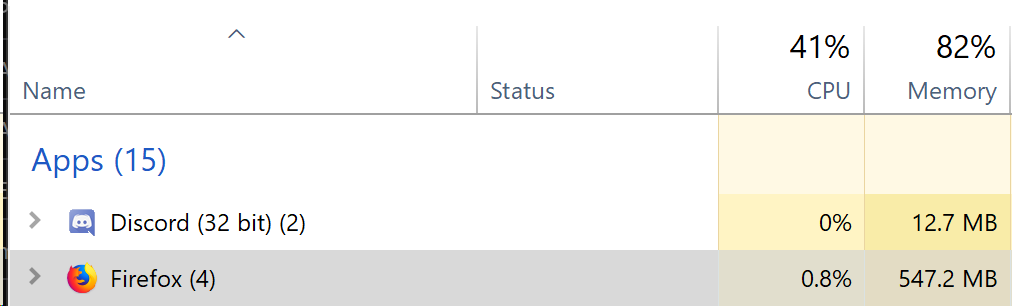
Yeah, in any case I’m closing since there’s nothing that can be done to further improve resident memory consumption extension-wise. Further progress to be pursued in Firefox codebase.
Thanks for your comments 😃
I’m still not convinced that anything is wrong. So far we have only the supposition that maybe the browser will not relinquish memory when it should.
If that’s true, that’s an actual bug in the browser, And it should be brought to Mozilla bug reporter. Without a demonstration of this happening, I’m not sure why we’re assuming that it is happening.