react-native-settings: Release version crash on start up (android 5)
Issue
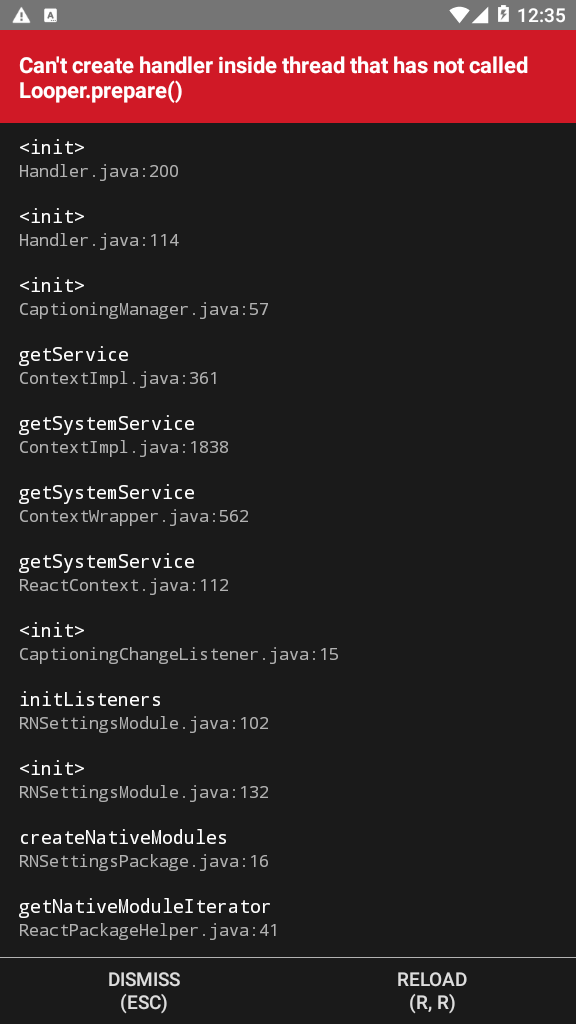
Release version crash on start up (android 5). log:
FATAL EXCEPTION: create_react_context
Process: com.cinemanaplus, PID: 2961
java.lang.RuntimeException: Can't create handler inside thread that has not called Looper.prepare()
	at android.os.Handler.<init>(Handler.java:200)
	at android.os.Handler.<init>(Handler.java:114)
	at android.view.accessibility.CaptioningManager.<init>(CaptioningManager.java:57)
	at android.app.ContextImpl$3.getService(ContextImpl.java:361)
	at android.app.ContextImpl.getSystemService(ContextImpl.java:1838)
	at android.content.ContextWrapper.getSystemService(ContextWrapper.java:562)
	at com.facebook.react.bridge.ReactContext.getSystemService(ReactContext.java:112)
	at io.rumors.reactnativesettings.listeners.CaptioningChangeListener.<init>(CaptioningChangeListener.java:15)
	at io.rumors.reactnativesettings.RNSettingsModule.initListeners(RNSettingsModule.java:102)
	at io.rumors.reactnativesettings.RNSettingsModule.<init>(RNSettingsModule.java:132)
	at io.rumors.reactnativesettings.RNSettingsPackage.createNativeModules(RNSettingsPackage.java:16)
	at com.facebook.react.ReactPackageHelper.getNativeModuleIterator(ReactPackageHelper.java:41)
	at com.facebook.react.NativeModuleRegistryBuilder.processPackage(NativeModuleRegistryBuilder.java:41)
	at com.facebook.react.ReactInstanceManager.processPackage(ReactInstanceManager.java:1230)
	at com.facebook.react.ReactInstanceManager.processPackages(ReactInstanceManager.java:1201)
	at com.facebook.react.ReactInstanceManager.createReactContext(ReactInstanceManager.java:1134)
	at com.facebook.react.ReactInstanceManager.access$1000(ReactInstanceManager.java:125)
	at com.facebook.react.ReactInstanceManager$5.run(ReactInstanceManager.java:951)
	at java.lang.Thread.run(Thread.java:818)
In debug version:
Project Files
Android
Click To Expand
android/build.gradle:
// Top-level build file where you can add configuration options common to all sub-projects/modules.

buildscript {
    ext {
        buildToolsVersion = "28.0.3"
        minSdkVersion = 16
        compileSdkVersion = 28
        targetSdkVersion = 25
    }
    repositories {
        google()
        jcenter()
    }
    dependencies {
        classpath("com.android.tools.build:gradle:3.4.2")

        // NOTE: Do not place your application dependencies here; they belong
        // in the individual module build.gradle files
    }
}

allprojects {
    repositories {
        mavenLocal()
        maven {
            // All of React Native (JS, Obj-C sources, Android binaries) is installed from npm
            url("$rootDir/../node_modules/react-native/android")
        }
        maven {
            // Android JSC is installed from npm
            url("$rootDir/../node_modules/jsc-android/dist")
        }

        google()
        jcenter()
        maven { url 'https://jitpack.io' }
    }
}
android/app/build.gradle:
apply plugin: "com.android.application"

import com.android.build.OutputFile

/**
 * The react.gradle file registers a task for each build variant (e.g. bundleDebugJsAndAssets
 * and bundleReleaseJsAndAssets).
 * These basically call `react-native bundle` with the correct arguments during the Android build
 * cycle. By default, bundleDebugJsAndAssets is skipped, as in debug/dev mode we prefer to load the
 * bundle directly from the development server. Below you can see all the possible configurations
 * and their defaults. If you decide to add a configuration block, make sure to add it before the
 * `apply from: "../../node_modules/react-native/react.gradle"` line.
 *
 * project.ext.react = [
 *   // the name of the generated asset file containing your JS bundle
 *   bundleAssetName: "index.android.bundle",
 *
 *   // the entry file for bundle generation
 *   entryFile: "index.android.js",
 *
 *   // https://facebook.github.io/react-native/docs/performance#enable-the-ram-format
 *   bundleCommand: "ram-bundle",
 *
 *   // whether to bundle JS and assets in debug mode
 *   bundleInDebug: false,
 *
 *   // whether to bundle JS and assets in release mode
 *   bundleInRelease: true,
 *
 *   // whether to bundle JS and assets in another build variant (if configured).
 *   // See http://tools.android.com/tech-docs/new-build-system/user-guide#TOC-Build-Variants
 *   // The configuration property can be in the following formats
 *   //         'bundleIn${productFlavor}${buildType}'
 *   //         'bundleIn${buildType}'
 *   // bundleInFreeDebug: true,
 *   // bundleInPaidRelease: true,
 *   // bundleInBeta: true,
 *
 *   // whether to disable dev mode in custom build variants (by default only disabled in release)
 *   // for example: to disable dev mode in the staging build type (if configured)
 *   devDisabledInStaging: true,
 *   // The configuration property can be in the following formats
 *   //         'devDisabledIn${productFlavor}${buildType}'
 *   //         'devDisabledIn${buildType}'
 *
 *   // the root of your project, i.e. where "package.json" lives
 *   root: "../../",
 *
 *   // where to put the JS bundle asset in debug mode
 *   jsBundleDirDebug: "$buildDir/intermediates/assets/debug",
 *
 *   // where to put the JS bundle asset in release mode
 *   jsBundleDirRelease: "$buildDir/intermediates/assets/release",
 *
 *   // where to put drawable resources / React Native assets, e.g. the ones you use via
 *   // require('./image.png')), in debug mode
 *   resourcesDirDebug: "$buildDir/intermediates/res/merged/debug",
 *
 *   // where to put drawable resources / React Native assets, e.g. the ones you use via
 *   // require('./image.png')), in release mode
 *   resourcesDirRelease: "$buildDir/intermediates/res/merged/release",
 *
 *   // by default the gradle tasks are skipped if none of the JS files or assets change; this means
 *   // that we don't look at files in android/ or ios/ to determine whether the tasks are up to
 *   // date; if you have any other folders that you want to ignore for performance reasons (gradle
 *   // indexes the entire tree), add them here. Alternatively, if you have JS files in android/
 *   // for example, you might want to remove it from here.
 *   inputExcludes: ["android/**", "ios/**"],
 *
 *   // override which node gets called and with what additional arguments
 *   nodeExecutableAndArgs: ["node"],
 *
 *   // supply additional arguments to the packager
 *   extraPackagerArgs: []
 * ]
 */

project.ext.react = [
    entryFile: "index.js",
    enableHermes: true,  // clean and rebuild if changing
]

apply from: "../../node_modules/react-native/react.gradle"

/**
 * Set this to true to create two separate APKs instead of one:
 *   - An APK that only works on ARM devices
 *   - An APK that only works on x86 devices
 * The advantage is the size of the APK is reduced by about 4MB.
 * Upload all the APKs to the Play Store and people will download
 * the correct one based on the CPU architecture of their device.
 */
def enableSeparateBuildPerCPUArchitecture = false

/**
 * Run Proguard to shrink the Java bytecode in release builds.
 */
def enableProguardInReleaseBuilds = false

/**
 * The preferred build flavor of JavaScriptCore.
 *
 * For example, to use the international variant, you can use:
 * `def jscFlavor = 'org.webkit:android-jsc-intl:+'`
 *
 * The international variant includes ICU i18n library and necessary data
 * allowing to use e.g. `Date.toLocaleString` and `String.localeCompare` that
 * give correct results when using with locales other than en-US.  Note that
 * this variant is about 6MiB larger per architecture than default.
 */
def jscFlavor = 'org.webkit:android-jsc:+'

/**
 * Whether to enable the Hermes VM.
 *
 * This should be set on project.ext.react and mirrored here.  If it is not set
 * on project.ext.react, JavaScript will not be compiled to Hermes Bytecode
 * and the benefits of using Hermes will therefore be sharply reduced.
 */
def enableHermes = project.ext.react.get("enableHermes", false);

android {
    compileSdkVersion rootProject.ext.compileSdkVersion

    compileOptions {
        sourceCompatibility JavaVersion.VERSION_1_8
        targetCompatibility JavaVersion.VERSION_1_8
    }

    defaultConfig {
        applicationId "com.cinemanaplus"
        minSdkVersion rootProject.ext.minSdkVersion
        targetSdkVersion rootProject.ext.targetSdkVersion
        versionCode 1
        versionName "1.0"
        renderscriptTargetApi 23
        renderscriptSupportModeEnabled true
    }
    splits {
        abi {
            reset()
            enable enableSeparateBuildPerCPUArchitecture
            universalApk false  // If true, also generate a universal APK
            include "armeabi-v7a", "x86", "arm64-v8a", "x86_64"
        }
    }
    signingConfigs {
        debug {
            storeFile file('debug.keystore')
            storePassword 'android'
            keyAlias 'androiddebugkey'
            keyPassword 'android'
        }
    }
    buildTypes {
        debug {
            signingConfig signingConfigs.debug
        }
        release {
            // Caution! In production, you need to generate your own keystore file.
            // see https://facebook.github.io/react-native/docs/signed-apk-android.
            signingConfig signingConfigs.debug
            minifyEnabled enableProguardInReleaseBuilds
            proguardFiles getDefaultProguardFile("proguard-android.txt"), "proguard-rules.pro"
        }
    }
    // applicationVariants are e.g. debug, release
    applicationVariants.all { variant ->
        variant.outputs.each { output ->
            // For each separate APK per architecture, set a unique version code as described here:
            // https://developer.android.com/studio/build/configure-apk-splits.html
            def versionCodes = ["armeabi-v7a": 1, "x86": 2, "arm64-v8a": 3, "x86_64": 4]
            def abi = output.getFilter(OutputFile.ABI)
            if (abi != null) {  // null for the universal-debug, universal-release variants
                output.versionCodeOverride =
                        versionCodes.get(abi) * 1048576 + defaultConfig.versionCode
            }

        }
    }
}

dependencies {
    implementation fileTree(dir: "libs", include: ["*.jar"])
    implementation "com.facebook.react:react-native:+"  // From node_modules
    implementation 'androidx.appcompat:appcompat:1.1.0-rc01'
    implementation 'androidx.swiperefreshlayout:swiperefreshlayout:1.1.0-alpha02'
    implementation 'com.facebook.fresco:animated-gif:2.0.0'

    if (enableHermes) {
        def hermesPath = "../../node_modules/hermes-engine/android/";
        debugImplementation files(hermesPath + "hermes-debug.aar")
        releaseImplementation files(hermesPath + "hermes-release.aar")
    } else {
        implementation jscFlavor
    }
}

// Run this once to be able to run the application with BUCK
// puts all compile dependencies into folder libs for BUCK to use
task copyDownloadableDepsToLibs(type: Copy) {
    from configurations.compile
    into 'libs'
}

apply from: file("../../node_modules/@react-native-community/cli-platform-android/native_modules.gradle"); applyNativeModulesAppBuildGradle(project)
apply from: "../../node_modules/react-native-vector-icons/fonts.gradle"
android/settings.gradle:
rootProject.name = 'CinemanaPlus'
apply from: file("../node_modules/@react-native-community/cli-platform-android/native_modules.gradle"); applyNativeModulesSettingsGradle(settings)
project(':react-native-video').projectDir = new File(rootProject.projectDir, '../node_modules/react-native-video/android-exoplayer')
include ':app'
MainApplication.java:
package com.cinemanaplus;

import android.app.Application;
import android.content.Context;
import com.facebook.react.PackageList;
import com.facebook.react.ReactApplication;
import com.facebook.react.ReactNativeHost;
import com.facebook.react.ReactPackage;
import com.facebook.soloader.SoLoader;
import java.lang.reflect.InvocationTargetException;
import java.util.List;

import android.content.IntentFilter;
import io.rumors.reactnativesettings.RNSettingsPackage;
import io.rumors.reactnativesettings.receivers.GpsLocationReceiver;
import io.rumors.reactnativesettings.receivers.AirplaneModeReceiver;

public class MainApplication extends Application implements ReactApplication {

  private final ReactNativeHost mReactNativeHost =
      new ReactNativeHost(this) {
        @Override
        public boolean getUseDeveloperSupport() {
          return BuildConfig.DEBUG;
        }

        @Override
        protected List<ReactPackage> getPackages() {
          @SuppressWarnings("UnnecessaryLocalVariable")
          List<ReactPackage> packages = new PackageList(this).getPackages();
          // Packages that cannot be autolinked yet can be added manually here, for example:
          // packages.add(new MyReactNativePackage());
          return packages;
        }

        @Override
        protected String getJSMainModuleName() {
          return "index";
        }
      };

  @Override
  public ReactNativeHost getReactNativeHost() {
    return mReactNativeHost;
  }

  @Override
  public void onCreate() {
    super.onCreate();
    SoLoader.init(this, /* native exopackage */ false);
    initializeFlipper(this); // Remove this line if you don't want Flipper enabled

    registerReceiver(new GpsLocationReceiver(), new IntentFilter("android.location.PROVIDERS_CHANGED"));
    registerReceiver(new AirplaneModeReceiver(), new IntentFilter("android.intent.action.AIRPLANE_MODE"));
  }

  /**
   * Loads Flipper in React Native templates.
   *
   * @param context
   */
  private static void initializeFlipper(Context context) {
    if (BuildConfig.DEBUG) {
      try {
        /*
         We use reflection here to pick up the class that initializes Flipper,
        since Flipper library is not available in release mode
        */
        Class<?> aClass = Class.forName("com.facebook.flipper.ReactNativeFlipper");
        aClass.getMethod("initializeFlipper", Context.class).invoke(null, context);
      } catch (ClassNotFoundException e) {
        e.printStackTrace();
      } catch (NoSuchMethodException e) {
        e.printStackTrace();
      } catch (IllegalAccessException e) {
        e.printStackTrace();
      } catch (InvocationTargetException e) {
        e.printStackTrace();
      }
    }
  }
}
AndroidManifest.xml:
<manifest xmlns:android="http://schemas.android.com/apk/res/android"
  package="com.cinemanaplus">

    <uses-permission android:name="android.permission.INTERNET" />
    <uses-permission android:name="android.permission.READ_EXTERNAL_STORAGE" />
    <uses-permission android:name="android.permission.WRITE_EXTERNAL_STORAGE" />
    <uses-permission android:name="android.permission.DOWNLOAD_WITHOUT_NOTIFICATION" />
    <uses-permission android:name="android.permission.RECEIVE_BOOT_COMPLETED"/>
    <uses-permission android:name="android.permission.VIBRATE"/>

    <application
      android:name=".MainApplication"
      android:label="@string/app_name"
      android:icon="@mipmap/ic_launcher"
      android:roundIcon="@mipmap/ic_launcher_round"
      android:allowBackup="false"
      android:theme="@style/AppTheme">
      <activity
        android:name=".MainActivity"
        android:label="@string/app_name"
        android:configChanges="keyboard|keyboardHidden|orientation|screenSize"
        android:windowSoftInputMode="adjustResize">
        <intent-filter>
            <action android:name="android.intent.action.MAIN" />
            <category android:name="android.intent.category.LAUNCHER" />
        </intent-filter>
      </activity>
      <activity android:name="com.facebook.react.devsupport.DevSettingsActivity" />
      <receiver android:name="com.staltz.reactnativeandroidlocalnotification.NotificationEventReceiver" />   <!-- <- Add this line -->
      <receiver android:name="com.staltz.reactnativeandroidlocalnotification.NotificationPublisher" />       <!-- <- Add this line -->
      <receiver android:name="com.staltz.reactnativeandroidlocalnotification.SystemBootEventReceiver">       <!-- <- Add this line -->
        <intent-filter>                                                                   <!-- <- Add this line -->
          <action android:name="android.intent.action.BOOT_COMPLETED"></action>           <!-- <- Add this line -->
        </intent-filter>                                                                  <!-- <- Add this line -->
      </receiver>
    </application>

</manifest>
Environment
Click To Expand
react-native info output:
System:
    OS: Windows 10 10.0.17763
    CPU: (4) x64 Intel(R) Core(TM) i7-4600U CPU @ 2.10GHz
    Memory: 1.89 GB / 7.90 GB
  Binaries:
    Node: 11.14.0 - C:\Program Files\nodejs\node.EXE
    Yarn: 1.15.2 - C:\Program Files (x86)\Yarn\bin\yarn.CMD
    npm: 6.7.0 - C:\Program Files\nodejs\npm.CMD
  SDKs:
    Android SDK:
      Android NDK: 20.0.5594570
  npmPackages:
    react: 16.9.0 => 16.9.0
    react-native: 0.61.5 => 0.61.5
- Platform that you’re experiencing the issue on:
- iOS
- Android
About this issue
- Original URL
- State: closed
- Created 5 years ago
- Comments: 15 (9 by maintainers)
@shababcreative Thank you for opening this issue, I’ll have time to look into next week