react-use-draggable-scroll: [Problem] keepMovingX invoked after router unmounts component
Hi again.
Not sure if you need a repro project for this, will try to describe what we’re experiencing.
Version:
0.4.0
Browser:
Windows Chrome
Steps to reproduce:
- Project setup
- Set up a react app to use react router v6
- Have an app or sub-component with a router
Outletand twoRoutes, the first as default index route. Have some links to navigate from first route to the second - In the first route, have a component, say
MainCanvas, which in turns shows some overflowing content and usesuseDraggable
- Launch app
- Within
MainCanvas, drag content a little - Browse to the second route
What should happen: Browser DevTools console should show no errors
What actually happens: Browser DevTools console shows an always-growing list of errors. It keeps on repeating the following messages:
12:12:59.874 main.ff8383e8.js:2 Uncaught TypeError: Cannot read properties of null (reading 'scrollLeft')
    at main.ff8383e8.js:2:430029
(anonymous) @ main.ff8383e8.js:2
setInterval (async)
(anonymous) @ main.ff8383e8.js:2
S @ main.ff8383e8.js:2
12:12:59.875 main.ff8383e8.js:2 Uncaught TypeError: Cannot read properties of null (reading 'scrollTop')
    at main.ff8383e8.js:2:430279
(anonymous) @ main.ff8383e8.js:2
setInterval (async)
(anonymous) @ main.ff8383e8.js:2
S @ main.ff8383e8.js:2
For scrollLeft case, the culprit line highlighted in DevTools is the following, in keepMovingY interval body:
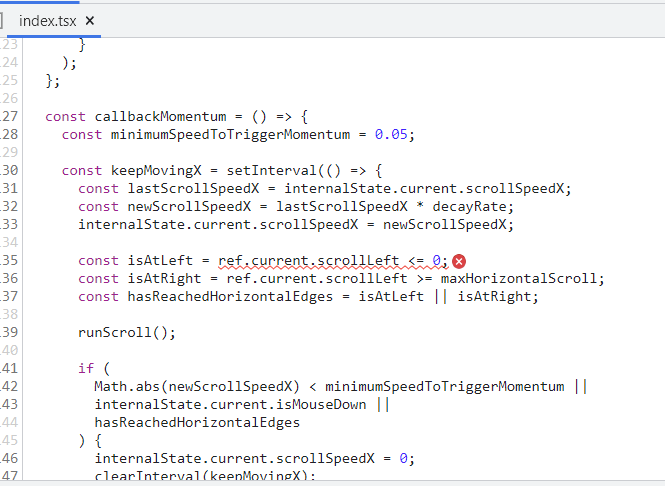
Probably, for the scrollTop case the culprit lies within keepMovingY body.
The immediate issue is that there’s no check for ref.current being null or not. But then the question arises: why is keepMovingX (or Y) interval still invoked? Does useDraggable keeps things lingering around even after client component is unmounted? Or maybe is the client component fault (MainCanvas in this example)?
About this issue
- Original URL
- State: closed
- Created 5 years ago
- Comments: 17 (8 by maintainers)
Re. tags: you can add a tag to your local repository through your preferred git client (command line, Fork… whatever), then make sure to push also tags when doing a push from local to remote. As an alternative, on GitHub you can add a new Release and at the same time add a new tag as well, directly on remote repo so to say. In this case, the next time you fetch/pull from remote to local, you’ll see the tags locally as well.
Re. badge: we might create a tiny PR to add that to readme, if you prefer.
Hi @BrainCrumbz,
Thank you very much for the valuable suggestions!
I will definitely incorporate them in the following days. However, I’ve never added tags or set up GitHub releases before, so it might take a little bit longer for me to do that.
All the best, Renato
Thanks to your work, actually.
From the maintenance point of view, so to say:
From the documentation point of view:
As mentioned above, providing a link to a StackBlitz/CodeSandbox sample project in readme or in some other place visibile to newcomers, could be an idea.These are just some ideas coming to mind, and as you might noticed they’re not focused on new features, but more on “rounding up” things. HTH
It’s great to hear that!
@BrainCrumbz, I have just published a new version to npm with this fix. The latest version is now 0.4.2
Thank you again for supporting this project! And do not hesitate to propose further improvements or report any issues in the future!