background_locator: App stops after 5 minutes on Android with the screen turned off
Hi! First of all, wonderful plugin, thanks to the devs.
Now there is a problem with my app. I am trying to create an activity tracker (running, bicycle…), and I need a background gps tracking system to track user position and speed in the background.
The problem is that after exactly 5 minutes with the screen turned off (a person running will keep their phone in their pocket, with the screen turned off), the app stops working and tracking the position. Running it in an Android 10 emulator.
I have a brand new project with the same code as in the installation guide, plus integrated shared preferences plugin to store data. What I’ve tried is disabling battery optimizations on stock Android emulator, but still nothing. However the app isn’t killed when the screen isn’t turned off. The notification (although not permanent/uncancellable, this may be the cause) is present. The app works fine on iOS even with the screen turned off.
I am really lost and don’t have any idea on what to do since nobody else seems having this problem. I am thinking to send regular notifications every 4 minutes to wake up the phone, but I don’t know if the app may be allowed on the play store/app store, and don’t know if it would work since there is already the default notification which is updated every 2 seconds.
I’ve tried running adb logcat to see if the system is going into some battery optimization sleep mode, but not even a hint:
11-30 03:04:31.841  1750  2445 E GnssHAL_GnssInterface: gnssSvStatusCb: b: input svInfo.flags is 8
11-30 03:04:31.903 22510 23088 I flutter : SendPort
11-30 03:04:31.903 22510 22669 I flutter : on receive isolate data
11-30 03:04:31.903 22510 22669 I flutter : LocationDto{latitude: 37.4219983, longitude: -122.084, accuracy: 20.0, altitude: 5.0, speed: 0.0, speedAccuracy: 0.0, heading: 0.0, time: 1606701915000.0, isMocked: false}
11-30 03:04:31.904 22510 22669 I flutter : Instance of 'SharedPreferences'
11-30 03:04:31.904 22510 22669 I flutter : position saved to prefs
11-30 03:04:31.905 22510 22669 I flutter : updated notification
11-30 03:04:32.844  1750  2445 E GnssHAL_GnssInterface: gnssSvStatusCb: a: input svInfo.flags is 8
11-30 03:04:32.844  1750  2445 E GnssHAL_GnssInterface: gnssSvStatusCb: b: input svInfo.flags is 8
11-30 03:04:33.848  1750  2445 E GnssHAL_GnssInterface: gnssSvStatusCb: a: input svInfo.flags is 8
11-30 03:04:33.848  1750  2445 E GnssHAL_GnssInterface: gnssSvStatusCb: b: input svInfo.flags is 8
11-30 03:04:33.910 22510 23088 I flutter : SendPort
11-30 03:04:33.911 22510 22669 I flutter : on receive isolate data
11-30 03:04:33.911 22510 22669 I flutter : LocationDto{latitude: 37.4219983, longitude: -122.084, accuracy: 20.0, altitude: 5.0, speed: 0.0, speedAccuracy: 0.0, heading: 0.0, time: 1606701917000.0, isMocked: false}
11-30 03:04:33.911 22510 22669 I flutter : Instance of 'SharedPreferences'
11-30 03:04:33.911 22510 22669 I flutter : position saved to prefs
11-30 03:04:33.912 22510 22669 I flutter : updated notification
--- THE APP HAS BEEN KILLED BY NOW ---
11-30 03:04:34.853  1750  2445 E GnssHAL_GnssInterface: gnssSvStatusCb: a: input svInfo.flags is 8
11-30 03:04:34.853  1750  2445 E GnssHAL_GnssInterface: gnssSvStatusCb: b: input svInfo.flags is 8
11-30 03:04:35.238  1750  2445 E GnssHAL_GnssInterface: gnssSvStatusCb: a: input svInfo.flags is 8
11-30 03:04:35.238  1750  2445 E GnssHAL_GnssInterface: gnssSvStatusCb: b: input svInfo.flags is 8
11-30 03:04:35.247  2257  2257 W View    : requestLayout() improperly called by com.android.keyguard.AlphaOptimizedLinearLayout{43d94cf V.E...... ......ID 7,0-48,61 #7f0a041c app:id/wifi_group} during layout: running second layout pass
11-30 03:04:35.857  1750  2445 E GnssHAL_GnssInterface: gnssSvStatusCb: a: input svInfo.flags is 8
11-30 03:04:35.857  1750  2445 E GnssHAL_GnssInterface: gnssSvStatusCb: b: input svInfo.flags is 8
11-30 03:04:36.860  1750  2445 E GnssHAL_GnssInterface: gnssSvStatusCb: a: input svInfo.flags is 8
11-30 03:04:36.860  1750  2445 E GnssHAL_GnssInterface: gnssSvStatusCb: b: input svInfo.flags is 8
11-30 03:04:37.863  1750  2445 E GnssHAL_GnssInterface: gnssSvStatusCb: a: input svInfo.flags is 8
11-30 03:04:37.863  1750  2445 E GnssHAL_GnssInterface: gnssSvStatusCb: b: input svInfo.flags is 8
11-30 03:04:38.868  1750  2445 E GnssHAL_GnssInterface: gnssSvStatusCb: a: input svInfo.flags is 8
11-30 03:04:38.868  1750  2445 E GnssHAL_GnssInterface: gnssSvStatusCb: b: input svInfo.flags is 8
11-30 03:04:39.868  1750  2445 E GnssHAL_GnssInterface: gnssSvStatusCb: a: input svInfo.flags is 8
11-30 03:04:39.869  1750  2445 E GnssHAL_GnssInterface: gnssSvStatusCb: b: input svInfo.flags is 8
11-30 03:04:40.870  1750  2445 E GnssHAL_GnssInterface: gnssSvStatusCb: a: input svInfo.flags is 8
Also, this is what the adb shell dumpsys activity services (to show running services) looks like (including only results where the app name com.skuu.test_gps is mentioned):
adrianivascu@MBP-di-Adrian ~ % adb shell dumpsys activity services
ACTIVITY MANAGER SERVICES (dumpsys activity services)
  User 0 active services:
  ...
  * ServiceRecord{f8bc66c u0 com.skuu.test_gps/rekab.app.background_locator.IsolateHolderService}
    intent={act=START cmp=com.skuu.test_gps/rekab.app.background_locator.IsolateHolderService}
    packageName=com.skuu.test_gps
    processName=com.skuu.test_gps
    permission=android.permission.FOREGROUND_SERVICE
    baseDir=/data/app/com.skuu.test_gps-PSh_UuDdM8JXBTFISzogVA==/base.apk
    dataDir=/data/user/0/com.skuu.test_gps
    app=ProcessRecord{273e00f 22510:com.skuu.test_gps/u0a136}
    isForeground=true foregroundId=1 foregroundNoti=Notification(channel=app.rekab/locator_plugin pri=1 contentView=null vibrate=null sound=null defaults=0x0 flags=0x6a color=0xff9e9e9e vis=PRIVATE)
    createTime=-2m24s858ms startingBgTimeout=--
    lastActivity=-659ms restartTime=-2m24s857ms createdFromFg=true
    startRequested=true delayedStop=false stopIfKilled=false callStart=true lastStartId=69

  * ServiceRecord{ae77366 u0 com.google.android.gms/com.google.android.location.internal.GoogleLocationManagerService}
    intent={act=com.google.android.location.internal.GoogleLocationManagerService.START pkg=com.google.android.gms}
    packageName=com.google.android.gms
    processName=com.google.android.gms.persistent
    baseDir=/data/app/com.google.android.gms-VMmaef8awA98_Pupd2d0Xw==/base.apk
    dataDir=/data/user/0/com.google.android.gms
    app=ProcessRecord{2379889 12582:com.google.android.gms.persistent/u0a97}
    createTime=-2h34m56s969ms startingBgTimeout=--
    lastActivity=-2m24s149ms restartTime=-2h34m56s969ms createdFromFg=true
    startRequested=true delayedStop=false stopIfKilled=false callStart=true lastStartId=3
    Bindings:
    * IntentBindRecord{a1fb84a CREATE}:
      intent={act=com.google.android.location.internal.GoogleLocationManagerService.START pkg=com.google.android.gms}
      binder=android.os.BinderProxy@ce433bb
      requested=true received=true hasBound=true doRebind=false
      * Client AppBindRecord{28f30d8 ProcessRecord{273e00f 22510:com.skuu.test_gps/u0a136}}
        Per-process Connections:
          ConnectionRecord{9b9a6be u0 CR WACT com.google.android.gms/com.google.android.location.internal.GoogleLocationManagerService:@214d979}
    All Connections:
      ConnectionRecord{9b9a6be u0 CR WACT com.google.android.gms/com.google.android.location.internal.GoogleLocationManagerService:@214d979}

  Connection bindings to services:
  * ConnectionRecord{9b9a6be u0 CR WACT com.google.android.gms/com.google.android.location.internal.GoogleLocationManagerService:@214d979}
    binding=AppBindRecord{28f30d8 com.google.android.gms/com.google.android.location.internal.GoogleLocationManagerService:com.skuu.test_gps}
    conn=android.os.BinderProxy@214d979 flags=0x81

Active foreground apps - user 0:
  #0: com.skuu.test_gps
    mNumActive=1 mAppOnTop=false mShownWhileTop=true mShownWhileScreenOn=true
    mStartTime=-2m24s682ms mStartVisibleTime=-2m24s682ms
adrianivascu@MBP-di-Adrian ~ %
Thank you.
About this issue
- Original URL
- State: closed
- Created 4 years ago
- Comments: 29
Hi, I’m facing the same problem on the real device i.e the background locator stops after 5 min when the screen is locked.I’m using LG G8x with Android 10.
@mehdok You are a hero! It works, thank you for fixing it! 😃
@ferdinandfrank Thank you for the information, I have some free time this weekend to work on this;
@ferdinandfrank Please check the new version, the problem must be solved;
It seems like the issues occur when running on Android 10 (API level 29) or higher as I can’t reproduce the issues when running on Android 9.0 (API level 28). Probably due to the behavior changes introduced with Android 10.0 that also mentions changes on the background access to device location. See here for the details: https://developer.android.com/about/versions/10/behavior-changes-all
Steps to reproduce on the example app:
This is my output of the app. As you can see, the recording stopped at iteration 37 when the screen is turned off. After turning on the screen again multiple records for iteration 38 were tracked and then continued with iteration 75.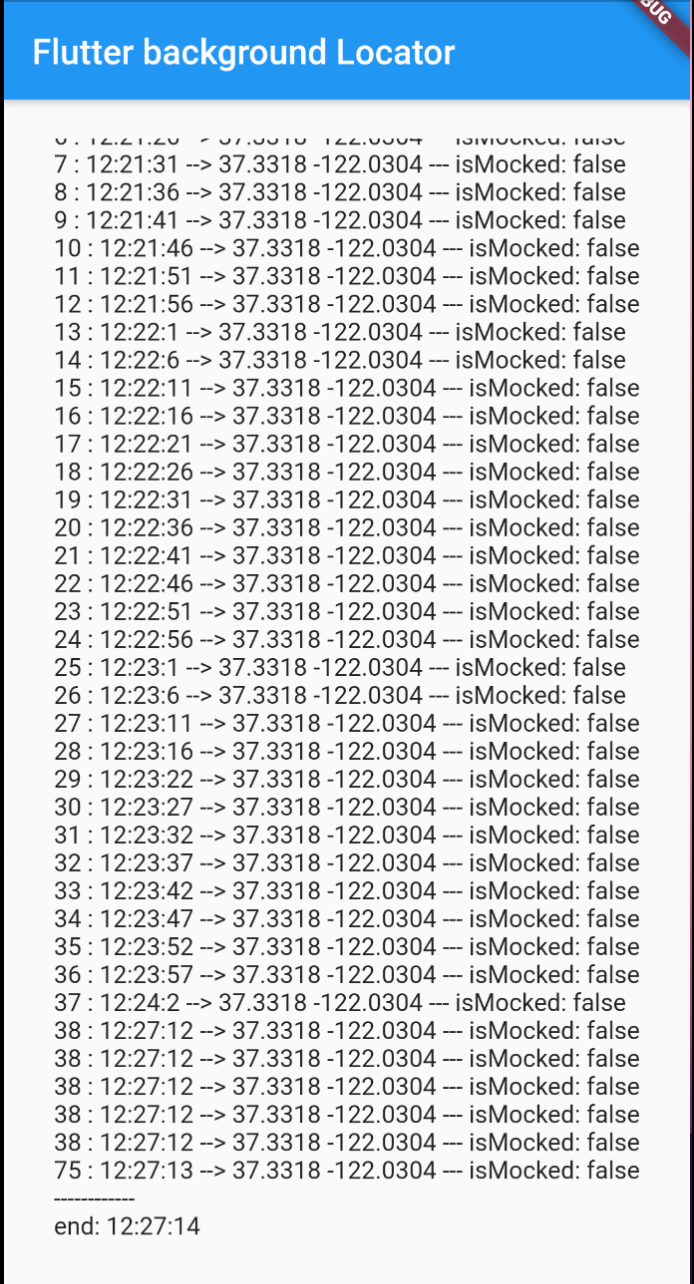
Hi @Ivaskuu Thank you for opening an issue;
Does your app work fine when you put it in the background (pressing the home button), what if you terminate it? (removing from recent apps) - (both scenario screen is on)
Does the example app works fine for you? even when the screen is off?
Can you create a repo and share a working example of your code?